


.svg)

.svg)


.svg)

.svg)


.webp)
Webflow has evolved significantly by 2026, transitioning from a visual designer to a comprehensive low-code platform. While its native interactions are more powerful than ever, the demand for bespoke digital experiences often requires stepping into the developer's realm. This updated guide explores the modern landscape of technical integration within the ecosystem, focusing on how to bridge the gap between visual building and programmatic power.
In today's landscape, the platform has matured into a multi-contextual environment where design, AI-driven automation, and deep logic coexist. With the introduction of the next-generation CMS and advanced Browser APIs, the boundaries of what can be achieved without a traditional backend have expanded. Developers now utilize the Designer API to manipulate the canvas programmatically, while the new Webflow Cloud capabilities allow for the deployment of full-stack modules directly within the visual interface. Whether you are aiming to implement high-performance animations with standardized container queries or orchestrating complex data flows via the latest REST endpoints, understanding the strategic implementation of technical scripts is the key to mastering modern web development.
Why Add Custom Code to Webflow?
In the current web landscape, standing out requires more than just a clean layout. Utilizing external scripts and logic allows you to bypass platform-specific hurdles and deliver high-performance applications. By 2026, the shift toward "low-code" rather than "no-code" means that the most successful projects are those that blend visual speed with the surgical precision of manual programming.
1. Extended Functionality
Modern web standards in 2026 prioritize speed and privacy. By injecting specialized scripts, you can implement advanced client-side logic such as real-time data validation, biometric authentication prompts, or dynamic content state management that goes beyond standard triggers.
- Real-time Logic: Create interactive calculators or configuration tools that update instantly without page refreshes. This is essential for SaaS pricing pages or custom product builders where users expect immediate feedback.
- User Sessions: Manage sophisticated client-side state to remember user preferences across different visits. By leveraging local storage and session variables, you can create "continue where you left off" features that mimic native app behavior.
- Smart Automation: Trigger background tasks based on granular user behavior that native interactions cannot track. For instance, you can auto-save form progress or trigger specific AI-driven suggestions based on the duration of a user’s hover or scroll depth.
2. Personalized Design Elements
Visual boundaries are meant to be pushed. Using specialized syntax allows for the implementation of advanced CSS properties like container queries (now fully standardized) and complex Shaders via WebGL that provide a cinematic feel to the user interface.
- Dynamic Typography: Implement fluid type scales that respond perfectly to any viewport dimensions. This goes beyond simple breakpoints, using mathematical functions to ensure legibility and aesthetic balance on everything from wearable tech to ultra-wide monitors.
- Advanced Masking: Use manual SVG path manipulation for unique transition effects between sections. You can create organic, liquid-like reveals that flow with the user’s scroll, providing a high-end feel that standard "fade-ins" cannot replicate.
- Custom Cursors: Build high-performance, interactive pointer behaviors that respond to proximity and hover states. In 2026, cursors act as secondary navigation guides, expanding or changing shape to signal clickable "hotspots" and improve the overall UX.
3. External Platform Integrations
The tech stack of 2026 is modular. Whether you are syncing with decentralized databases or connecting to AI-driven marketing engines, manual script placement is the primary way to ensure your site communicates effectively with your broader software ecosystem.
- Webhook Synchronization: Establish direct communication between your site and automation platforms like Make or Zapier. This allows for instant data reflection, such as updating a "live spots remaining" counter as soon as a user completes a checkout.
- Live Chat Support: Embed next-gen AI assistants that require deep integration with your site’s internal navigation. These agents can now "see" what the user is looking at and provide contextual help based on the specific page elements currently in view.
- Analytics Engines: Deploy privacy-compliant tracking scripts that offer deeper insights than standard dashboard metrics. By using "edge-side" tagging, you can collect vital performance data without impacting the page load speed or violating modern global privacy regulations.
4. Overcoming Webflow’s Limitations
Even with the latest updates, certain backend-heavy tasks require a manual touch. This includes handling complex multi-step logic for enterprise-level lead routing or managing stateful transitions in headless commerce setups.
- Conditional Routing: Send form data to different endpoints based on the specific inputs provided by the visitor. This is crucial for large organizations that need to funnel high-value leads to a specific CRM while sending general inquiries to a support desk.
- Headless Integration: Pull content from external headless CMS providers like Contentful or Strapi while maintaining the visual style of your project. This allows your marketing site to serve as a frontend for massive, complex databases managed elsewhere.
- Infinite Scrolling: Implement custom logic to load massive datasets without slowing down the initial page render. By utilizing the Intersection Observer API, you can fetch and append new items only when the user is about to reach the end of a list.
5. Advanced SEO and Metadata Control
While the platform handles basic SEO well, 2026 search algorithms demand more structured data and JSON-LD schemas. Using manual script injections allows you to dynamically generate schema markup based on user-generated content or real-time API data.
- Dynamic Schema: Automatically update Product or FAQ schemas as your database evolves. This ensures that search engine "Answer Engines" (AEO) always have the most current facts, increasing your chances of appearing in AI-generated summaries.
- Social Graph Control: Fine-tune how your content appears on emerging decentralized social platforms. By customizing Open Graph tags via code, you can ensure your visual previews are optimized for specific platform aspect ratios and text limits.
- Automated Redirects: Manage complex URL migrations programmatically to preserve ranking equity. This is a lifesaver during large-scale site restructures where manual 301 mapping would be prone to human error and performance lags.
6. Enhanced Performance via Micro-Libraries
Native features sometimes carry "code bloat" to ensure compatibility. By writing focused scripts, you can replace heavy plugins with lightweight, purpose-built logic. This reduces the total payload of your pages, leading to near-instant load times.
- Tree Shaking: Import only the specific functions you need from libraries, keeping your files incredibly small. Instead of loading an entire interaction library for one button effect, you only ship the ten lines of code that matter.
- Lazy Loading: Programmatically control exactly when and how heavy assets are introduced to the browser. In 2026, "smart loading" prioritizes content that is currently in the user’s viewport while deferring everything else until it is strictly necessary.
- Edge Execution: Utilize scripts that leverage global content delivery networks for faster processing. By running simple logic at the "edge" (the server closest to the user), you can deliver personalized content in milliseconds without waiting for a central database.
7. Native Device API Access
Modern browsers now offer deep integration with hardware. Through manual implementation, your project can access the Web Bluetooth API, File System Access API, or advanced Geolocation services.
- Device Awareness: Tailor the experience based on the user's specific hardware, such as battery status or ambient light levels. Your site can automatically switch to a high-contrast "Power Save" mode if it detects a low mobile battery.
- Offline Capabilities: Use Service Workers to allow your site to remain functional even when the user loses internet connectivity. This turns your website into a Progressive Web App (PWA) that users can interact with in tunnels or on flights.
- Haptic Feedback: Trigger physical vibrations on mobile devices to enhance the tactile feel of specific UI interactions. Small pulses can confirm a successful form submission or alert the user to an error, making the interface feel more physical and responsive.
Where to Add Custom Code in Webflow
The architecture for placing scripts remains structured, ensuring you can target the global scope or specific micro-interactions. In 2026, Webflow has optimized how these scripts are handled, allowing for higher character limits (up to 50,000 per section) and better execution in preview modes.
1. Site-wide Code
This is the command center for your project. Located within the Site Settings dashboard, this area is reserved for scripts that must persist across every page.
- Global Styling: Use the Head section for CSS variables and global typography rules. This ensures styles are parsed before the page content renders, preventing "flashes" of unstyled content.
- Analytics & Verification: Place tracking pixels (Google Analytics 4, Meta Pixel) and site ownership meta tags here.
- Global Scripts: Use the Footer section (before the </body> tag) for non-essential JavaScript. This allows the visual elements of your site to load first, significantly improving your Core Web Vitals and 2026 SEO rankings.
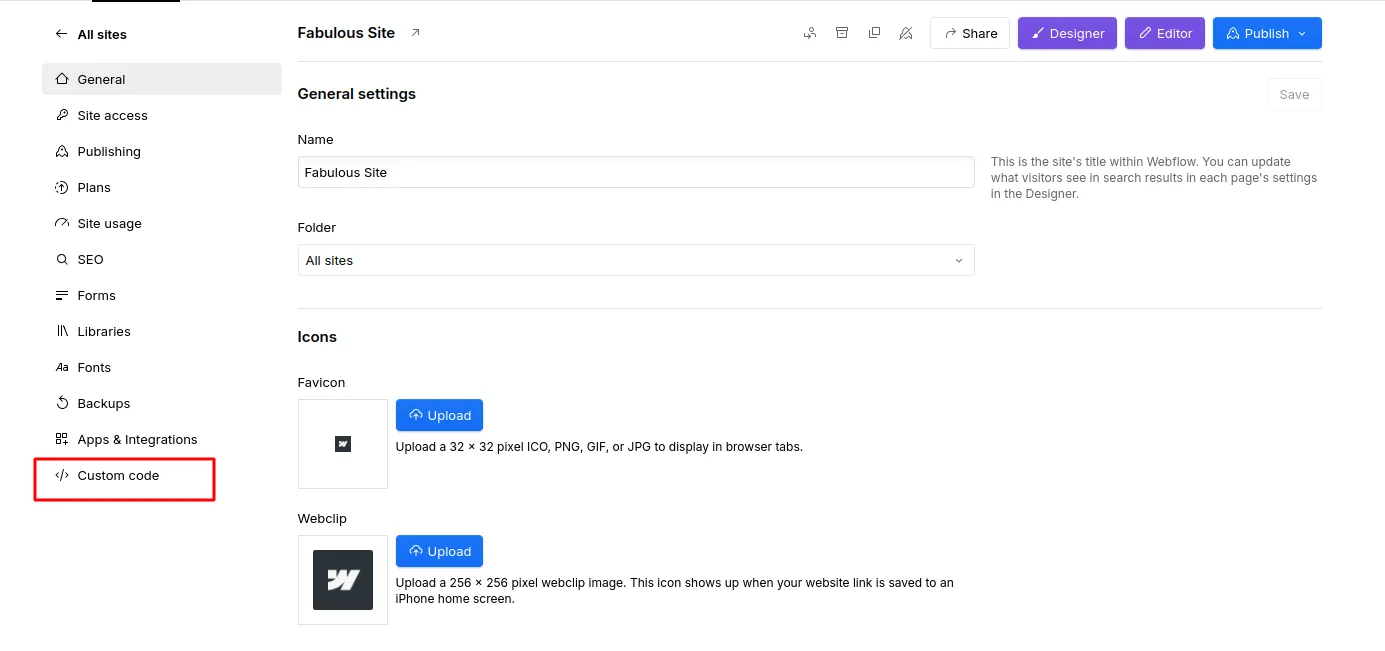
2. Page-specific Code
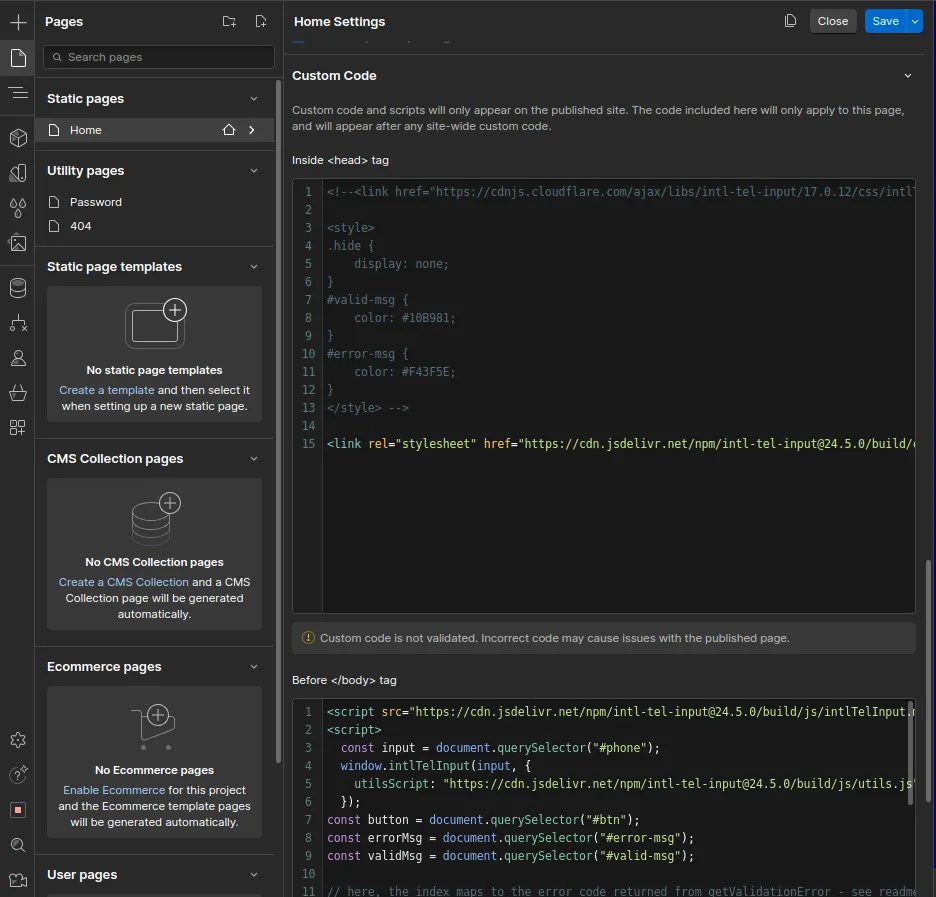
For optimized performance, you should only load what you need. Page settings allow you to inject scripts that serve a single purpose, keeping your global bundle size lean and your site fast.
- Targeted Performance: If you are using a heavy library like Three.js for a 3D hero section on only the "About" page, adding it here prevents users on other pages from downloading unnecessary data.
- Custom Meta Logic: Add page-specific structured data (JSON-LD) to enhance search engine visibility for specific articles or products.
- Interactive Overrides: Implement specific logic for page-level interactions, such as custom scroll-progress bars or unique modal behaviors that don't exist elsewhere on the site.
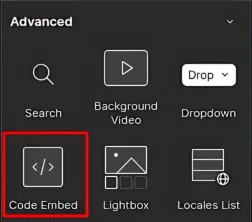
3. Embed Code for Specific Elements
The Embed component remains the most versatile tool for localized logic. It allows you to place HTML structures or small script snippets directly into the DOM tree at a specific location.
- Visual Components: Directly integrate third-party widgets like Calendly booking frames, specialized maps, or dynamic data tables.
- Dynamic CMS Integration: In 2026, you can now more easily pull CMS data into an Embed element. This allows you to create custom code templates that change based on the collection item, such as unique color themes or dynamic API endpoints for different blog posts.
- SVG Manipulation: Embed raw SVG code to gain full CSS control over paths and animations, enabling sophisticated hover effects that external image files cannot support.
4. Rich Text Embeds
A major update for 2026 is the enhanced support for technical snippets within Rich Text elements. This is a game-changer for content-heavy sites and blogs.
- Inline Interactivity: Editors can now drop custom scripts directly into the flow of a blog post, such as interactive charts or "tweet this" highlights, without needing to touch the main Designer interface.
- Encapsulated Styles: Apply specific CSS only to the elements within that Rich Text block, ensuring that your article styling doesn't conflict with the rest of your site's design system.
Ready to bring your web design ideas to life? Start your project with Zignuts expert Webflow developers.
**Hire now**Hire Now**Hire Now**Hire now**Hire now

How to Add Custom JavaScript in Webflow
In 2026, JavaScript has become more efficient with the widespread adoption of ES2025 features. Adding interactivity now focuses on modularity and non-blocking execution. The modern developer workflow in Webflow has shifted away from monolithic scripts toward "buildless" architectures that prioritize speed and maintainability.
Steps to Add JavaScript
- Placement Strategy: Determine if your script is a global utility or a local interaction. With 2026's stricter Core Web Vitals, placing scripts in the Footer (Before </body>) is the default standard to ensure visual content is not blocked by script execution.
- Modern Library Integration: Instead of bulky libraries, many developers now use lightweight, module-based versions of tools like GSAP or Three.js. This allows for "tree-shaking," where only the code you actually use is loaded by the browser.
To include the latest animation engine, place this in your Head section:
3. Leveraging ES2025 Features: In 2026, you can take advantage of the latest language updates directly in Webflow.
- Top-Level Await: You no longer need to wrap your API calls in complex asynchronous functions; you can use await at the top level of your script for cleaner data fetching.
- Iterator Helpers: New methods like .map(), .filter(), and .take() can now be used directly on iterators (like NodeLists from Webflow elements), making data manipulation faster and more memory-efficient.
- Explicit Resource Management: Using the using keyword allows for automatic cleanup of resources, such as event listeners or database connections, preventing the memory leaks that often plague complex sites.
4. Modern Interactivity: Use the Intersection Observer API for high-performance scroll effects. Here is a modern implementation for a scroll-triggered reveal:
5. Using Type="Module": For more complex projects, you can now use <script type="module">. This enables the use of import and export statements, allowing you to break your custom code into small, manageable files hosted on a CDN like GitHub + jsDelivr. This bypasses Webflow’s character limits and keeps your Designer interface clean.
6. Performance Optimization: Always use the defer attribute when linking external scripts. This tells the browser to download the script in the background and only execute it after the HTML has been fully parsed, ensuring a lightning-fast "First Contentful Paint" (FCP).
How to Add APIs in Webflow
The "API-first" approach is the standard for 2026. Connecting your site to live data sources turns a static site into a dynamic application. With the release of the Webflow Data API v2.0 and the integration of the Model Context Protocol (MCP), developers can now automate site updates and data syncing with unprecedented speed.
Step-by-Step Guide to API Integration
- Documentation Review: Always verify the authentication methods, as many modern APIs now require OAuth 2.0 or specific Bearer tokens. In 2026, many services have moved away from simple API keys toward more secure, granular scopes to protect user data.
- Authentication Setup: Generate your access tokens through the Apps & Integrations tab in your Site Settings. Remember that in 2026, Webflow tokens are more restrictive; you must explicitly enable "Read" or "Write" permissions for specific collections to maintain a secure environment.
- Asynchronous Data Fetching: Use the modern async/await syntax for cleaner, more readable integrations. This ensures your site remains responsive while waiting for external data to arrive.
- Handling Rate Limits: Modern APIs utilize aggressive rate limiting. Implement "exponential backoff" or local caching logic to ensure your Webflow site doesn't break if an external service is temporarily throttled.
- Data Security: Never expose sensitive "Write" tokens in your frontend code. For operations that require high security, 2026 workflows involve using Webflow Cloud or serverless functions as a middleware to keep your credentials hidden from the browser.
Example: Google Maps API Integration
For 2026 projects, ensuring your map loads efficiently without blocking the main thread is crucial. Google Maps now supports advanced vector styling and 3D building views directly through the JS API. Use the following structure:
The Rise of Headless Architecture
In 2026, many Webflow sites act as the "Head" for external CMS platforms like Strapi or Sanity. By using the Fetch API, you can pull content into your Webflow design at runtime. This allows marketing teams to use Webflow's visual canvas while the technical team manages data in a specialized backend, offering the best of both worlds.
- Real-time Inventory: Sync e-commerce stock levels instantly from an external ERP.
- Dynamic Personalization: Fetch user-specific data to show "Welcome back" messages or tailored product recommendations.
- Cross-platform Publishing: Update a central database and watch your Webflow site, mobile app, and social feeds update simultaneously.
Benefits of Adding Custom Code
While powerful, these tools must be used with a focus on technical health and user experience. In 2026, the distinction between a "pretty site" and a "high-performance application" lies in the strategic execution of custom logic. Adopting a developer-first mindset within the visual canvas allows you to build digital products that are resilient, fast, and accessible to every visitor.
Performance Optimization:
In 2026, Core Web Vitals will be stricter than ever. Using defer or async tags for your scripts ensures that the visual content renders before the logic executes, preventing the browser from "blocking" while it reads code.
- LCP (Largest Contentful Paint): By preloading hero assets and deferring non-critical CSS, you can hit the 2026 gold standard of under 1.2 seconds. This involves manually identifying "above-the-fold" elements and ensuring they are prioritized in the browser's render pipeline, which significantly lowers bounce rates.
- INP (Interaction to Next Paint): Splitting heavy JavaScript into smaller "chunks" prevents the main thread from freezing, ensuring your buttons and menus respond in under 200ms. In the 2026 landscape, INP has replaced First Input Delay (FID) as the primary metric for responsiveness, making efficient script execution a non-negotiable requirement.
- Resource Prioritization: Use fetchpriority="high" on critical scripts and images. This modern attribute allows you to tell the browser exactly which custom assets are vital for the initial user experience, reducing "jank" during the load sequence.
Enhanced Security:
Always sanitize inputs and avoid exposing sensitive keys in the client-side source. In an era where automated bots are more sophisticated, protecting your site's logic is paramount.
- Serverless Middleware: Use platforms like Webflow Cloud or Cloudflare Workers to handle private credentials (like Stripe Secret Keys) so they never touch the user's browser. This "headless" approach to security ensures that even if a user inspects your source code, your most valuable integration keys remain invisible.
- Content Security Policy (CSP): Implement custom headers to restrict which scripts can execute, protecting your site from Cross-Site Scripting (XSS) attacks. By explicitly whitelisting your trusted domains, you prevent malicious third-party scripts from running on your domain.
- Input Sanitization: For any custom forms or search bars, use scripts to strip out potentially harmful characters or code injections. This protects your database integrity and ensures that user-generated content doesn't break your site's layout or security.
Accessibility (a11y):
Ensure that any dynamic content created via scripts is readable by screen readers by using proper ARIA live regions. As global accessibility laws become more stringent in 2026, technical compliance is a legal necessity.
- Aria-Live: Use aria-live="polite" for non-critical updates (like search result counts) and aria-live="assertive" for critical alerts (like form errors). This ensures that users with visual impairments receive real-time audio feedback as they interact with your site.
- Keyboard Focus Management: When scripts trigger modals or tab changes, manually move the browser focus to the new element so keyboard users aren't left stranded. Without this, a user might open a pop-up but find their cursor stuck on the background page, creating a frustrating "keyboard trap."
- Reduced Motion Preferences: Respect the user's OS-level settings by wrapping your custom animations in a prefers-reduced-motion media query. This ensures that visitors with vestibular disorders can browse your site comfortably without being triggered by intense visual movement.
Ready to bring your web design ideas to life? Start your project with Zignuts expert Webflow developers.
**Hire now**Hire Now**Hire Now**Hire now**Hire now
Best Practices for Maintaining Technical Health with Custom Code
As your project scales, the complexity of your manual scripts can lead to technical debt if not managed properly. Maintaining a clean codebase within a visual tool requires discipline and a structured approach. In 2026, the most resilient sites are those that treat their manual logic with the same rigor as a dedicated software application.
Documentation and Commenting
Visual development tools often hide logic behind various panels. It is vital to maintain internal documentation within your script blocks. Use clear commenting to explain the "why" behind complex logic, ensuring that other team members or your future self can troubleshoot issues without reverse-engineering the entire site.
- Logic Mapping: Keep a master "Logic Map" in your project notes that lists which pages contain specific scripts.
- Variable Naming: Use descriptive, semantic names for your variables (e.g., userSubscriptionStatus instead of s) to make the code self-explanatory.
- External Links: In 2026, many teams use centralized documentation tools like Notion or Obsidian, linking specific pages directly in the code comments for instant context.
Version Control for Scripts
Since the platform does not natively support Git-style versioning for script blocks, consider maintaining your complex logic in an external repository like GitHub. By loading your scripts as modules from a CDN, you gain the ability to roll back changes instantly and track the history of your code evolution.
- Staging Workflows: Always test scripts in a separate staging project before deploying to your production domain.
- Minification: Use build tools to minify your scripts before hosting them, ensuring that your site's performance remains high while keeping your source files readable.
- Dependency Audits: Regularly check your external libraries for security vulnerabilities or deprecated functions to prevent "silent failures" as browser standards evolve.
Future-Proofing Your Webflow Architecture with Custom Code
The web is in a constant state of flux, and 2026 is seeing a shift toward more decentralized and AI-integrated experiences. Preparing your site for future updates involves building with flexibility and interoperability in mind.
Embracing Web Components
Standardized Web Components are becoming the preferred way to build reusable, encapsulated UI elements. By structuring your manual logic into Web Components, you ensure that your work remains compatible even if you decide to migrate parts of your site to different frameworks or headless setups in the future.
- Shadow DOM: Utilize the Shadow DOM to prevent your component styles from "leaking" and affecting other parts of your site.
- Reusability: Build components that can be easily dropped into any page via a simple HTML tag, reducing the need for repetitive script duplication.
- Framework Agnostic: Because Web Components are native to the browser, they will continue to function perfectly regardless of the latest JavaScript framework trends.
AI-Ready Data Structures
As AI search agents and LLM-based crawlers become the primary way users discover information, the way you structure your manual data fetches matters. Ensure your logic outputs clean, semantically correct HTML that AI agents can easily parse and understand.
- Semantic HTML: Avoid "div soup" by using meaningful tags like <article>, <section>, and <aside> when injecting dynamic content.
- JSON-LD Injection: Programmatically inject structured data that explicitly tells AI models what your content represents, from product availability to event dates.
- Machine-Readable Feeds: For advanced projects, use scripts to generate real-time XML or JSON feeds that external AI agents can use to stay updated on your site's latest offerings.
Edge Computing and Middleware
In 2026, moving your logic closer to the user is a key trend. By implementing "Edge Functions," you can execute code at the server level before the page even reaches the user's browser.
- A/B Testing: Run experimentation logic at the edge to serve different versions of a page without the "flicker" associated with client-side scripts.
- Localization: Automatically detect a user’s location and serve translated content or region-specific pricing with zero latency.
- Personalization: Use edge middleware to verify user permissions and serve gated content securely, bypassing the limitations of standard frontend-only authentication.
Conclusion
Mastering the integration of Custom Code in Webflow is no longer just an optional skill it is the defining factor for creating world-class, scalable digital products in 2026. By blending Webflow's visual speed with advanced JavaScript, modern APIs, and edge computing, you can bypass platform limitations and deliver high-performance applications that are secure, accessible, and future-proof. However, as the gap between design and engineering closes, the complexity of these integrations often requires specialized expertise.
To ensure your project meets the highest technical standards while maintaining lightning-fast performance, it is often best to Hire Webflow Developers who understand the intricacies of the 2026 low-code ecosystem. Our team at Zignuts is dedicated to helping you transform your vision into a robust reality, whether you need custom API architectures, WebGL animations, or enterprise-level security.
Ready to elevate your Webflow project? Contact Zignuts today to discuss your custom development needs and discover how our experts can optimize your site for the next generation of the web.




.webp)
.webp)
.webp)

.webp)
.webp)
.webp)
.webp)
.webp)
.webp)


