In this 2026 update, we provide an advanced step-by-step guide on setting up the latest GitHub Copilot ecosystem, which has now evolved into a full-scale agentic development platform. We will explore the revolutionary agentic features, including the new Plan Mode that architecturally maps your code before writing a single line and the multi-model selector that allows you to toggle between industry-leading models like GPT-5.2-Codex, Claude 4.5, and Gemini 3 Pro.
We also dive deep into the GitHub Copilot Workspace, a collaborative environment that has transformed coding from a manual, line-by-line task into a high-level orchestration of AI agents. Whether you are leveraging the new Copilot Memory to maintain long-term repository context or utilizing the Model Context Protocol (MCP) to connect your IDE to live documentation and external data, this guide covers it all. You'll gain insights into maximizing AI potential through Agent Skills and custom AGENTS.md files to streamline your development process and boost productivity. By following this guide, you'll be well-prepared to leverage the full power of GitHub Copilot for more efficient, autonomous, and effective coding in the modern era.
What is GitHub Copilot?
The current version of GitHub Copilot is a comprehensive AI-native development platform that has redefined the software development lifecycle. No longer just a "plugin" or a basic autocomplete tool, it acts as a high-level agentic partner capable of understanding your entire repository's architecture and intent. With Copilot Integration Services, businesses can integrate AI-powered coding assistance into their existing development environments and workflows. By utilizing a multi-model approach, you can now toggle between the latest frontier models, including GPT-5.2-Codex for complex reasoning, Claude 4.5 for creative refactoring, and Gemini 3 Flash for lightning-fast routine tasks.
In 2026, its capabilities extend far beyond the code editor:
Holistic Repository Understanding: Through advanced "Repo Grokking" technology and Copilot Memory, the tool maintains a deep index of your project’s unique patterns, internal APIs, and architectural decisions, ensuring suggestions are always contextually relevant.
Autonomous Agent Mode: You can assign high-level tasks such as "Migrate this service to the new Auth provider," and GitHub Copilot will autonomously identify necessary subtasks, execute changes across multiple files, and even run the local test suite to verify the fix.
GitHub Copilot Workspace: This dedicated environment allows you to move from a natural language idea or a GitHub Issue directly to a verified Pull Request. It handles the "plan-to-code" pipeline, providing a structured summary of proposed changes before implementation.
AI-Native Security & Autofix: Integrated directly into the workflow, it identifies vulnerabilities in real-time and provides Copilot Autofix suggestions that remediate up to 90% of common security alerts in languages like Python, JavaScript, and Java.
Model Context Protocol (MCP): Acting as a "USB port for intelligence," MCP allows the assistant to securely connect to your organization's live documentation, internal databases, and CI/CD logs, grounding its suggestions in your real-world operations.
Key Features of GitHub Copilot
In 2026, the platform has transcended traditional text completion, evolving into a proactive, multi-agent ecosystem that acts as a full-time engineering partner. Here are the defining features:
Multi-Model Selection & Auto-Routing: You are no longer locked into a single AI model. You can manually toggle between GPT-5.2-Codex, Claude 4.5, and Gemini 3 Pro via the model picker, or let Auto-Model Selection dynamically choose the best engine based on the task’s complexity and required latency.
Agentic Workflows & "Plan Mode": The system introduces a revolutionary Plan Mode where the AI first drafts a technical specification and a multi-step execution plan before writing code. This allows for autonomous, large-scale tasks like migrating legacy services to modern frameworks or refactoring entire API surfaces across dozens of files.
Deep Repository Memory: GitHub Copilot now utilizes remote semantic indexing to maintain a persistent "memory" of your project. It understands your unique coding standards, dependency trees, and even external symbols from referenced packages, ensuring that suggestions remain consistent with your specific architectural decisions.
GitHub Copilot Workspace: This is a comprehensive, browser-based agentic environment. It takes you from a natural language idea or a GitHub Issue directly to a verified Pull Request. It orchestrates sub-agents for brainstorming, planning, and implementation, even running automated "Repair Agents" if tests fail during the process.
Model Context Protocol (MCP) Integration: Through MCP Support, you can connect the assistant to a vast library of external tools and data sources. This allows the AI to query your internal databases, browse live documentation, or interact with third-party services like Slack, Jira, or Linear directly from the chat interface.
Advanced Code Review & Autofix: The assistant acts as a "Senior Dev" in your PRs. It uses the new /review command to proactively identify logic flaws, security vulnerabilities, and N+1 query bottlenecks. With Copilot Autofix, it can automatically propose and apply remediation for up to 90% of detected security alerts.
Custom Agent Skills: You can "teach" the AI new capabilities by adding markdown files to a .github/agents/ or github/skills/ folder. These files define domain-specific rules and business logic, allowing the assistant to follow your company’s exact "flavor" of development without constant prompting.
Profiler & Debugging Agents: Exclusive to Visual Studio 2026, the Profiler Agent analyzes CPU and memory usage in real-time. If your app is slow, you can ask "Why is this laggy?" and the agent will generate benchmarks, identify the bottleneck, and suggest targeted optimizations.
Advantages of GitHub Copilot
In 2026, using GitHub Copilot is no longer just an advantage it is a baseline requirement for high-velocity engineering teams. The platform has evolved into an ecosystem that balances rapid output with structural integrity. The tool provides a decisive edge in several critical areas:
Massive Productivity & Velocity Gains: Developers are now completing complex tasks up to 55% faster on average. By automating between 46% and 61% of all new code, with Java developers seeing the highest acceleration due to the language's verbose nature, GitHub Copilot has reduced the average pull request cycle time from 9.6 days to just 2.4 days. This 75% increase in delivery speed allows teams to iterate on market feedback in hours rather than weeks.
Superior Code Quality & Reliability: The integration of Copilot Autofix and real-time security scanning has led to an 84% increase in successful builds across CI/CD pipelines. By leveraging the Model Context Protocol (MCP), the assistant proactively suggests adherence to CLEAN and SOLID principles tailored to your specific project, effectively preventing technical debt from entering the codebase at the point of creation.
Drastic Reduction in Cognitive Load: About 87% of developers report a significant decrease in mental fatigue. By handling the "boilerplate toil" of syntax recall, API discovery, and repetitive implementation patterns, the assistant helps engineers maintain their "flow state" longer. Research shows 73% of users report fewer context switches, as they no longer need to exit their IDE to search for documentation or Stack Overflow solutions.
Accelerated Onboarding & Knowledge Sharing: New team members use GitHub Copilot Enterprise to index internal knowledge bases and "chat" with legacy repositories. This has reduced the time-to-first-commit for new hires by 30%, effectively turning the AI into a 24/7 digital mentor that explains complex logic and organizational standards in real-time.
Focus on High-Value Innovation: By offloading the "how" (unit test skeletons, CRUD operations, and configuration files) to the AI, engineers can focus 100% on the "what", solving unique business problems, perfecting user experience, and designing scalable system architectures. This shift allows teams to deliver more user stories per sprint without increasing headcount.
Enhanced Developer Satisfaction: Beyond technical metrics, 95% of developers report enjoying coding more when using the assistant. By automating the tasks developers typically dislike, such as writing documentation, code comments, and test cases, GitHub Copilot increases job fulfillment for 60% of users and significantly reduces the burnout associated with routine maintenance.
Seamless Framework Upgrades & Refactoring: Moving to the latest versions of libraries is now 25-35% faster. The assistant's Agent Mode can scan an entire workspace to identify deprecated APIs, suggest modern equivalents, and even execute the multi-file refactoring required to keep the system up to date with 2026 security standards.
Getting Started with GitHub Copilot
In 2026, the barrier to entry for AI-assisted development has been virtually eliminated with the introduction of Copilot Free for individuals, alongside enhanced Pro, Business, and Enterprise tiers. Setting up the environment is now a streamlined, "intelligence-first" experience.
How to Access GitHub Copilot
The platform is accessible through a unified identity system. Your GitHub Copilot subscription now automatically synchronizes across a massive ecosystem, including:
Desktop IDEs: VS Code, Visual Studio 2026, JetBrains (IntelliJ, PyCharm, WebStorm), Xcode, and Eclipse.
The Command Line: Via the GitHub Copilot CLI, now available as a native shell integration (brew install copilot-cli or winget install GitHub.Copilot).
Mobile & Web: Real-time chat and code review on the GitHub Mobile app and the github.com integrated chat interface.
Prerequisites
To unlock the high-performance agentic features of 2026, ensure you have:
An Active Subscription: While Copilot Free offers basic autocomplete, a Pro or Enterprise plan is required for multi-model switching (GPT-5.2, Claude 4.5) and the GitHub Copilot Workspace.
The Latest IDE Build: Visual Studio Code (version 1.109+) or Visual Studio 2026.
Repository Indexing: For optimal performance, enable Copilot Memory in your GitHub settings. This creates a secure, repository-level "Memory" index that allows the AI to understand your project's specific business logic and internal library dependencies.
Access through VS Code
In 2026, GitHub Copilot is deeply integrated into the VS Code core, no longer requiring a dozen separate plugins.
Open VS Code: Launch Visual Studio Code on your computer.
Navigate to Extensions: Click on the Extensions view icon on the Sidebar or press Ctrl+Shift+X.
Search for GitHub Copilot: Type "GitHub Copilot" in the search bar.
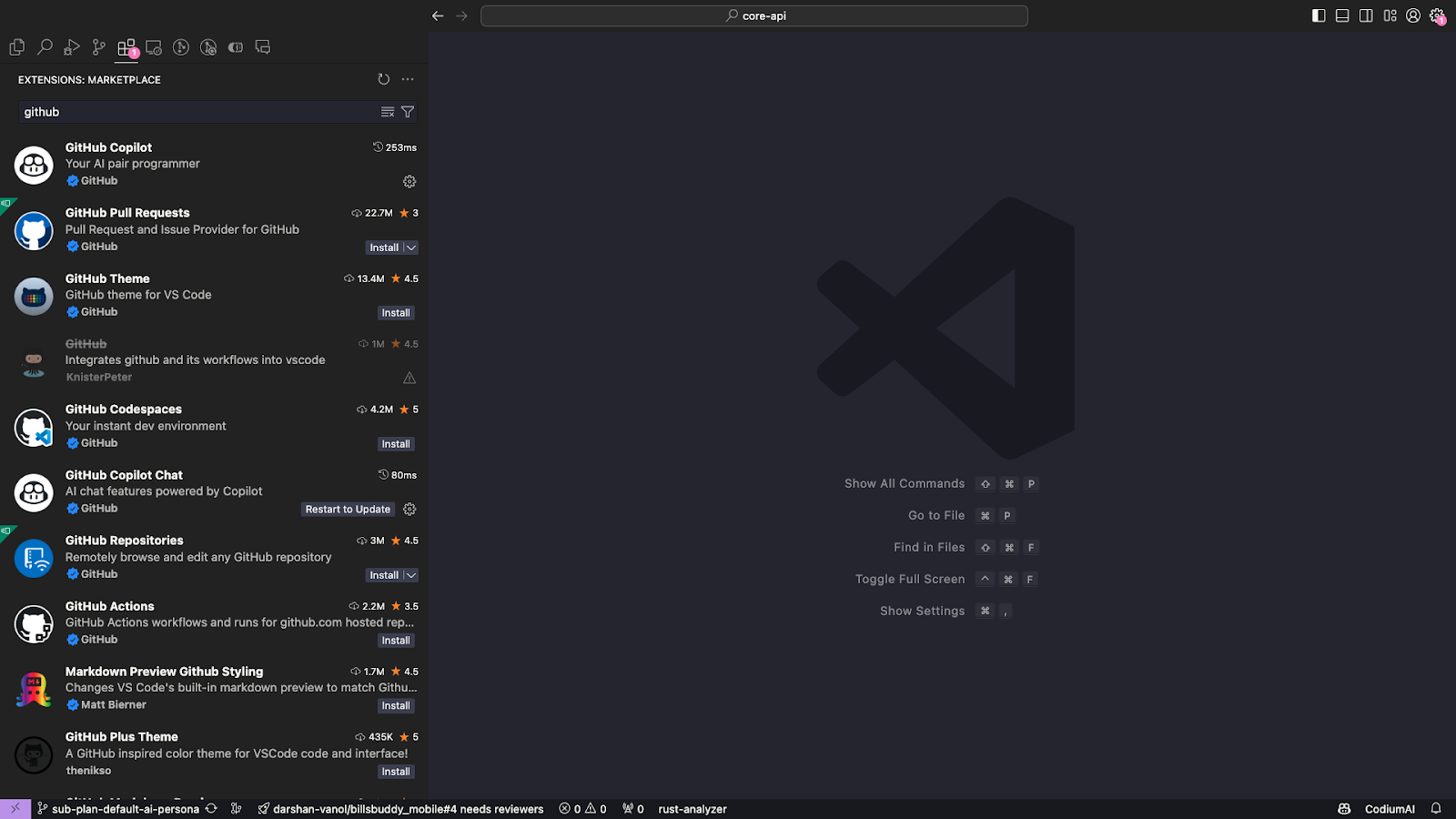
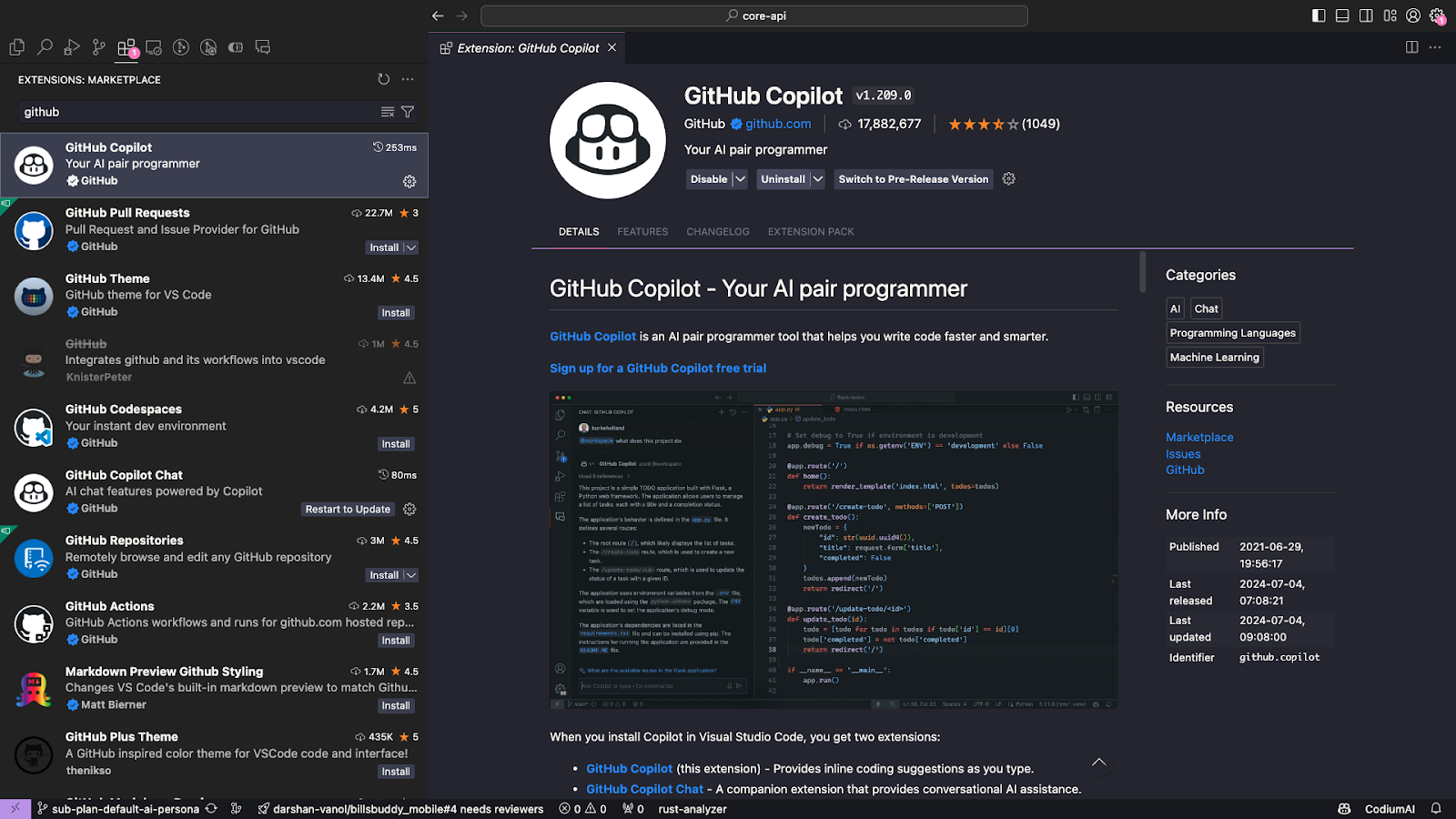
Install the Extension: Click the "Install" button for the GitHub Copilot extension from the search results.
Hire Dedicated Developers Today!

Setting up GitHub Copilot in your IDE
Sign in: Authenticate using your GitHub ID to sync your personalized "Skills" and "Instructions."
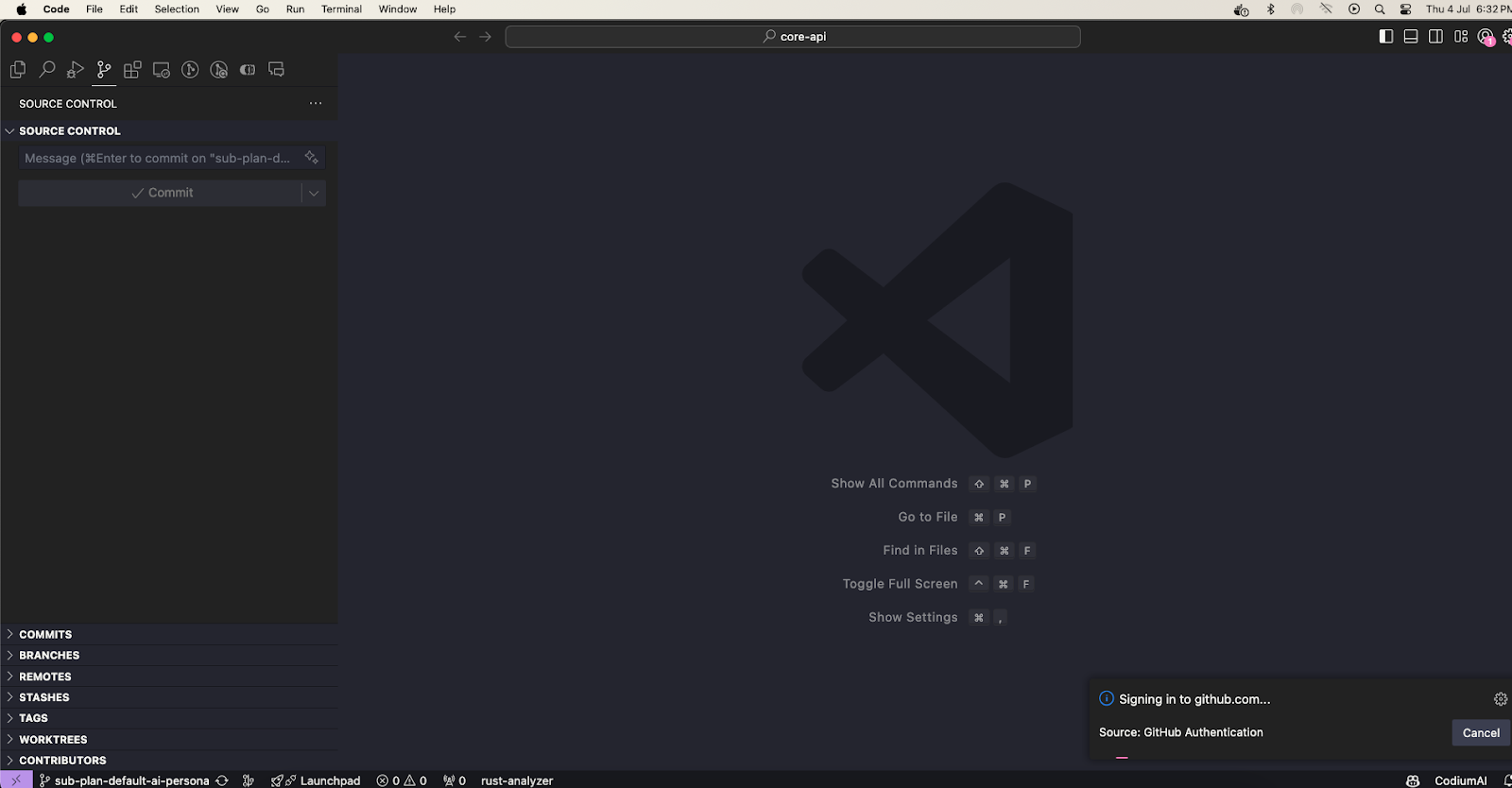
Enable GitHub Copilot: After signing in, GitHub Copilot will be enabled automatically. You might see a notification confirming that GitHub Copilot is active.
Configure GitHub Copilot Settings: You can customize GitHub Copilot's behavior by configuring its settings. Go to the settings by clicking on the gear icon in the lower-left corner of VS Code, then navigate to Extensions > GitHub Copilot. Here, you can adjust preferences like enabling or disabling specific features, changing suggestion behavior, and more.
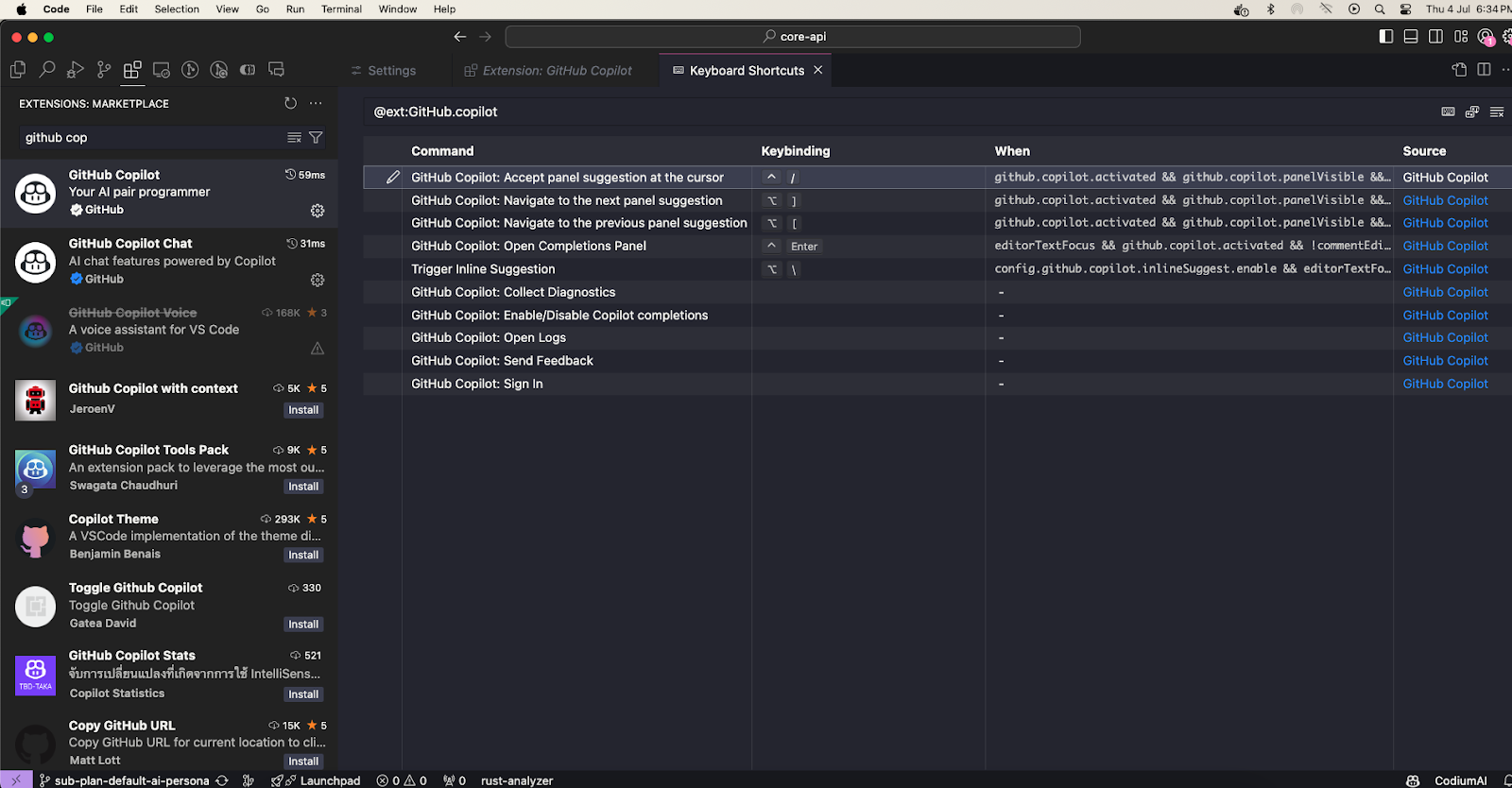
By following these steps, you'll have GitHub Copilot set up and ready to assist you in your coding tasks within Visual Studio Code.
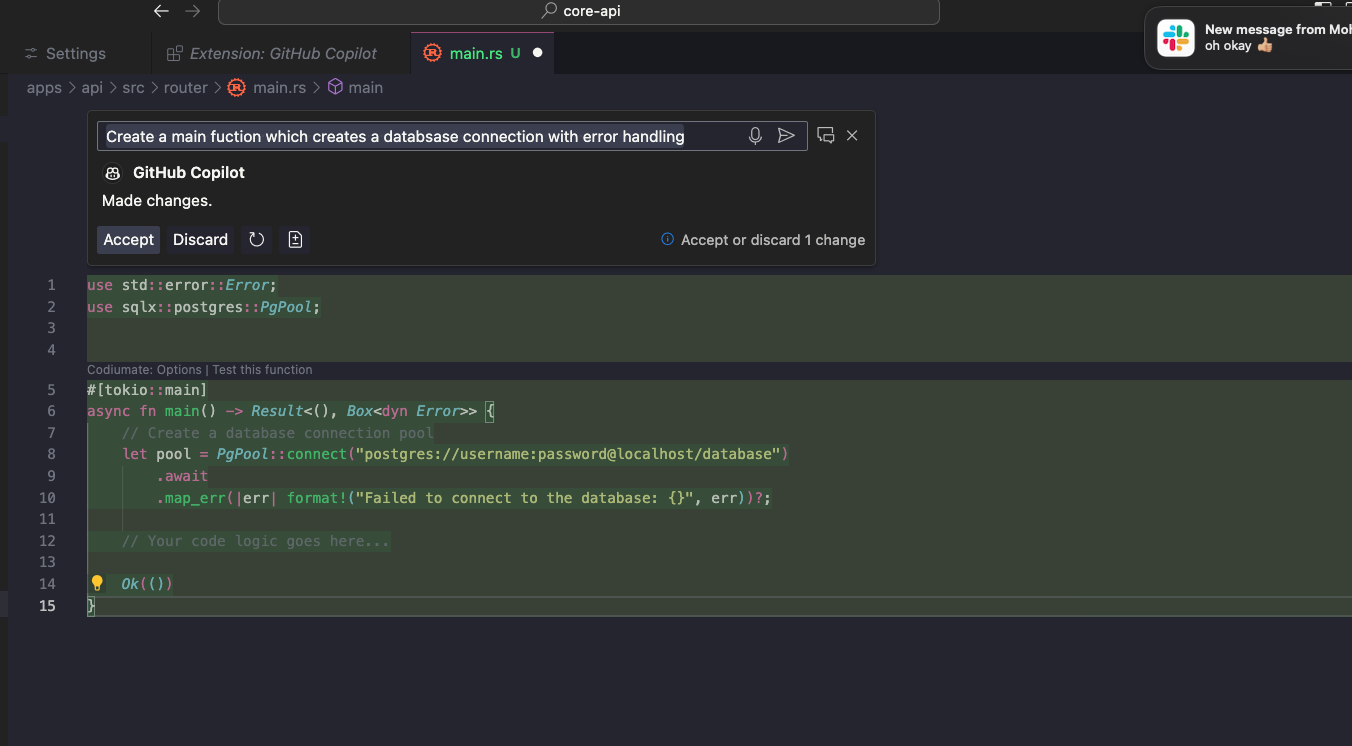
By pressing Cmd + I you can ask Copilot to do something
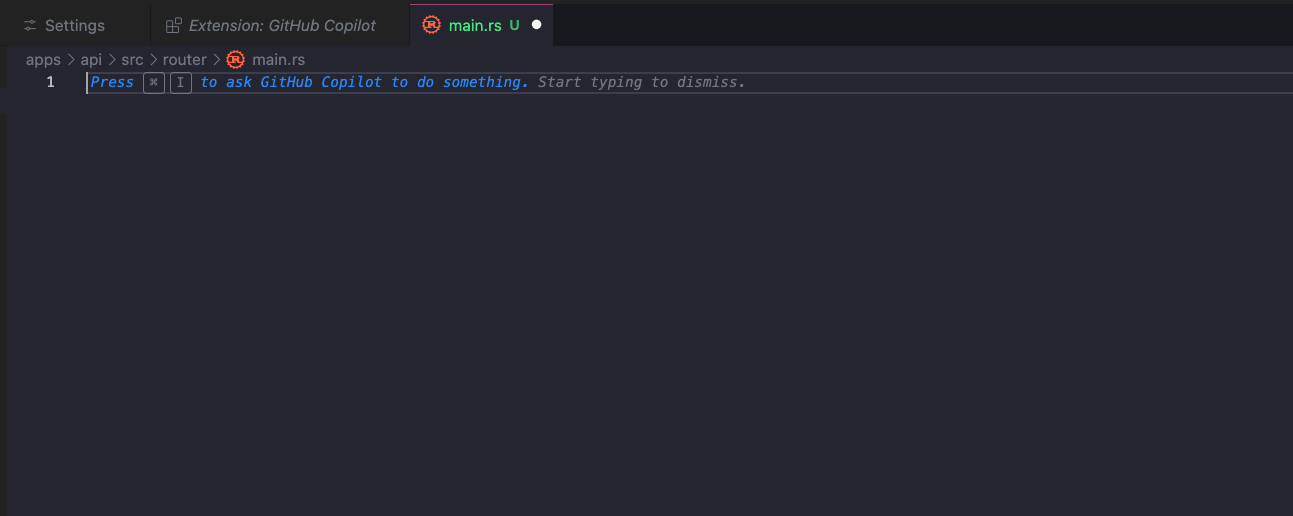
Here is an example of inline instructions:
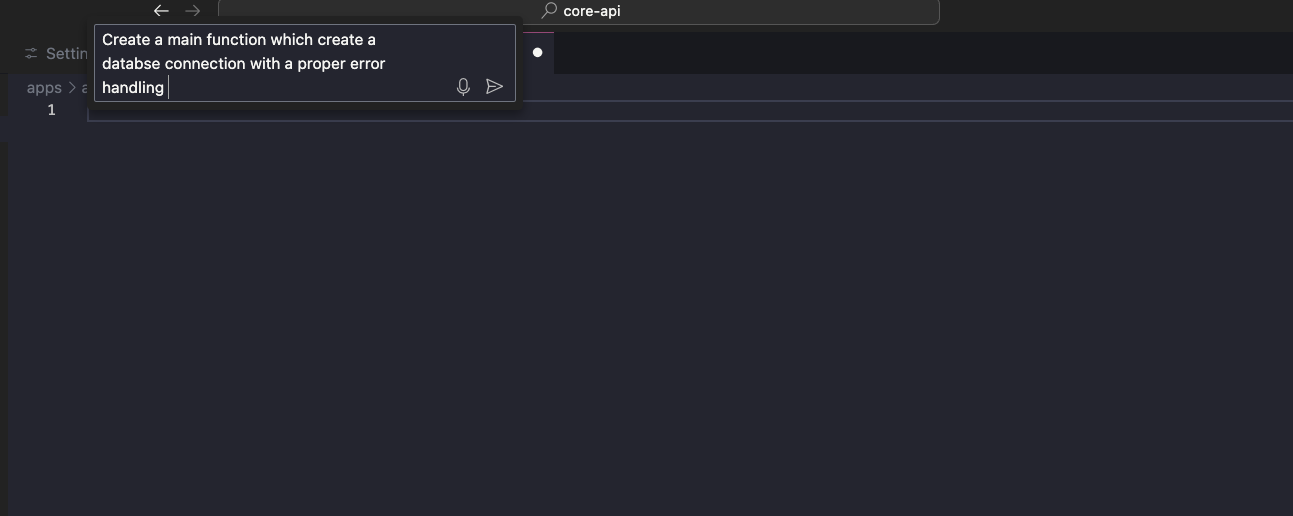
Voila! It's generating the whole code, which I intended
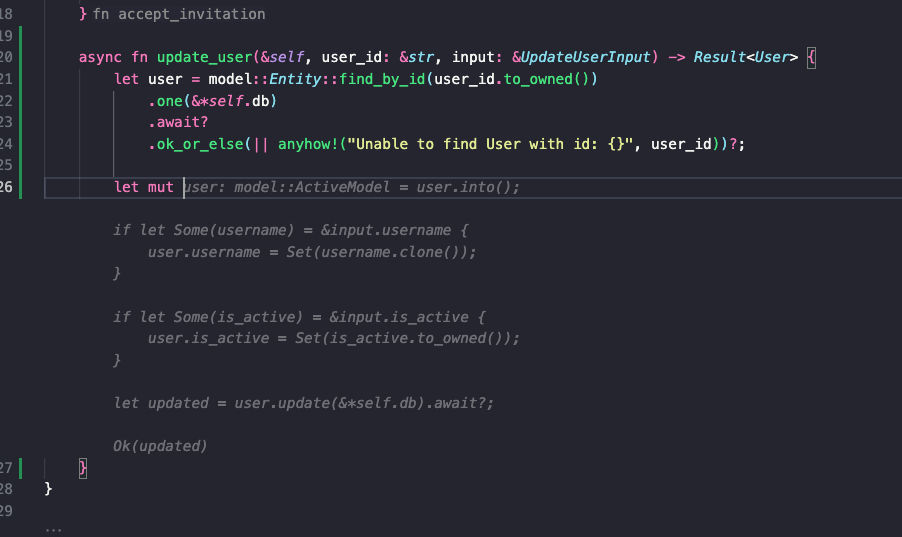
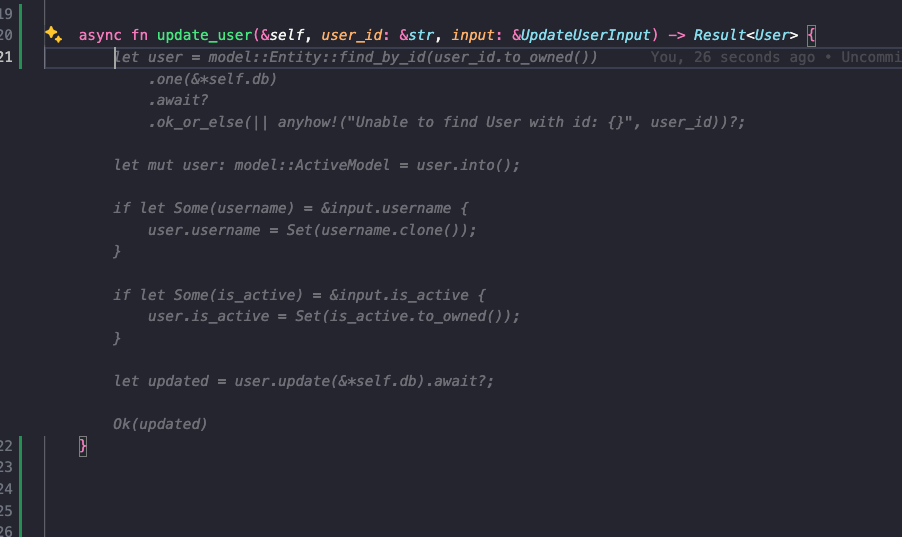
Here is another example of code generation
You can control github copilot code acceptance by Cmd + right-arrow, and if a suggestion seems fine to you, you can directly accept all of them in just one tab.
Practical Examples and Use Cases
In 2026, GitHub Copilot has evolved from a simple code assistant into a versatile engine capable of handling complex, multi-step engineering workflows. Here are the primary scenarios where it delivers the most value:
Bug Fixing and Debugging
The debugging experience has been revolutionized by the Repair Agent and the @Debugger participant. When a test fails, or a runtime exception occurs, the assistant doesn't just show you the error; it analyzes the entire stack trace, inspects local variables, and identifies the root cause.
One-Click Repair: Use the "Fix with Copilot" button to have the AI propose a diff that addresses the logic flaw.
Root Cause Analysis: Ask the @Debugger, "Why is this variable null at this point?" and it will trace back the data flow to the source of the initialization error.
Writing Unit Tests
Testing is no longer a chore. With GitHub Copilot, you can bootstrap comprehensive coverage in seconds.
Coverage on Demand: Prompt the assistant with "Generate 100% coverage for this service using xUnit and Moq," and it will create the test project, add the necessary files, and mock all external dependencies.
Edge Case Detection: It proactively identifies boundary conditions you might have missed, such as null inputs, empty lists, or timeout scenarios, and writes specific test cases for them.
Regression Testing: Use the assistant to generate integration tests that verify how different modules interact within your 2026 microservices architecture.
Cloud Development and DevOps
Modern infrastructure management is seamless with GitHub Copilot CLI and its native cloud integrations.
Infrastructure as Code (IaC): Describe your deployment needs: "Generate a Kubernetes manifest for a load-balanced React app with an auto-scaling policy." The assistant will produce production-ready YAML files following the latest 2026 best practices.
CI/CD Pipeline Automation: Quickly scaffold GitHub Actions or Azure DevOps pipelines by stating, "Create a workflow that builds, tests, and deploys this container to AWS EKS on every push to main."
Security Scanning: The assistant helps you secure your cloud secrets by identifying hardcoded credentials and suggesting GitHub Secrets integration instead.
App Modernization and Refactoring
The @Modernize participant is a game-changer for maintaining healthy codebases.
Legacy Migration: Use GitHub Copilot to plan and execute migrations, such as moving from Java 11 to Java 21 or converting an old .NET Framework app to a modern .NET 8+ containerized service.
Language Translation: Effortlessly translate logic between languages, for example, converting a legacy Python data-processing script into a high-performance Rust module.
Performance Optimization: Tag the @Profiler to analyze execution traces and hot paths. It can suggest specific refactors, like replacing nested loops with optimized LINQ queries or implementing caching strategies.
Example: Rapid Prototyping in GitHub Copilot Workspace
Imagine a developer at a startup tasked with adding a new feature. Using the GitHub Copilot Workspace, the process looks like this:
Natural Language Task: The developer opens an issue: "Add a dark mode toggle that persists in local storage."
Autonomous Planning: The Plan Agent reads the repository, generates a specification of the current state, and proposes a multi-file execution plan.
One-Pass Implementation: The AI generates the UI component, the state management logic, and the CSS variables simultaneously.
Verification: The developer runs the integrated terminal within the workspace to verify the UI, and the Repair Agent automatically fixes any minor CSS alignment issues found during the preview.
Case Studies and Examples of GitHub Copilot in 2026
The adoption of GitHub Copilot by global industry leaders has provided concrete data on how AI transforms large-scale engineering. These real-world examples from 2026 demonstrate the platform's versatility across different domains:
Example 1: Web Development at Microsoft
Web developers at Microsoft working on the Azure and Teams ecosystems leverage GitHub Copilot to manage the immense scale of their React codebases.
Context-Aware Components: Developers use the assistant to quickly generate complex, accessible UI components that adhere to the Fluent UI design system.
State & Routing: The tool streamlines the implementation of global state management and dynamic routing, allowing engineers to focus on latency reduction and user experience.
Result: By automating routine front-end boilerplate, teams have reported a 55% faster task completion rate during high-pressure feature sprints.
Example 2: Data Science & Analytics at Intuit
Data scientists at Intuit utilize GitHub Copilot within Jupyter Notebooks to accelerate the financial modeling and tax-prediction algorithms behind TurboTax.
Complex Data Wrangling: The assistant helps write intricate Python scripts for cleaning massive CSV datasets and performing statistical analyses.
Visual Intelligence: By typing comments like "Plot a correlation heatmap for user churn variables using Seaborn," the AI generates pixel-perfect visualizations instantly.
Efficiency: Context-aware suggestions ensure that data processing is not only fast but optimized for memory, helping scientists derive actionable insights from trillions of data points more quickly.
Example 3: Mobile App Development at Shopify
At Shopify, where mobile commerce is a priority, developers use GitHub Copilot to maintain high-performance iOS and Android applications.
Swift & Kotlin Mastery: Mobile engineers use the assistant to write Swift code for user interfaces and handle asynchronous networking tasks.
Native API Integration: The tool suggests the most efficient patterns for local storage (CoreData/SQLite) and integrates seamlessly with platform-specific APIs.
Impact: Shopify reported that commit times dropped by 15%, and the reduction in minor syntax errors has significantly eased the burden on senior reviewers.
Example 4: Open Source Contributions at Red Hat
Contributing to massive projects like the Linux kernel or OpenShift can be daunting. Red Hat engineers use GitHub Copilot to navigate these vast codebases.
Standards Alignment: The assistant provides suggestions that automatically align with the specific coding standards and documentation styles of different open-source communities.
Multi-File Refactoring: Contributors use Agent Mode to propose sweeping changes across interconnected repositories, making it easier to add value to complex upstream projects.
Example 5: DevOps Automation at Airbnb
The DevOps team at Airbnb utilizes GitHub Copilot to manage their extensive cloud infrastructure and CI/CD pipelines.
Infrastructure as Code (IaC): Engineers generate Terraform and Kubernetes manifests by describing their infrastructure needs in natural language.
Workflow Automation: The assistant helps automate repetitive tasks, such as writing deployment scripts and configuring security policies.
Performance: By delegating boilerplate configuration to the AI, the DevOps team has increased its operational efficiency, allowing it to focus on site reliability and scaling for peak travel seasons.
Hire Dedicated Developers Today!
Limitations and Considerations
With the immense power of GitHub Copilot in 2026 comes the necessity for rigorous human oversight and strategic guardrails. While the platform has moved from simple autocomplete to autonomous agents, developers must manage the following challenges to ensure system integrity:
The "Pilot" Rule & Verification: You remain the ultimate authority. Despite the AI's ability to generate entire pull requests, "overconfidence bias" is a documented risk where developers may blindly trust plausible-looking but flawed code. You must review every line to ensure it doesn't introduce subtle logic errors or "hallucinated" library calls.
Context Windows & "Skimming" Risks: Even with the massive token limits of 2026, the AI may occasionally "skim" large codebases, analyzing only a portion of the project (e.g., 10-20%) and guessing the rest. For extremely massive monorepos, you should manually "pin" critical files or use the @workspace command to force a deeper semantic index of specific directories.
Security & Secret Leakage: Research indicates that repositories with AI assistants enabled can have up to 6.4% higher secret leakage rates. Always ensure your "Public Code Matching" filters are active to prevent the accidental inclusion of licensed snippets, and use Copilot's Secret Scanning to block prompts that inadvertently contain .env data, SSH keys, or API tokens.
Dependency & Supply Chain Risks: The assistant may suggest outdated or vulnerable packages found in its training data. In 2026, it is vital to pair GitHub Copilot with automated dependency scanning (like Dependabot) to verify that AI-suggested imports aren't introducing known CVEs (Common Vulnerabilities and Exposures).
The "Spaghetti" Cascade: If the AI makes a logic error that goes unnoticed, subsequent prompts may build upon that error, creating a "cascade effect" of hardcoded values and messy logic. Starting a new chat session frequently helps reset the context and prevents the AI from spiraling into complex, unmaintainable patterns.
Ethical & Bias Awareness: AI models are probabilistic and may reflect biases present in their training sets. Be vigilant for "functional biases" such as insecure default configurations or non-inclusive naming conventions, and use custom AGENTS.md files to enforce your organization's specific ethical and technical standards.
Conclusion: The Future of AI in GitHub Copilot
As we have explored in this 2026 update, GitHub Copilot has transitioned from a helpful autocomplete tool into a sophisticated agentic partner that redefines the engineering workflow. By integrating features like Plan Mode, multi-model selection, and deep repository memory, the platform allows developers to transcend manual coding and become architects of complex AI-driven systems. The advantages, ranging from 75% faster delivery speeds to a massive reduction in cognitive load, clearly demonstrate that AI-native development is no longer a luxury but a fundamental necessity for staying competitive in the modern tech landscape.
However, the true power of GitHub Copilot is only realized when paired with expert human intuition. To bridge the gap between AI potential and production-ready excellence, visit Hire Dedicated Developers to learn more about how our talented developers can help you achieve your development goals and drive your projects to success.
Ready to transform your development cycle with elite talent? Contact Zignuts today to learn how our specialized developers can drive your mission-critical projects to success in this AI-first world.

Zignuts Technolab
Zignuts Technolab delivers future-ready tech solutions and keeps you updated with the latest innovations through our blogs. Read, learn, and share!