


.svg)

.svg)


.svg)

.svg)


.webp)
Visual search has moved from a novelty feature to a core capability in modern mobile applications. In 2026, users expect apps to understand images as naturally as they understand text or voice. Whether it's identifying products, translating text in real time, scanning documents, or recognizing objects, visual search is reshaping how users interact with mobile apps.
In this comprehensive guide, we’ll break down what visual search is, why it matters, and, most importantly, how to implement it effectively using Flutter.
1. What is Visual Search?
Visual search is a technology that allows users to search using images instead of text. Instead of typing “red sneakers,” users can upload or capture an image, and the system identifies objects, patterns, or similar items.
At its core, visual search combines:
- Computer Vision (CV) – understanding image content
- Machine Learning (ML) – classifying and predicting patterns
- Deep Learning Models – extracting high-level features
Example Use Cases:
- E-commerce: Find similar products from a photo
- Travel: Identify landmarks
- Healthcare: Scan reports or detect anomalies
- Social apps: Filter or tag images
2. Why Visual Search Matters in 2026
The rise of visual search is tied to broader advancements in AI systems that can analyze and synthesize large volumes of multimodal data. Tools like OpenAI’s deep research systems demonstrate how modern AI can interpret text, images, and structured data together for deeper insights.
Key Trends Driving Adoption:
- Camera-first interactions
- Real-time processing on-device
- Edge AI and on-device ML (TensorFlow Lite, Core ML)
- Visual commerce boom
- Multilingual and accessibility use cases
Users increasingly prefer showing instead of telling. That’s why visual search is becoming a competitive advantage.
3. Visual Search Architecture (Mobile Apps)
Before diving into Flutter, let’s understand the typical pipeline:
Visual Search Flow:
- Image Input
- Camera capture or gallery upload
- Preprocessing
- Resize, normalize, compress
- Feature Extraction
- CNN model (e.g., MobileNet, EfficientNet)
- Inference
- On-device or API-based prediction
- Post-processing
- Ranking, similarity matching
- Results Display
- UI rendering in app
Ready to build a high-quality mobile app? Start your project with Zignuts' expert mobile developers today.
**Hire now**Hire Now**Hire Now**Hire now**Hire now

4. Flutter’s Role in Visual Search
Flutter is ideal for building visual search apps because of:
- Cross-platform support (iOS + Android + Web)
- Fast UI rendering (Skia engine)
- Strong plugin ecosystem
- Easy integration with ML frameworks
Key Flutter Capabilities:
- Camera access (camera plugin)
- Image processing (image, tflite_flutter)
- ML integration (Firebase ML, TensorFlow Lite)
- REST APIs for cloud-based inference
5. Core Technologies You’ll Use
5.1 Camera Integration
5.2 Image Picking (Gallery)
5.3 TensorFlow Lite Integration
6. Approach 1: On-Device Visual Search (Recommended)
Why On-Device?
- Faster (low latency)
- Works offline
- Better privacy
Popular Models:
- MobileNet
- EfficientNet Lite
- YOLO (for object detection)
Flutter Workflow:
- Capture image
- Convert image to tensor
- Run model locally
- Display predictions
Example: Image Classification Pipeline
7. Approach 2: Cloud-Based Visual Search
If your model is large or needs continuous updates:
Options:
- Firebase ML Kit
- AWS Rekognition
- Google Vision API
- Custom backend (Node/Python)
Flutter API Call Example:
Pros vs Cons
8. Building a Visual Search UI in Flutter
Key UI Components:
- Camera preview
- Image upload button
- Result grid/list
- Confidence scores
Sample UI Layout:
Ready to bring your app vision to life? Start your journey with Zignuts expert Flutter developers.
**Hire now**Hire Now**Hire Now**Hire now**Hire now
9. Advanced Features to Add
9.1 Reverse Image Search
Compare embeddings:
9.2 Object Detection (Bounding Boxes)
Use models like YOLO or SSD:
9.3 Text Recognition (OCR)
Use:
- Google ML Kit Text Recognition
- Tesseract
Flutter plugin:
9.4 Visual Search + AI Assistants
Combine visual search with conversational AI:
- “What is this product?”
- “Find cheaper alternatives.”
Modern systems can combine multimodal reasoning, an approach highlighted in advanced research systems that analyze text, images, and documents together.
10. Performance Optimization in Flutter
Tips:
- Use isolates for heavy processing
- Compress images before inference
- Cache results
- Use batching for API calls
Example: Using Isolate
compute(runInference, inputData);
11. Security & Privacy Considerations
Visual search apps handle sensitive data (images). Always:
- Use HTTPS
- Avoid storing images unnecessarily
- Encrypt local storage
- Follow GDPR/DPDP regulations
12. Real-World Use Cases (Flutter Apps)
1. E-Commerce App
- Snap a product → find similar items
2. Food Recognition App
- Identify dishes → show recipes
3. Travel Guide App
- Scan landmark → show details
4. Document Scanner
- OCR → extract text
13. Challenges in Visual Search
1. Accuracy Issues
- Lighting, angles, occlusion
2. Model Size Constraints
- Mobile devices have limits
3. Latency
- Especially in cloud-based systems
4. Data Bias
- Poor training data leads to bad predictions
14. Future of Visual Search (2026 and Beyond)
Visual search is evolving toward:
- Multimodal AI (image + text + voice)
- Agentic systems that act on visual input
- AR + Visual Search (real-time overlays)
- Edge AI with powerful on-device models
Systems capable of deep reasoning across multiple data types are already emerging, enabling more intelligent and context-aware visual experiences.
15. Step-by-Step Flutter Implementation Plan
Phase 1: MVP
- Camera + gallery input
- Simple classification model
Phase 2: Enhancement
- Add object detection
- Improve UI
Phase 3: Scaling
- Backend integration
- Search indexing
Phase 4: Advanced AI
- Multimodal assistant
- Personalized recommendations
16. Choosing the Right Tech Stack for Flutter Visual Search
Selecting the right combination of tools is critical for building a scalable and efficient visual search app in Flutter. The decision often depends on your app’s complexity, performance needs, and budget.
Recommended Stack (2026)
Frontend (Flutter):
- Flutter SDK (latest stable)
- State management: Riverpod / Bloc
- Camera & image handling plugins
On-device ML:
- TensorFlow Lite (tflite_flutter)
- MediaPipe (for real-time vision tasks)
Backend (Optional):
- Node.js / Python (FastAPI)
- Firebase / Supabase for quick deployment
Cloud Vision APIs (if needed):
- Google Vision API
- AWS Rekognition
Decision Matrix
👉 Pro Tip: Start with on-device inference and scale to cloud only when necessary.
17. Testing & Debugging Visual Search in Flutter
Testing visual search apps is more complex than standard mobile apps because you're dealing with ML models, image inputs, and probabilistic outputs.
Key Testing Strategies
1. Unit Testing (Model Logic)
- Validate preprocessing pipeline
- Ensure correct tensor shapes
2. Integration Testing
- Camera → Model → UI flow
- API response validation
3. Real-World Testing
- Different lighting conditions
- Various device cameras
- Edge cases (blur, noise, occlusion)
Debugging Tips
- Log model outputs (confidence scores)
- Save intermediate processed images
- Use mock APIs for faster iteration
- Monitor inference time
Example: Logging Predictions
Performance Benchmark Targets (2026)
- Inference time: < 100 ms (on-device)
- API response time: < 500 ms
- Accuracy: 85%+ (baseline)
Ready to build a high-quality mobile app? Start your project with Zignuts' expert mobile developers today.
**Hire now**Hire Now**Hire Now**Hire now**Hire now
18. Monetization Strategies for Visual Search Apps
Once your Flutter visual search app is live, the next step is turning it into a sustainable product.
1. E-commerce Integration
- Affiliate product linking
- Commission-based sales
- Visual shopping experiences
Example: User scans shoes → app shows buy links
2. Subscription Model
Offer premium features like:
- Unlimited scans
- High-accuracy models
- Faster processing
- Cloud-enhanced results
3. API-as-a-Service
If your visual search engine is strong:
- Provide APIs to other developers
- Charge per request or subscription
4. In-App Ads (Careful Use)
- Reward-based ads (for extra scans)
- Minimal intrusive banners
5. Enterprise Solutions
- Retail analytics
- Inventory management
- Healthcare imaging tools
Monetization Strategy Comparison
19. Visual Search Architecture Diagrams (Flutter)
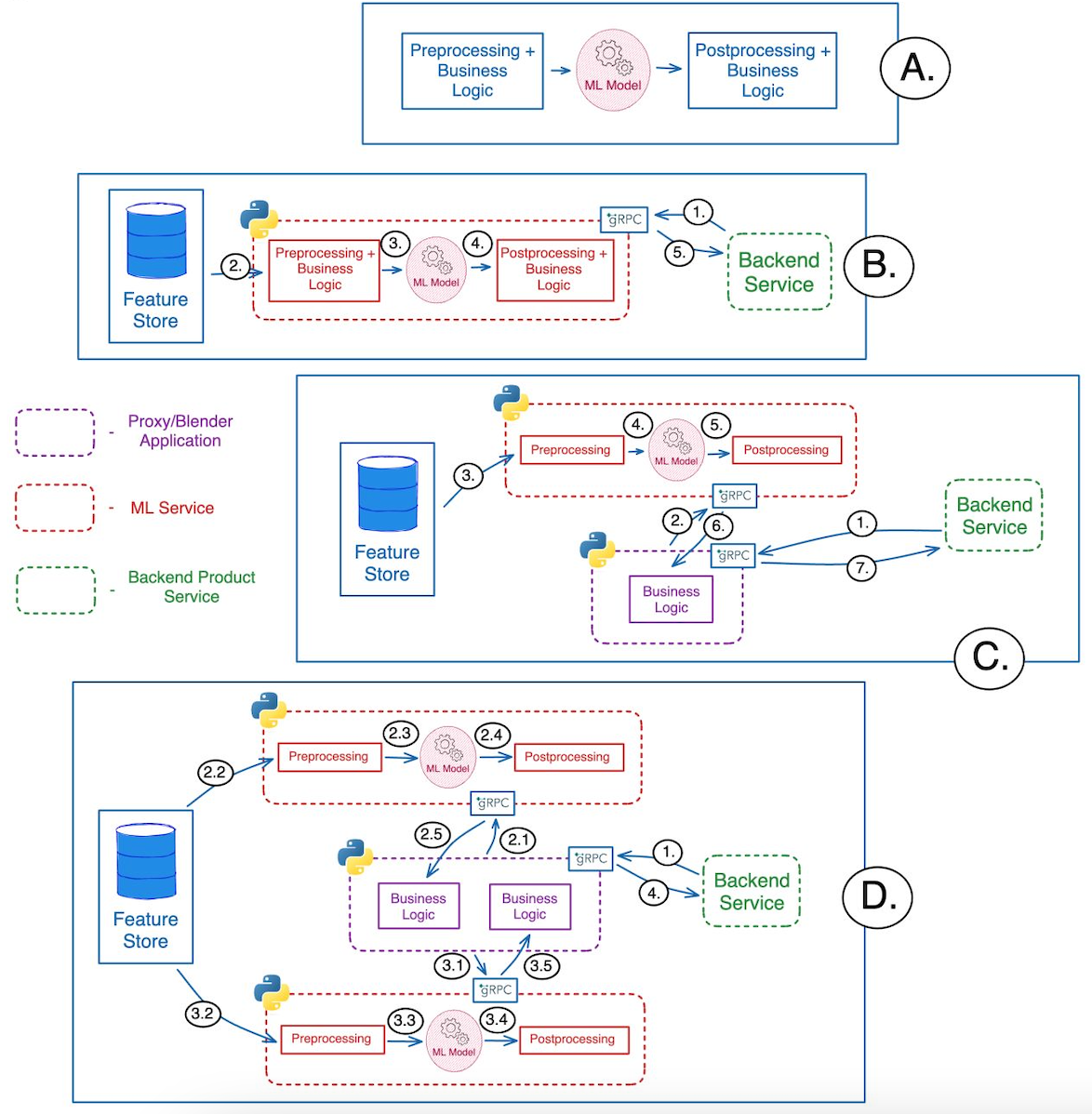
19.1 Flutter + TensorFlow Lite (On-Device Architecture)
This is the recommended architecture for performance and privacy.
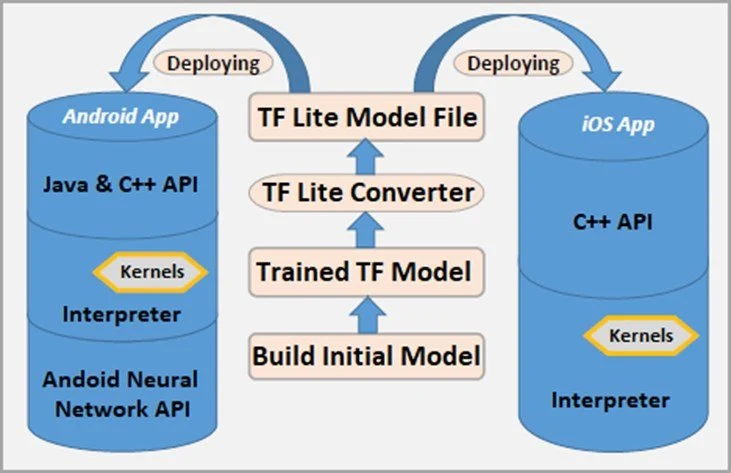
Breakdown:
Flutter Layer
- UI (Widgets)
- Camera plugin
- Image processing
ML Layer (On Device)
- TFLite Interpreter
- Model (.tflite file)
- Input/Output tensors
Data Flow
Camera → Image → Preprocessing → TFLite → Output → UI
Benefits:
- Ultra-fast inference
- No data leaves device
- Works offline
19.2 Hybrid Architecture (On-Device + Cloud)
Best for scalable and production-grade apps.
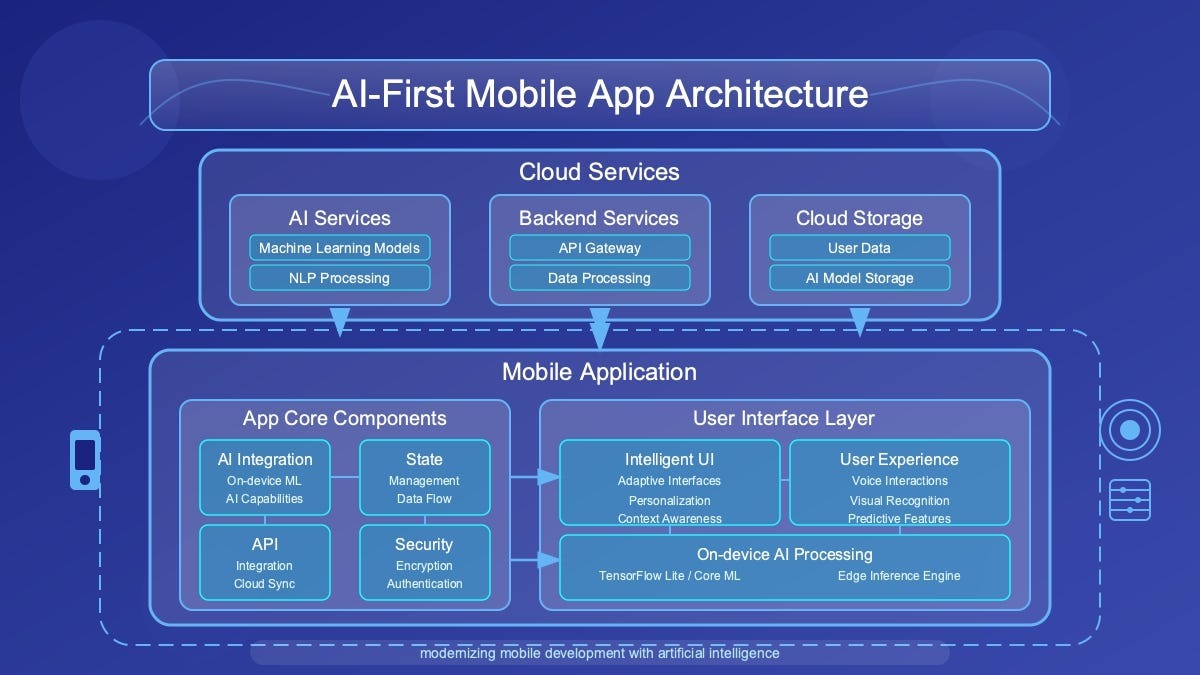
Flow Explanation:
- Step 1 (Local Check)
- Run lightweight model on-device
- Step 2 (Fallback to Cloud)
- If confidence is low → send to API
- Step 3 (Cloud Processing)
- Heavy model (YOLO, ResNet, etc.)
- Database matching
- Step 4 (Response)
- Return enriched results
Hybrid Logic Example (Flutter)
19.3 Component-Level Flutter Architecture
This diagram helps developers structure production apps.
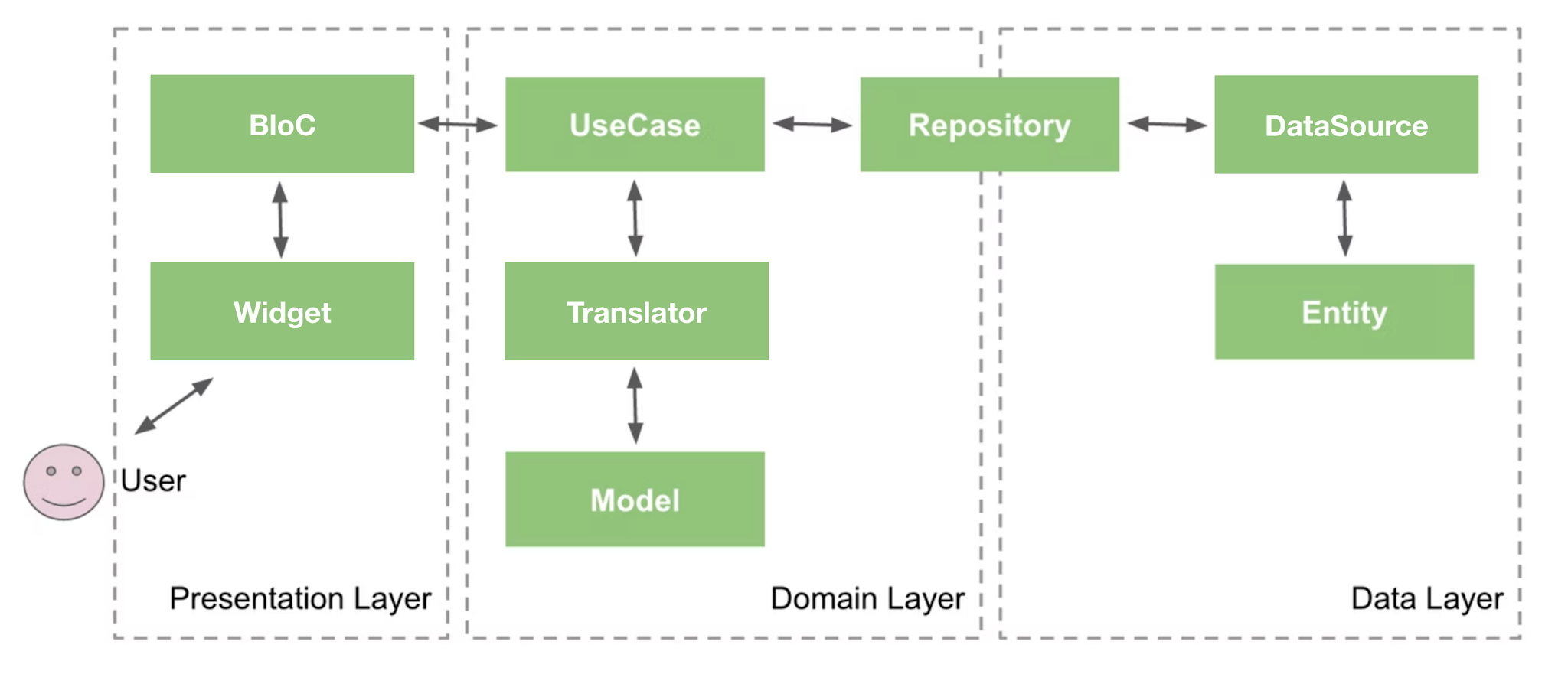
Recommended Structure:
Presentation Layer
- UI Widgets
- State Management (Bloc / Riverpod)
Domain Layer
- Use cases (DetectObject, SearchImage)
Data Layer
- Repository
- ML Service (TFLite / API)
Ready to bring your app vision to life? Start your journey with Zignuts expert Flutter developers.
**Hire now**Hire Now**Hire Now**Hire now**Hire now
20. Final Thoughts
Visual search is no longer optional; it’s becoming a standard feature in modern apps. Flutter provides a powerful and flexible platform to build these experiences quickly and efficiently.
By combining:
- Flutter UI
- TensorFlow Lite
- Cloud APIs
- Smart UX
You can create intelligent, real-time visual search applications that feel futuristic yet practical.
The next generation of apps won’t just respond to what users type , they’ll understand what users see. And with Flutter, you’re fully equipped to build that future.





.webp)
.webp)
.webp)

.webp)
.webp)
.webp)
.webp)
.webp)
.webp)


