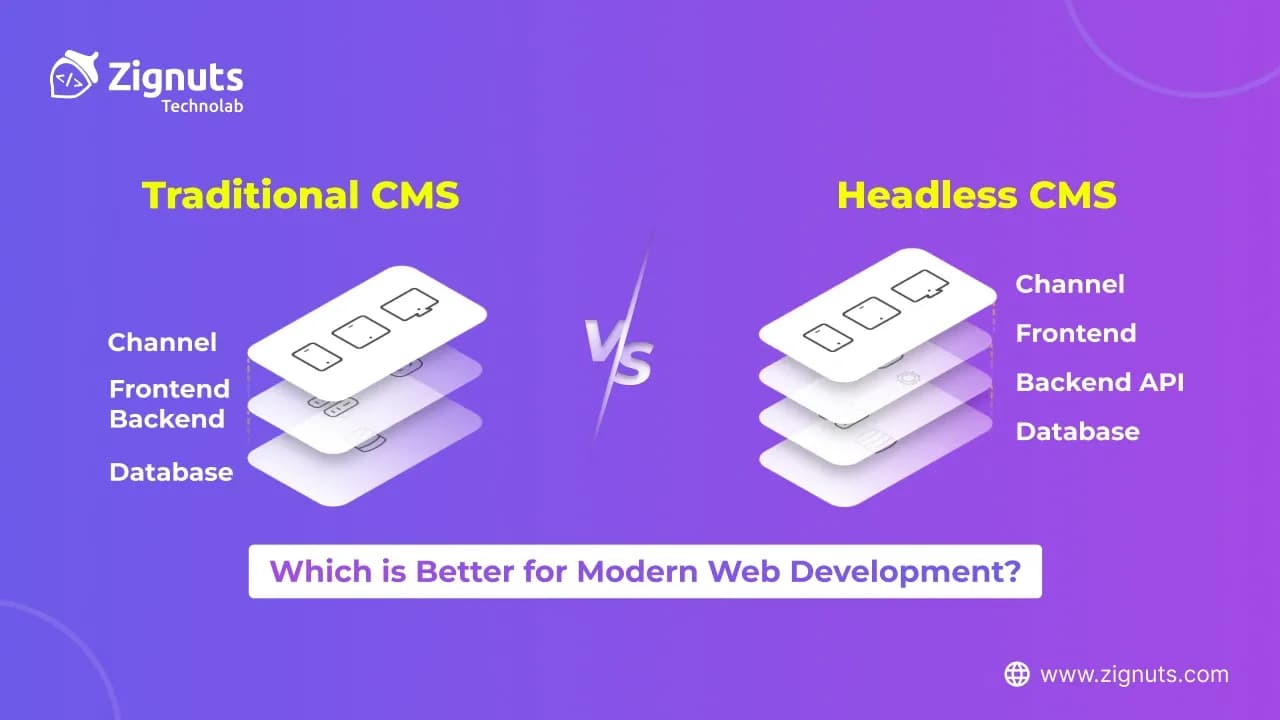
A content management system, or CMS, acts as the central hub for digital projects, enabling team members without a coding background to build and distribute content with ease. Depending on the architecture you choose, this content can live on a standard website, a high-performance mobile app, or even smart devices.
In the rapidly evolving landscape of 2026, the role of a CMS has expanded from a simple storage unit to a sophisticated engine that powers omnichannel experiences. As user expectations for speed and accessibility reach new heights, selecting the right foundation determines how effectively a brand can scale. Modern development now demands a choice between the cohesive, all-in-one nature of classic platforms and the agile, data-first logic of decoupled systems. This decision impacts everything from your team's daily workflow to the security and loading performance of your final product.
Why Prefer CMS?
In the digital landscape of 2026, a CMS is no longer just a luxury but a fundamental tool for organizing brand narratives. The technology has evolved significantly, moving from simple blogging tools to sophisticated engines that drive global digital experiences.
Essentially, a CMS is a bridge between complex code and creative execution. It allows editors and administrators to handle everything from long-form articles to immersive multimedia without needing a computer science degree. While the market offers various niche solutions, the conversation today centers on two dominant architectures.
Modern businesses rely on these platforms to maintain agility in a market where content needs to be updated across various time zones and devices instantly. Beyond just "hosting text," a CMS now serves as the operational heart of a company's digital transformation, integrating with CRM systems, AI translation tools, and advanced analytics to create a cohesive user journey.
Key Reasons to Choose a CMS
- Democratic Content Creation: It breaks down technical barriers, allowing marketing and editorial teams to push updates live in seconds without waiting for a developer's sprint cycle.
- Unified Brand Governance: By using centralized media libraries and master templates, organizations ensure that their brand identity remains consistent across thousands of pages.
- Built-in SEO and Accessibility: In 2026, search engines prioritize structured data. Modern CMS platforms automatically handle schema markup, alt-text prompts, and mobile-first indexing requirements.
- Seamless Collaboration: With advanced role-based permissions, multiple stakeholders (writers, editors, and legal teams) can work on a single piece of content simultaneously with full version control and audit trails.
- Scalability on Demand: Whether you are managing ten blog posts or ten million product listings, a CMS provides the infrastructure to organize data logically and serve it efficiently to a global audience.
- Future-Proofing Assets: Storing content in a structured environment makes it significantly easier to migrate to new technologies or redesign the visual interface without losing years of valuable data.
Headless CMS
What Exactly is a Headless CMS?
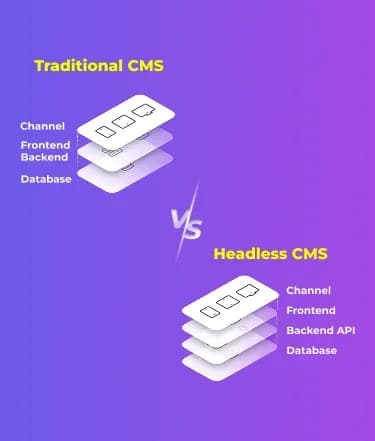
A Headless CMS treats content as data. It strips away the "head" (the frontend or the website view) and focuses entirely on the "body" (the content storage and management). By delivering content through flexible APIs like GraphQL or REST, it remains agnostic about where the data eventually ends up. This means the same content can look beautiful on a VR headset, a smartwatch, or a React-based web app simultaneously.
By 2026, the market will have matured significantly, with platforms like Contentful, Strapi, and Sanity evolving into "Content Operating Systems." These tools no longer just store text; they act as a central intelligence hub that orchestrates digital experiences across a limitless array of touchpoints.
Exploring the Mechanism of Headless CMS
- Content Innovation: Creators work in a specialized environment designed for modularity. Features like advanced version control, media cloud integration, and automated scheduling make workflows incredibly smooth. In 2026, many of these platforms will include Agentic AI, which can autonomously suggest content structures or perform real-time SEO audits within the editor.
- API-Driven Delivery: Instead of the system "pushing" a page to a browser, the frontend "pulls" specific data via APIs. This decoupling ensures that the backend never dictates the design. High-performance projects often utilize GraphQL to fetch exactly what is needed, reducing data overhead for mobile users.
- Independent Frontend and Backend: Developers are no longer restricted by the CMS's language. They can build the user interface using modern stacks like Next.js, Nuxt, or Svelte, ensuring a premium user experience. This separation allows the backend team to update security protocols without ever touching the visual code.
Headless CMS Advantages
- Cross-Platform Versatility:
The ability to push content to multiple digital touchpoints from a single source is a massive strategic win. In 2026, this is known as Omnichannel Orchestration. Whether it is an in-store kiosk, a mobile application, or a desktop site, your content remains consistent, updated in one place, and distributed everywhere instantly.
- Safety:
Security is a standout feature here. Because the content repository is physically separated from the display layer, the "attack surface" is significantly smaller. Many headless systems now implement Client-Side Encryption (CSE), ensuring data is encrypted before it even reaches the cloud. These systems handle heavy traffic spikes more gracefully, providing natural resistance against DDoS attempts.
- Speed:
Modern users expect results in under 1 second. Because headless systems utilize Edge Delivery and static site generation, pages load almost instantly. In 2026, performance is a direct ranking factor for AI-driven search engines. By serving pre-rendered content via global CDNs, brands see a direct correlation between faster speeds and higher conversion rates.
- Developer Freedom: Engineers are free to use the best tool for the job. Whether it is integrating WebAssembly for near-native browser performance or complex 3D visualizations, the decoupled nature of the system allows for rapid experimentation. Developers can swap out frontend frameworks without having to migrate the entire database.
Headless CMS Disadvantages
- Complex Setup:
This power comes with a steeper learning curve. You need a team that understands how to bridge the gap between APIs and the frontend. It requires a modern CI/CD pipeline and intentional architectural planning to ensure that the "head" and "body" communicate effectively.
- Higher Project Development Expenses:
Building two separate systems naturally requires more initial investment. While it pays off in long-term scalability and 35% lower operational costs over time, smaller projects with immediate, simple needs might find the bespoke development costs difficult to justify.
- Editorial Learning Challenges:
The shift from "page-based" to "data-based" thinking can be a hurdle. While 2026 tools have introduced robust live previews and visual component builders (like Sanity Studio or Storyblok), editors must still adapt to a workflow where they are managing "content blocks" rather than a single static page.
Hire Dedicated Developers Today!

How to Develop a Headless CMS: A Complete Guide for Modern Web Development
In the digital landscape of 2026, building a custom headless architecture is about more than just data delivery; it is about creating a resilient Content Operating System. By decoupling your systems, you move away from the "all-in-one" constraints and toward a Composable Architecture that can adapt to AI-driven search, IoT devices, and spatial computing environments.
Step 1: Understand the Architecture
Modern headless systems follow a three-tier logic designed for maximum isolation and performance:
- The Backend (The Engine): A robust data hub (built with Laravel, Node.js, or Go) that manages structured content, handles authentication, and exposes secure endpoints.
- The API Layer (The Bridge): The communication protocol (REST, GraphQL, or GROQ) that allows the frontend to request exactly what it needs without over-fetching data.
- The Frontend (The Face): A high-performance visual layer (React.js, Vue.js, or Svelte) that consumes API data to generate the user interface, often utilizing Edge Rendering to ensure sub-second load times.
Step 2: Arrange the Backend (Content API)
Your backend must be designed for Zero-Trust Data Sovereignty. In 2026, this means ensuring your API is not only functional but also secure against modern automated threats.
Option 1: Laravel Backend Laravel remains a top choice for developers who value elegant syntax and built-in security features like Eloquent ORM and middleware.
Option 2: Node.js Backend (with Express) For real-time applications and high-concurrency environments, a Node.js stack provides the non-blocking I/O necessary for a fluid experience.
Once the backend is initialized, focus on Semantic Content Modeling. Instead of building "pages," you build "entities" (like Authors, Products, or Events). This ensures your content remains reusable across different platforms without needing a redesign.
Step 3: Set Up the Frontend (Vue.js or React.js)
The frontend is where Core Web Vitals are won or lost. In 2026, developers prioritize React Server Components or Vue's Composition API to minimize the JavaScript bundle sent to the user's device.
Option 1: Vue.js Frontend Vue.js is favored for its simplicity and the power of its reactivity system, making it ideal for dynamic dashboards.
- Install Vue.js:
- Install Axios for API Requests:
- Fetch Data from the Backend:
Option 2: React.js Frontend React.js continues to lead the market due to its massive ecosystem and its ability to handle complex state management for enterprise-scale applications.
- Set Up a React Project:
- Install Axios:
- Fetch Data from the Backend:
Traditional CMS
What Exactly is a Traditional CMS?
Think of WordPress, Drupal, or Joomla. These are "all-in-one" platforms where the content management and the display layers are permanently joined. They offer a massive ecosystem of themes and plugins that allow users to launch a functional website in minutes. This "monolithic" approach remains the go-to for many because of its accessibility and the sheer volume of community support available.
In the context of 2026, these platforms have evolved into Experience Engines. While they still maintain their linked architecture, modern versions now include built-in AI tools for automated layout generation and real-time content optimization. They serve as a complete digital home for brands that want a "single pane of glass" to manage their entire web presence without juggling multiple cloud services.
Exploring the Mechanism of Traditional CMS
- Content Handling: Everything is managed through a central dashboard that usually features a visual editor. In 2026, these editors have moved beyond simple text boxes to Full-Site Editing (FSE) environments. This makes it incredibly easy for users who prefer a "Word-doc" style of content creation to manipulate every pixel of their site.
- Templating System: Themes dictate the look and feel. You choose a design, and the system automatically populates your content into the pre-defined areas. Modern templates now feature Dynamic Styles, which automatically adjust typography and spacing based on the content type.
- Coupled Frontend & Backend: Because the two sides are linked, the system knows exactly how the content will look on the page, allowing for effortless "What You See Is What You Get" (WYSIWYG) editing. This unity ensures that what the editor sees in the dashboard is 100% identical to what the visitor sees on the live site.
Traditional CMS Advantages
- Simplicity of Operation:
The barrier to entry is almost zero. Drag-and-drop builders and intuitive dashboards mean that a marketing team can run an entire site without ever calling a developer for daily updates. In 2026, many of these platforms even offer Voice-to-Site commands, allowing users to update text or change images simply by speaking.
- Ready-made Themes and Templates:
The speed of deployment is unmatched. If you need a professional site by tomorrow, you can purchase a theme, upload your logo, and be ready for the public. This is ideal for rapid prototyping or for businesses that need to test a market fit quickly without a six-month development cycle.
- Comprehensive Solution:
These platforms are Swiss Army knives. From SEO plugins like Yoast to built-in media galleries and user management, everything you need is usually just one click away in a central marketplace. In 2026, these marketplaces will have become more secure, featuring AI-vetted extensions that guarantee compatibility and performance.
- Decreased Initial Setup Costs:
For startups or personal brands, the financial investment is minimal. Shared hosting and a standard template are highly affordable, making it the most cost-effective way to get online quickly. You don't need to hire a separate frontend engineer, backend architect, and DevOps specialist to get your first page live.
Traditional CMS Disadvantages
- Limited Growth Opportunities:
The monolithic nature makes it hard to scale beyond the web. If you decide to launch a mobile app later, you might find yourself manually copying content because the system wasn't built to share data easily with other platforms. While some 2026 versions offer "Headless-lite" APIs, they often lack the performance of a pure headless system.
- Frontend Boundaries;
You are often stuck within the "grid" of your chosen theme. Making significant changes to the user experience often requires fighting against the core code of the CMS, which can lead to messy workarounds. This "Design Debt" can accumulate over time, making future updates more difficult and expensive.
- Performance Challenges:
As you add more plugins and features, the system can become "heavy." Since the server has to process both the backend logic and the frontend rendering for every visitor, load times can suffer during high traffic periods. To combat this in 2026, traditional systems require aggressive Object Caching and specialized managed hosting, which can increase long-term operational costs.
How to Develop a Traditional CMS: A Complete Guide for Modern Web Development
In 2026, building a traditional monolithic site is about leveraging Integrated Intelligence. While the architecture remains coupled, the development process has shifted toward high-performance managed environments and AI-assisted workflows. This approach is the fastest route for teams that need to go from a blank canvas to a high-converting digital presence with minimal architectural overhead.
Step 1: Set Up the Environment
Your environment is the bedrock of your site's reliability. In 2026, the focus has moved away from basic shared hosting toward Optimized WordPress/Drupal Stacks that prioritize Core Web Vitals and automated security.
Option 1: WordPress Setup WordPress 6.9+ has introduced deeper integration with modern hosting features like Redis Object Caching and Edge HTML caching, making "slow WordPress" a thing of the past.
- Hosting: Use a modern 2026 provider like DigitalOcean or specialized managed hosts like WP Engine. These providers now offer Auto-Scaling Clusters that handle viral traffic spikes without manual intervention.
- Installation: Most modern hosts provide a Git-integrated installer. This allows you to push code from GitHub directly to your CMS, combining the ease of a traditional setup with professional developer workflows.
- Database: WordPress 2026 requires MySQL 8.0+ or MariaDB 10.6+. During the guided setup, ensure you enable TLS 1.3 for all database communications to maintain modern data privacy standards.
Option 2: Drupal Setup Drupal 11 and 12 are the current enterprise standards, offering a "Starshot" experience that makes the initial setup much faster for non-technical users while retaining its powerful technical core.
- Installation: Download the latest core via Composer. In 2026, the community recommends using DDEV or Lando for local development to ensure your local environment perfectly matches your production server's PHP 8.3 configuration.
- Configuration: Define your content types using the Field UI. Drupal’s new Recipes API allows you to apply pre-configured bundles of modules and settings (like "Event Site" or "News Portal") in one click, drastically reducing setup time.
Step 2: Customizing the Experience
Once the core is installed, the next phase is moving from a generic template to a Component-Based Design System.
- Full Site Editing (FSE): In WordPress, use the Block Editor to build global patterns. This allows you to create a "Hero Section" or "Newsletter Signup" once and reuse it across the site, ensuring design consistency without writing custom PHP templates.
- Module Selection: In 2026, the mantra is "Less is More." Prioritize AI-Vetted Extensions from official repositories. For SEO, use tools that leverage agentic AI to suggest real-time improvements rather than just static keyword checks.
- Security Hardening: Traditional systems are popular targets. Implement Passkey-based Authentication (Passwordless) for your admin accounts and use a Web Application Firewall (WAF) at the edge to filter out bot traffic before it hits your server.
Step 3: Launch and Optimization
Launching a traditional CMS today requires a "Performance First" mindset:
- Image Optimization: Use modern formats like AVIF and WebP 2. Most 2026 CMS versions handle this conversion automatically upon upload.
- Staging Workflows: Never test on your live site. Use One-Click Staging environments to verify that new plugins or theme updates don't break your layout.
- Continuous Monitoring: Integrate Observability Tools like Query Monitor to watch for slow database calls or inefficient PHP scripts, keeping your site lean as your content library grows.
Hire Dedicated Developers Today!
What’s the Best Choice for Modern Web Development: Headless CMS vs Traditional CMS?
The decision usually boils down to the scope of your vision and the technical resources at your disposal. In 2026, this choice is no longer just about where you store text; it is about choosing the right Architectural Strategy for your brand's digital survival.
As AI-driven search engines and spatial computing change how people consume information, the "best" choice is the one that aligns with your three-year growth plan rather than just your three-month launch goal.
Go with a Headless CMS if:
A Headless CMS is the gold standard for Omnichannel Orchestration. You should choose this route if:
- Multi-Platform Consistency: You are building a complex ecosystem that includes a high-performance web app, native mobile apps (iOS/Android), and emerging interfaces like digital signage or voice assistants.
- Developer Innovation: You want total control over the user experience and have access to developers who can manage APIs and modern frontend frameworks like Next.js or Svelte.
- Future-Proofing: You need a system that can adapt to new devices that haven't even been invented yet. Since content is stored as "clean data," it can be pushed to any new "head" that enters the market.
- Enterprise Security: Your project requires a reduced attack surface and the ability to isolate the content engine from the public-facing website.
Go with a Traditional CMS if:
A Traditional CMS remains the king of Speed and Simplicity. This remains a powerful choice if:
- Single-Channel Focus: Your primary goal is a high-quality website or blog where content is consumed mainly via a web browser.
- Editorial Autonomy: You have a marketing-heavy team that needs to build pages, change layouts, and manage SEO without constantly waiting on a developer’s schedule.
- Budget and Timeline: You need a professional site live in days, not weeks. The vast ecosystem of ready-made themes and plugins allows for a lower initial investment and a faster "Time to Market."
- Ease of Maintenance: You don't have a dedicated DevOps team. Traditional platforms offer an all-in-one package where hosting, security updates, and content tools are handled in one familiar dashboard.
Conclusion
When creating digital platforms in 2026, the debate between Headless CMS vs Traditional CMS centers on balancing specialized performance with operational simplicity. A headless architecture is the premier future-proof solution for modern web development because its composable nature allows content to flow seamlessly across diverse channels. Conversely, a traditional CMS remains a robust, reliable choice for website-centric projects where rapid deployment and intuitive editorial control are the highest priorities.
To make the best decision for your organization, evaluate your long-term scaling goals, your team's technical depth, and your specific audience's needs. If you require professional guidance to architect these complex systems or need to Hire Dedicated Developers to build your custom frontend or backend infrastructure, expert support can bridge the gap between vision and execution. This strategic alignment ensures your digital presence remains agile as your content strategy evolves.
At Zignuts, we are committed to helping you implement the perfect technology stack to drive your business forward. To discuss your project requirements or to start building your next-generation application with our expert team, simply Contact Zignuts and let us help you elevate your digital strategy today.

Zignuts Technolab
Zignuts Technolab delivers future-ready tech solutions and keeps you updated with the latest innovations through our blogs. Read, learn, and share!