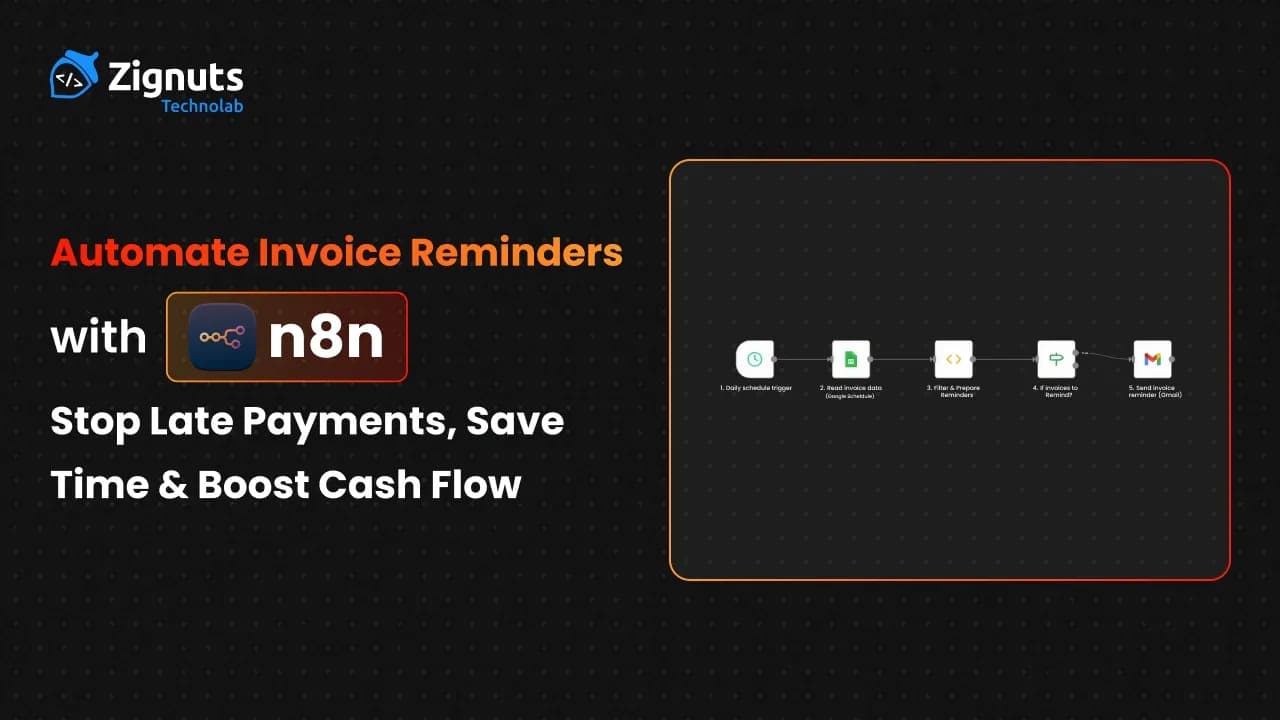
In the modern business landscape of 2026, efficiency isn't just an advantage; it's a necessity for survival. As companies navigate increasingly complex financial cycles, the manual task of chasing payments has become a significant bottleneck that drains creative energy and stalls growth. This guide explores how you can leverage cutting-edge n8n automation to transform your accounts receivable from a stressful manual chore into a seamless, background process that works while you sleep. By integrating intelligent workflows, you can ensure your business remains liquid, your client relationships stay positive, and your focus remains exactly where it belongs on scaling your vision.
The shift toward hyper-automation in 2026 means that businesses can no longer afford to let human error dictate their bank balance. Traditional methods of tracking spreadsheets or sending one-off emails are not only slow, but they are also costly. An automated approach ensures that every client receives the right message at the exact moment it is needed, without a single minute of manual intervention. Beyond just sending emails, these systems now sync across your entire tech stack, updating your CRM, notifying your finance team on Slack, and even adjusting credit terms in real-time. This level of synchronization builds a foundation of financial stability, allowing you to move from a reactive state of "chasing money" to a proactive state of "strategic reinvestment."
Introduction: The Real Cost of Missed Payments
Are you exhausted from waiting for clients to pay their invoices? Managing cash flow disruptions while trying to maintain professional relationships can feel like a constant uphill battle. You are definitely not alone in this struggle. Late payments are a universal hurdle for businesses of all sizes, yet they are entirely avoidable with the right systems in place.
Recent data from 2026 highlights the urgency of this issue:
- Over 60% of B2B invoices currently miss their initial due date.
- Small business owners still sacrifice roughly 15 hours a week just to chase money they have already earned.
- Unstable cash flow remains a primary reason why promising startups fail within their first three years.
The true cost of a late payment extends far beyond the number on the invoice. When payments are stalled, your ability to reinvest in your own growth is paralyzed. You may find yourself delaying payroll, postponing essential software upgrades, or missing out on early-payment discounts from your own vendors. Furthermore, the mental tax of manual debt collection is immense. Spending your Tuesday morning drafting firm yet polite emails is a poor use of your leadership energy.
In the fast-moving economy of 2026, the gap between thriving companies and those struggling to survive is often defined by administrative efficiency. By letting a manual process handle your revenue collection, you are essentially allowing human forgetfulness to dictate your company’s financial health.
Imagine a world where your reminders send themselves, ensuring you never have to send a "just checking in" email ever again. A world where your accounts receivable department runs on autopilot, maintaining perfect professional courtesy while aggressively securing your bottom line. Automation doesn't just save time; it provides the peace of mind that comes with a predictable, healthy cash flow.
Why You Should Automate Your Invoice Reminders with n8n automation
Manual follow-ups are inherently flawed. They are inconsistent, prone to human error, and nearly impossible to scale as your client list grows. By shifting to an automated model, you transform your accounts receivable department into a high-efficiency engine. In an era where digital precision is expected, relying on manual memory to trigger payment requests is a strategy that belongs in the past.
The benefits are immediate:
- Reclaim 2 to 3 hours of high-value time every single week by removing the need for manual drafting and tracking.
- Boost your liquid cash flow and cut down overdue accounts by nearly 30% through relentless, timely follow-ups that never forget.
- Maintain a professional, consistent cadence that keeps your brand top-of-mind without appearing desperate or disorganized.
- Grow your operations without increasing overhead, allowing your existing team to focus on high-level strategy rather than administrative debt.
- Eliminate the risk of an invoice simply slipping through the cracks, ensuring every dollar earned is a dollar collected.
- Remove the "Awkward Factor" from client relationships, as automated systems act as a neutral third party, allowing you to stay the "good guy" while the system handles the firm reminders.
- Leverage Multi-Channel Urgency by moving from simple email to SMS or Slack notifications as an invoice moves from "due" to "critically overdue."
- Ensure Data Integrity across your tech stack, as your accounting software, CRM, and bank feeds stay perfectly synchronized without manual data entry.
- Optimize for Global Time Zones, ensuring your reminder hits the client's inbox at 9 AM their time, significantly increasing the likelihood of immediate action.
Meet n8n automation - Your Automation Machine
In 2026, n8n stands as the premier open-source platform for businesses that need powerful workflows without the hefty price tag of older tools. It offers the flexibility of custom coding with the ease of a visual interface, making it the go-to choice for modern finance teams. Unlike rigid, "black-box" automation tools that limit how you process your data, n8n provides a transparent environment where you can see exactly how every invoice is handled.
The platform operates on a node-based system, which essentially means you can map out your business logic like a flowchart. For finance operations, this is revolutionary. It allows you to build complex "if-this-then-that" scenarios that mirror your real-world accounting policies. For instance, you can set a rule that sends a gentle email for invoices under $1,000 but triggers a personal Slack notification to an account manager for anything over $10,000. Because n8n can be self-hosted, your sensitive financial data never has to leave your own infrastructure, providing a level of security and compliance that is non-negotiable in 2026.
Beyond simple task execution, n8n automation acts as a bridge between your legacy systems and modern cloud applications. Whether you are pulling data from an old SQL database or pushing updates to a cutting-edge CRM, the platform ensures that information flows without friction. This adaptability is what makes it a "machine" rather than just a tool; it scales with your complexity, allowing you to start with a simple reminder and eventually build a fully autonomous finance department.
Key features that set it apart include:
- Deep integrations with over 500 applications, including Stripe, QuickBooks, Xero, and Slack, ensure your entire ecosystem is connected.
- An intuitive drag-and-drop builder that visualizes your entire logic flow, making it easy for non-developers to understand and audit the process.
- Advanced capabilities for JavaScript logic and direct database connections, giving power users the ability to write custom scripts for complex tax calculations or currency conversions.
- A fair-code model that prevents vendor lock-in and keeps your overhead predictable, so your automation costs don't spiral as your volume grows.
- Built-in Error Handling, which ensures that if an email fails to send or a database is offline, the system can automatically retry or alert you immediately.
Understanding the Invoice Reminder Workflow with n8n automation
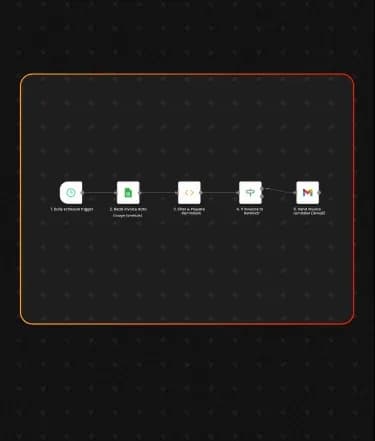
A robust automated system follows a logical path to ensure no client is bothered unnecessarily and no payment is ignored. By mapping out this journey, you can see how n8n automation replaces hours of manual checking with a sequence of events that trigger in seconds.
Daily Trigger:
The system wakes up every morning at a scheduled time (typically 8:00 or 9:00 AM) to scan your records. This ensures that your reminders land in clients' inboxes at the start of their workday, increasing the visibility of your request before their schedule becomes cluttered.
Data Retrieval:
It pulls the latest invoice statuses from your source of truth, whether that is a cloud-based spreadsheet like Google Sheets, a local SQL database, or a dedicated accounting API like Stripe or QuickBooks. This step ensures that the workflow is always acting on the most current financial data available in 2026.
Filtering:
The logic identifies exactly which invoices are approaching their due date or have already passed it. This isn't just a simple date check; the system can be configured to exclude specific clients, skip public holidays, or focus only on invoices above a certain monetary threshold to prioritize high-value collections.
Content Generation:
It selects the right message based on the severity of the delay. The system dynamically pulls the client's name and invoice details to craft a message that moves from a "friendly heads-up" for upcoming dues to a "firm notification" for long-overdue accounts. In 2026, you can even integrate AI nodes to ensure the tone remains professional yet persuasive.
Dispatch:
Emails or messages are sent automatically through your preferred provider, such as Gmail, Outlook, or an SMTP service. By using authenticated nodes, these messages are less likely to end up in spam folders, ensuring your payment request actually reaches the recipient.
Termination:
The moment a payment is detected in your accounting system, the reminder sequence for that specific invoice self-terminates. This prevents the ultimate professional embarrassment: sending an overdue notice to a client who has already paid their bill.
Escalation:
If a payment remains critically late despite multiple automated attempts, the system doesn't just keep emailing into the void. It alerts a human team member via Slack, Microsoft Teams, or a CRM task. This ensures that your finance team only spends their time on the 5% of cases that actually require a human touch.
Hire AI Developers Today!

What You Need Before Starting with n8n automation
Before you dive into the world of streamlined finance, you need to ensure your toolkit is properly staged. Successful n8n automation requires more than just a workflow; it requires a reliable infrastructure where data can flow securely and without interruption. In 2026, the barrier to entry is lower than ever, but a thoughtful setup prevents "workflow breaks" down the line.
Here is exactly what you need to have in place before you build:
- n8n Instance:
You have two primary paths here. You can use the n8n Cloud version for an instant, managed setup that handles all the maintenance and updates for you. Alternatively, for those who prioritize maximum data sovereignty and zero execution costs, you can self-host via Docker on your own server. This ensures that sensitive financial records stay within your private infrastructure.
- Invoice Storage:
You need a structured home for your data. This is your "Source of Truth." For beginners, a well-organized Google Sheet or Airtable base works perfectly. For enterprise-level scaling, connecting directly to a PostgreSQL or MySQL database, or better yet, the API of your accounting software like Stripe, QuickBooks, or Xero, ensures that the automation is always reading live, accurate balances.
- Communication Channel:
You need an active dispatch method. This is usually an authorized Gmail or Outlook account, but for higher volumes, using an SMTP service or SendGrid is recommended to maintain high deliverability rates. Your communication channel must be authenticated within n8n so the system has the "permission" to send emails on your behalf.
- Operational Rules:
You must define your "Reminder Cadence." Automation is only as good as the logic you give it. Before building, write down your timeline. For example, a "3-0-7-14" rule means sending an email 3 days before the due date, on the due date, 7 days after, and a final notice at 14 days. Having this plan ready prevents you from over-emailing or under-reminding your clients.
- API Credentials & Tokens:
To allow n8n to "talk" to your other apps, you will need to generate API keys or OAuth credentials. Most modern platforms in 2026 make this easy, but having your login details and developer tokens ready will save you significant time during the configuration phase.
- Data Formatting Standards:
Ensure your invoice dates are in a consistent format (like YYYY-MM-DD). Computers are picky; if one date is "Jan 5th" and another is "05/01/2026," your code node might struggle to calculate the difference. Standardizing your data entry is a small step that prevents massive headaches.
Beginner Guide: Build a Simple Invoice Reminder Workflow Using n8n automation + Google Sheets
This straightforward approach is perfect for getting your feet wet with automation. By following these steps, you will transition from manual tracking to a "set it and forget it" system that works tirelessly in the background. In the 2026 business environment, starting with a foundational tool like Google Sheets allows you to maintain full visibility over your data while leveraging the high-speed processing of n8n automation.
Step 1: Prepare Your Google Sheet
Your automation is only as smart as the data you give it. Create a new Google Sheet and organize your data with these specific headers: InvoiceID, ClientName, ClientEmail, Amount, DueDate, and Status. Ensure that the "Status" column is updated regularly (e.g., 'Pending' or 'Paid') and that your "DueDate" follows a standard date format like YYYY-MM-DD. This structure acts as the "brain" of your workflow, allowing the system to distinguish between who has paid and who needs a nudge.
Step 2: Create a New Workflow
Log in to your n8n dashboard and start a fresh project. Your first building block is the Schedule Trigger. In 2026, timing is everything. Configure this node to run every morning at 9:00 AM. This ensures that your reminders are one of the first things your clients see when they open their inbox, significantly increasing the chances of getting your invoice processed in that day’s payment run.
Step 3: Pull Invoice Data
Next, add the Google Sheets Node and connect it to your account. Choose the "Read" action and select the specific spreadsheet and sheet name you created in Step 1. By pulling all rows into the workflow environment, n8n prepares to analyze every single record. It’s important to ensure your n8n credentials have "View" access to the sheet so the data flow remains uninterrupted.
Step 4: Add Logic to Filter Due & Overdue Invoices
Now it’s time to add the intelligence. Insert a Code Node (or Function Node) to handle the date math. This is where the "heavy lifting" happens. The system will look at today's date, compare it to the due date, and decide exactly what kind of message each client should receive.
Step 5: Add a Safety Check
To prevent the system from trying to send "empty" emails when all your clients have paid on time, you must add an If Node. This node checks the output of your Code Node. If the list of "reminders" is greater than zero, the workflow proceeds. If the list is empty, the workflow gracefully stops. This prevents technical errors and ensures your email service provider doesn't flag your account for suspicious activity.
Step 6: Send Emails Automatically
Finally, link your Gmail Node (or Outlook/SMTP node). In the configuration, use "expressions" to map the data dynamically. Set the To field to {{ $json.ClientEmail }}, the Subject to {{ $json.subject }}, and the Body to {{ $json.body }}. Once you hit 'Execute Workflow,' n8n will scan your sheet and instantly dispatch personalized, professional reminders to everyone who is behind on their payments.
Best Practices for Good Invoice Reminders with n8n automation
To maintain great relationships while getting paid, follow these rules. In the sophisticated business landscape of 2026, the goal is to be persistent without being a nuisance. A well-designed sequence in n8n automation allows you to walk this fine line by balancing firm financial boundaries with high-level professional courtesy. Your automation should feel like a helpful assistant to your client’s accounts payable team, rather than a robotic collector.
Frequency:
Stick to a 7-3-0-3-7-14 day schedule. This cadence ensures you are top-of-mind at critical decision points. By sending a reminder 7 days before the due date, you allow the client to fit the payment into their weekly processing run. The reminders then tighten in frequency as the date passes, creating a natural sense of escalating priority without requiring you to manually track the calendar.
Professionalism:
Always start warm and helpful. Assume the client simply forgot or that the invoice was buried in a busy inbox. Your initial messages should use phrases like "just a friendly heads-up" or "in case this stayed at the bottom of your inbox." By the time you reach the 14-day overdue mark, your tone can transition to a more formal "Final Notice" style, but staying objective rather than emotional is key to preserving the long-term partnership.
Clarity:
Always include a direct link to the payment portal and a PDF copy of the invoice. One of the biggest reasons for late payments is the client "losing" the original document or not knowing where to click to pay. Use the power of n8n to pull a direct URL or attach a file from your storage (like Google Drive or Dropbox) automatically. If the client has to search for information, they will likely postpone the task for later.
Timing:
Use logic to ensure emails land in inboxes on Tuesday, Wednesday, or Thursday mornings for the highest open rates. Data from 2026 shows that Monday mornings are often too cluttered with weekend backlog, and Friday afternoons are when focus shifts away from administrative tasks. By configuring your n8n automation schedule trigger to skip weekends and target the "Golden Window" (9:00 AM to 11:00 AM mid-week), you maximize the chance of immediate action.
Personalization Beyond the Name:
Do not stop at just "Hi [Name]." Use your data logic to include specific details like the project name or the purchase order (PO) number. When a reminder mentions specific work completed, it reinforces the value you provided, making the client feel more inclined to settle the balance quickly.
Multi-Channel Escalation:
If an email is ignored for more than 10 days, consider having n8n trigger a different channel. A polite automated SMS or a notification to a specific Slack channel can cut through the noise of a crowded email inbox. Sometimes a change in medium is all it takes to get a response from a distracted client.
Validation and Acknowledgement:
Use your workflow to send a "Thank You" email automatically once the payment is detected. This closes the loop professionally and confirms to the client that their payment was received and recorded. This positive reinforcement makes the next billing cycle much smoother.
Hire AI Developers Today!
Benefits You’ll See Right Away
Businesses implementing these 2026 strategies typically see a radical transformation in their operational health. Shifting your accounts receivable to n8n automation is not just a technical upgrade; it is a fundamental shift in how your company breathes and grows. By removing the friction from the payment cycle, you unlock a level of organizational speed that was previously impossible.
The impact is felt across every department:
- Payments are arriving 20% to 40% faster than before, as the immediate and consistent nature of automated reminders ensures your invoices are prioritized at the top of the client’s payment queue. Because the system triggers the moment an invoice hits its threshold, you capture the client's attention during their active banking windows, effectively shortening the "float" time between work completion and cash in hand.
- A complete end to the "anxiety" of manual collections, freeing you from the mental burden of tracking who owes what and the dread of initiating uncomfortable financial conversations. This psychological shift allows business owners to lead with confidence rather than desperation, knowing that the "heavy lifting" of debt recovery is being handled by a tireless, objective digital assistant.
- Stronger client ties through transparent communication, because clients appreciate the clarity of knowing exactly when payments are due, which eliminates the stress of unexpected "past due" surprises. By providing clear, consistent, and predictable touchpoints, you build a culture of mutual respect where financial expectations are never in doubt, significantly reducing the friction often caused by billing disputes.
- Predictable monthly revenue that allows for confident reinvestment, giving you the data-backed assurance to hire new talent, launch marketing campaigns, or upgrade equipment without second-guessing your bank balance. When your cash inflows become standardized through automation, you can move away from "survival mode" and begin making long-term strategic bets that drive true market expansion.
- A significant reduction in "Bad Debt" write-offs, as early and consistent intervention prevents small overdue amounts from aging into uncollectible losses. By maintaining a persistent presence in the client's workflow, you ensure that your invoice doesn't become the "forgotten bill" that eventually gets written off, protecting your profit margins from the erosion of delinquency.
- Enhanced professional brand image, as a sleek, automated notification system signals to your clients that your business is organized, technologically advanced, and serious about its financial operations. In 2026, clients equate administrative efficiency with service quality; a modern billing experience reinforces the idea that you are a top-tier partner capable of handling high-level enterprise requirements.
- Instant scalability for high-growth periods, ensuring that if your client load doubles overnight, your collection system handles the increased volume without requiring you to hire a single extra administrative employee. This decoupling of labor from revenue growth means your overhead stays flat even as your billing volume spikes, allowing you to maximize the profitability of every new contract.
- Improved team morale, as your finance and account managers are relieved from the repetitive, soul-crushing task of "chasing money" and can refocus on high-value client strategy and business development. Removing the "collector" hat from your team members allows them to focus on building positive relationships and solving complex problems, leading to higher job satisfaction and lower turnover rates.
Scaling to Enterprise Finance Operations with n8n automation
As your business grows, your n8n automation should evolve beyond simple email reminders. Advanced users in 2026 are now connecting their workflows to global payment gateways and credit scoring APIs. This allows the system to automatically adjust a client’s credit limit based on their payment history recorded by the automation.
For instance, if a client is consistently 10 days late, n8n can automatically flag them in your CRM and apply a "Late Payer" tag. This tag can then trigger a different workflow that requires upfront deposits for future projects. By turning your reminder data into actionable business intelligence, you move from simple administration to high-level risk management. At the enterprise level, automation stops being a utility and becomes a strategic asset that protects your margins and optimizes your working capital.
Scaling your finance operations means creating a self-healing system where data flows between your bank accounts, your accounting software, and your client-facing communication tools without friction. This ensures that your leadership team has a real-time view of "Days Sales Outstanding" (DSO) and can make aggressive expansion decisions based on actual liquidity rather than projected invoices.
Key features of an enterprise-grade setup include:
- Dynamic Credit Scoring Integration, where the system automatically queries credit bureaus or internal payment history to adjust payment terms for high-risk clients in real-time.
- Global Payment Gateway Syncing, connecting your reminders directly to Stripe, PayPal, or localized bank transfer systems like SEPA or UPI to provide an "Instant Pay" experience for international clients.
- Automated Collection Escalation, moving from digital reminders to triggering a physical mail service or a third-party collection agency API once an invoice hits a critical "90-days past due" threshold.
- Sophisticated Tax and Currency Conversion, utilizing n8n nodes to automatically calculate localized VAT or GST and convert foreign currency invoices into your base currency for accurate reporting.
- Internal Stakeholder Notification Loops, where the system sends automated "Weekly Delinquency Reports" to department heads, ensuring that no new work is started for clients with significant outstanding balances.
- AI-Powered Cash Flow Forecasting, using historical payment data gathered by your workflow to predict future bank balances with high accuracy, helping you avoid seasonal liquidity crunches.
Advanced AI-Driven Personalization in n8n automation
The standard "one-size-fits-all" email is becoming less effective in the highly digital landscape of 2026. By incorporating AI nodes into your n8n automation, you can analyze the historical sentiment of a client’s emails before sending a reminder. If a client has recently expressed frustration or is going through a known merger, the AI can adjust the reminder copy to be more empathetic, preserving the relationship while still requesting payment. This shift from "robotic" to "context-aware" automation is what differentiates market leaders from their competitors.
Furthermore, AI can predict when a specific client is most likely to pay by analyzing patterns across months of transaction data. If the data shows a certain client always processes invoices on Thursday afternoons, your n8n automation workflow can hold the reminder until Thursday morning, ensuring your request is at the very top of their stack when they sit down to do their banking. This level of precision ensures you aren't just sending emails, you are sending them at the exact psychological moment the recipient is prepared to take action.
Modern personalization also extends to the complexity of the invoice itself. AI can scan the line items of an invoice and, if it detects a potential dispute or a recurring billing error based on previous tickets, it can proactively flag the invoice for a human review before the reminder is even sent. This prevents the "cycle of frustration" where a client ignores a reminder simply because they are waiting for a correction.
Key AI-enhanced capabilities include:
- Dynamic Language Localization:
where the AI node detects the client’s primary language from previous correspondence and translates the reminder into their native tongue to improve clarity and response time.
- Predictive Delivery Timing:
Utilizing machine learning to bypass the "inbox graveyard" by sending reminders based on individual client engagement patterns rather than a generic morning blast.
- Sentiment-Based Tone Adjustment:
Allowing the workflow to switch between "supportive partner" and "formal creditor" copy based on the client's current relationship status and communication history.
- Automated Dispute Detection:
where the system uses Natural Language Processing (NLP) to categorize client replies (e.g., "we haven't received the goods yet") and automatically pauses the reminder sequence while alerting the logistics team.
- Smart Discounting Triggers:
This can offer a one-time, AI-calculated early payment discount to clients who are statistically likely to pay late, incentivizing faster cash flow when your business needs it most.
- Hyper-Personalized Content Mapping:
This goes beyond the name to reference specific project milestones or shared successes in the reminder body, making the request for payment feel like a natural part of an ongoing successful partnership.
Conclusion:
In the fast-paced economy of 2026, manual invoice management is no longer a viable strategy for growth. By implementing n8n automation, you transform a tedious administrative chore into a strategic advantage that safeguards your liquidity and professional reputation. Whether you are a startup looking to secure your first rounds of revenue or an enterprise aiming to optimize global accounts receivable, the power of a self-healing, AI-driven reminder system cannot be overstated.
However, building these complex, high-stakes workflows requires a blend of financial logic and technical expertise. To truly unlock the potential of hyper-automation, many businesses choose to Hire AI Developers who specialize in n8n and LLM integration. This ensures your systems are not only robust and secure but also future-proofed against the rapidly evolving digital landscape.
Ready to reclaim your time and boost your cash flow? Our team at Zignuts specializes in building sophisticated n8n workflows tailored to your unique business needs. Contact Zignuts today to start your journey toward a fully automated, stress-free finance department.

Ekta Trivedi
A Node.js enthusiast focused on building scalable, high-performance applications that power the next generation of web technologies

Manav Padalia
Passionate about building scalable solutions, exploring innovative technologies, and delivering meaningful user experiences across platforms.