Jetpack Compose has redefined how UI is built in Android by embracing a declarative rendering model. By 2026, the shift is complete: instead of manually updating views, the UI now reacts automatically to changes in state. This shift dramatically simplifies UI code across various form factors, from foldables to wearables.
However, as complexity increases with multiple screens, feature modules, AI-native components, and multi-device synchronization, Compose apps can become difficult to maintain if the underlying architecture is not deliberate. Modern applications now demand high-performance rendering that can handle rapid data updates from edge computing and real-time AI processing without dropping frames.
Common Scaling Pain Points:
- UI State scattered across many composables: When state is hoisted inconsistently, finding the "source of truth" becomes a debugging nightmare, leading to data mismatches between UI components.
- ViewModels doing too much: Often referred to as "God objects," these over-inflated classes become catch-alls for network logic, database management, and navigation, making them nearly impossible to unit test.
- Multiple mutable states: Using several independent MutableState objects instead of a single stream leads to "race conditions" in the UI where one part of the screen updates before another, causing visual flickering.
- Navigation logic leaking into UI elements: Hardcoding route transitions inside low-level composables prevents them from being reusable across different features or modules.
- Business logic accidentally embedded inside composables: Placing if-else validation or data formatting directly in @Composable functions forces unnecessary recompositions and breaks the separation of concerns.
- Unit tests failing or missing: When the UI is tightly coupled with logic, you cannot verify business rules without spinning up a heavy Robolectric test or an emulator, slowing down the CI/CD pipeline.
Core Architectural Principles for Jetpack Compose UI architecture
In a modern Android ecosystem, a scalable architecture functions like a well-oiled machine where each part has a specific, non-negotiable responsibility. Moving away from cluttered fragments and monolithic classes, we transition toward a "State-in, Events-out" model. This ensures that the UI remains a passive observer of data while the business logic remains entirely decoupled from the rendering layer.
UI State: The Immutable Snapshot
The UI State acts as the single source of truth for your screen at any given millisecond. By 2026, the standard practice is to use data classes that represent the entire visual state of the screen.
- Role: An immutable state container that the UI observes.
- What it Should Contain: Concrete data like lists of articles, Boolean loading flags, error message strings, and user-selected filters.
- What it Should Not Contain: You should never include business logic, references to repositories, or Android Context inside the state. It must be a "dumb" object that can be easily recreated for tests or previews.
UI Events: The User’s Inten
Events are the bridge between the user's physical interaction and the application’s logic. In a scalable Jetpack Compose UI architecture, these are modeled as a stream of discrete actions.
- Role: Triggers derived from the user or the system that signal a need for a state change.
- What it Should Contain: User-driven actions like button clicks, search query changes, swipe-to-refresh gestures, or biometric authentication results.
- What it Should Not Contain: Logic for navigation, direct database calls, or feature-level decisions. The event only says "this happened," not "here is what the app should do next."
ViewModel: The Deterministic State Machine
The ViewModel serves as the brain of the feature, coordinating between the data layer and the UI. It processes incoming events and outputs a new, updated state.
- Role: Acts as a state reducer and event processor that survives configuration changes.
- What it Should Contain: Logic for mapping incoming UI events to specific Use Cases and updating the StateFlow or SnapshotState. It manages the lifecycle of data collection.
- What it Should Not Contain: UI rendering details, references to @Composable functions, or any direct manipulation of the View hierarchy.
Use Cases: The Domain Boundary
Use Cases represent the "What" of your application. They encapsulate specific business rules that can be shared across multiple ViewModels, preventing logic duplication.
- Role: Discrete units of business logic that handle the heavy lifting of data coordination.
- What it Should Contain: Logic for merging local and remote data sources, complex data transformations, and the execution of specific business rules (e.g., "only allow refresh if the cache is older than 5 minutes").
- What it Should Not Contain: UI-specific conditions, navigation state, or formatting logic meant specifically for a single screen.
Why Immutable UI State is Critical for Jetpack Compose UI architecture
Compose re-renders the UI whenever the state value changes. In 2026, with the high-refresh rates of modern displays and the prevalence of foldable devices, inefficient state management leads to "recomposition storms." These are cascading UI updates that drain battery life and create noticeable micro-stutter. If your state is implicit, scattered across multiple variables, or mutable, you face screen flickers, redundant redraws, and frustrating performance lags.
The core of a high-performance Jetpack Compose UI architecture is the "Single Source of Truth." By bundling all related UI properties into a single immutable data class, you ensure that the UI layer only reacts when a meaningful change occurs. This approach allows the Compose compiler to skip unnecessary recompositions for components whose specific data hasn't changed.
Stable, Immutable State Example:
One screen → one state object. This ensures the UI remains a pure, deterministic reflection of your data.
Eliminating Side Effects and Race Conditions
When you use mutable state objects, different parts of your application might try to update the same variable simultaneously. This leads to race conditions where the UI displays stale or conflicting information. By using immutable state, the ViewModel emits a brand-new "snapshot" of the UI. This snapshot is thread-safe and predictable; once the UI receives it, that state cannot be altered mid-render.
Enhancing Debugging and Time-Travel Support
In complex 2026 Android apps, tracking down why a specific button is disabled or why a loading spinner won't disappear is difficult with mutable variables. Immutable state allows you to log or "snapshot" every state change. If a bug occurs, you can look at the exact ArticleUiState object that caused the issue. This predictability is what makes modern declarative UIs significantly more robust than the imperative View systems of the past.
Optimizing Memory with Smart Recomposition
By utilizing immutable data structures, you help the Compose runtime identify "Stable" types. When the UI state is updated, Compose compares the old state with the new one. If a specific sub-composable's parameters remain identical, Compose skips that function entirely. This "smart skipping" is only possible when the state is immutable, as it allows for lightning-fast equality checks rather than deep object inspections.
UI Events: Typed Action Channels for Jetpack Compose UI architecture
UI events should be explicit and centralized, rather than passed as loose callbacks through deep trees. In earlier Android development, passing multiple lambdas down through several layers of composables, often called "callback hell," made the code brittle and difficult to refactor. Using Kotlin 2.2's enhanced sealed hierarchies makes this pattern even more robust, transforming every user interaction into a structured, type-safe command.
Typed Event Example:
Decoupling Interaction from Implementation
By modeling user actions as a sealed interface, you create a clear contract between the UI and the ViewModel. The UI layer no longer needs to know "how" to refresh data or "where" to save a search query; it simply emits an OnRefresh or OnSearchQueryChange event. This separation allows you to change the underlying business logic in the ViewModel without ever touching your Composable code, which is essential for maintaining a clean Jetpack Compose UI architecture.
Simplified Event Handling with Single Entry Points
Instead of a ViewModel filled with dozens of public functions, you can implement a single onEvent(event: ArticleUiEvent) function. This centralized gateway uses a when expression to process actions. In 2026, the Kotlin compiler ensures that this when block is exhaustive; if you add a new event to the interface but forget to handle it in the ViewModel, the code will not compile. This safety net prevents "silent bugs" where user interactions appear to do nothing.
Audit Trails and Debugging
Structured events provide an excellent foundation for analytics and debugging. Since every meaningful user action passes through a single channel, you can easily attach a logger to your event stream. During development, this allows you to see a real-time "breadcrumb" trail of exactly what the user did leading up to a crash or an unexpected state change.
Enhanced Testability
This supports tracing UI behavior from event to logic to state and ensures clean, assertable unit testing. In a test environment, you can simply fire an event at the ViewModel and immediately assert that the resulting UI state reflects the expected change. There is no need to mock complex callback chains or simulate intricate UI clicks, making your test suite faster and more reliable.
Hire Mobile Developers Today!

ViewModel: The Deterministic State Machine for Jetpack Compose UI architecture
The ViewModel serves as the vital command center of your feature. It observes asynchronous data sources, processes incoming user events, and updates the UI state, but it never directly touches the UI or holds references to View-related classes. In a scalable Jetpack Compose UI architecture, the ViewModel functions as a deterministic state machine: for every given input (event), it produces a predictable output (state).
Key 2026 Patterns for Modern ViewModels
- StateFlow: By 2026, StateFlow will have completely superseded LiveData. It offers native Coroutine support and ensures "multi-collector safety," meaning multiple UI components (like a side rail and a main content area) can observe the same state without triggering redundant network calls.
- uiState.update { ... }: To maintain immutability, we use the .update extension function. This ensures thread-safety when multiple events try to modify the state simultaneously. It creates a new copy of the state, which is the only way to trigger "smart recomposition" in Compose.
- onEvent(event): Rather than exposing twenty different functions, a single onEvent entry point simplifies the API surface of your ViewModel. It makes the logic flow easy to follow: Event → Processor → State Update.
Managing Long-Running Operations and Scope
A robust ViewModel utilizes viewModelScope to manage the lifecycle of background tasks. Whether it is a complex AI data processing task or a simple database fetch, using the structured concurrency of 2026-era Kotlin ensures that if the user navigates away, all pending operations are instantly cancelled. This prevents memory leaks and background "zombie" tasks that drain device resources.
Bridging Domain Logic to UI State
The ViewModel is responsible for converting complex domain models into simple, "ready-to-display" UI State. For example, it might take a raw Java.util.Date from a repository and transform it into a formatted "2 hours ago" string before it ever reaches the Composable. By doing this heavy lifting in the ViewModel, the UI layer remains thin, clean, and focused solely on rendering.
Reactive Data Integration
Modern ViewModels often use the combine operator to merge multiple data streams, such as a user's preference settings, a real-time notification feed, and the primary content repository into a single StateFlow. This reactive approach ensures that the UI is always synchronized, regardless of which data source updates first.
Handling Navigation Without Breaking Architecture for Jetpack Compose UI architecture
In a professional development environment, coupling your ViewModel directly to the NavController is a significant architectural pitfall. The NavController is a UI-layer dependency that relies on the Activity's context and the FragmentManager; forcing it into a ViewModel makes the code difficult to test and breaks the separation of concerns. Instead, in a modern Jetpack Compose UI architecture, we treat navigation as a Side Effect or a One-Time Intent.
By modeling navigation as a stream of events, the ViewModel simply declares the intention to move to a new screen, while the UI layer remains responsible for the execution of that transition.
Decoupling Logic from the Navigation Stack
By using this pattern, your ViewModel has no knowledge of whether you are using the Jetpack Navigation Component, a custom Voyager implementation, or even a simple back-stack logic. This abstraction is vital for scalability. If your team decides to switch navigation libraries in 2026, you only update the UI-layer collection logic. The business logic inside your ViewModel remains completely untouched and valid.
UI Layer Collection: Ensuring Lifecycle Safety
The UI layer observes the navigation stream within a lifecycle-aware block. This prevents "illegal state exceptions" that occur when the app tries to navigate while it is in the background.
Handling Navigation as a "Fire and Forget" Event
Navigation is fundamentally different from UI State. While the state is persistent (you want to see the same data if you rotate the phone), navigation is a "hot" event. We use MutableSharedFlow because we don't want the app to re-navigate every time the user rotates the device, a common bug when using StateFlow for navigation. This ensures the event is consumed once and then discarded.
Simplified Deep Linking and Deep Integration
Using navigation events makes handling deep links or system-level notifications much cleaner. The ViewModel can process complex logic, such as verifying if a user is logged in or if a specific item exists in the database, before emitting the final NavigationEvent. This prevents the UI from having to "guess" where to go, placing the decision-making power exactly where it belongs: in the business logic layer.
Multi-Module Scaling Strategy for Jetpack Compose UI architecture
For large-scale applications, feature isolation is no longer an option; it is mandatory. By 2026, Gradle configuration caching, isolated compilation, and independent feature modules will have become the standard for high-velocity engineering teams. A monolithic "app" module creates a bottleneck where a single line change in one screen forces the entire project to recompile. In contrast, a multi-module Jetpack Compose UI architecture allows for parallel development and lightning-fast incremental builds.
The goal is to move toward a "Feature-First" structure where each module contains its own logic, UI, and data handling, depending only on shared "core" utilities.
Encapsulation and Boundary Control
This structure ensures faster builds, clear ownership, and prevents the "Monolith" trap. By using Kotlin's internal visibility modifier, you can hide implementation details within a module. For example, the ArticleRepository implementation can be kept private to the feature-articles module, exposing only a clean interface. This prevents other developers from accidentally creating tight couplings between unrelated features, keeping the codebase manageable as it grows to hundreds of thousands of lines.
Accelerated Build Times and CI/CD Efficiency
In 2026, build performance is a primary metric for developer productivity. When your Jetpack Compose UI architecture is split into modular components, Gradle only recompiles the modules that have actually changed. For a developer working on the articles feature, this means they don't have to wait for the authentication, profile, or payment modules to be built. This efficiency extends to your CI/CD pipeline, where "impact analysis" can run tests only on affected modules, drastically reducing the time from code-push to deployment.
Parallel Development and Team Autonomy
Modularization allows different teams to own specific parts of the app without stepping on each other's toes. One team can refactor the feature-articles data layer while another experiments with a new UI in feature-settings. Because the boundaries are strictly defined by the module's API, the risk of merge conflicts and "spaghetti code" integration issues is minimized.
Dynamic Delivery and App Size Optimization
A modular strategy also enables advanced delivery techniques like On-Demand Feature Modules. If a feature is only used by 10% of your users, you can configure the module to be downloaded only when needed. This keeps the initial install size small and the memory footprint lean, which is critical for maintaining high performance on the diverse range of Android devices available in 2026.
Hire Mobile Developers Today!
Optimizing Recomposition Performance for Jetpack Compose UI architecture
Modern Jetpack Compose UI architecture relies on keeping the composition "smart." In the high-refresh-rate environment of 2026, where 120Hz displays are the standard, the difference between a smooth UI and a stuttering one often comes down to how efficiently you manage recompositions. Every time a piece of state changes, Compose must decide which parts of the UI tree need to be updated; your job is to give the compiler enough information to skip as much work as possible.
Lifecycle-Aware State Consumption
- Collect with LifeCycle: Always use collectAsStateWithLifecycle() to save resources when the app is backgrounded. Unlike standard collection methods, this utility is aware of the Android Lifecycle. When the user switches to another app, the collection stops, preventing the ViewModel from wasting CPU cycles and battery life updating a UI that isn't even visible.
Smart State Derivation
- derivedStateOf: Use this when computing display-only values (like checking if a list is empty or calculating a scroll threshold) to avoid unnecessary redraws. If you have a state that changes frequently, like a scroll position, but your UI only needs to react when the scroll passes 100 pixels, derivedStateOf acts as a buffer. It ensures the UI only recomposes when the result of the calculation changes, not every time the input changes.
Stabilizing Lists and Collections
- Stable Keys: In LazyColumn or LazyRow, always use key = { it.id } to help Compose track item moves instead of recreating them. Without explicit keys, if you move the top item to the bottom, Compose might assume every single item in the list has changed and redraw all of them. By providing a unique identifier, Compose can simply move the existing UI node, preserving animations and reducing the computation load significantly.
Deferring State Reads
One of the most advanced optimization techniques in 2026 is "Phase Deferral." Instead of passing a raw value to a composable, you can pass a lambda (e.g., { state.value }). This allows Compose to skip the Composition and Layout phases and jump straight to the Draw phase. If a value only affects the color or offset of a component, deferring the read ensures that the entire UI tree doesn't have to be re-evaluated, keeping the frame rate locked at maximum performance.
Avoiding Unstable Object Graphs
The Compose compiler is wary of classes from external libraries or those with mutable properties, often marking them as "unstable." To fix this, developers in a scalable Jetpack Compose UI architecture use @Stable or @Immutable annotations on their data models. This explicitly tells the compiler that the object won't change without the UI knowing, allowing the runtime to confidently skip recompositions for those objects.
Testing Strategy for Jetpack Compose UI architecture
In a scalable Jetpack Compose UI architecture, testing is not an afterthought it is the foundation that allows teams to refactor with confidence. Because we have strictly separated the UI from the business logic, our testing strategy becomes modular as well. We can verify the "brains" of the application using lightning-fast unit tests and validate the "eyes" of the application using specialized UI testing tools. This dual approach ensures that even as the codebase grows to hundreds of features, the core logic remains regression-free.
ViewModel Test: The Business Logic Engine
Since our ViewModels do not depend on the Android framework or the UI layer, they can be tested using pure Kotlin Coroutines and JUnit 5. By 2026, we will utilize runTest to handle asynchronous logic deterministically, allowing us to "pause" time and verify state transitions at every step.
This test proves that when the user triggers a refresh, the state machine correctly moves into a "Loading" phase. Because this test doesn't require an emulator or a physical device, it runs in milliseconds, providing near-instant feedback during development.
UI Tests: Validating the User Experience
UI Tests focus on visual assertions and interaction flows using the Compose Test Rule. Rather than testing business rules here, we test the contract between the state and the screen. Does the loading spinner actually appear when isLoading is true? Does clicking the "Submit" button trigger the correct event?
By using semantic properties, we can find nodes in the UI tree just as a screen reader would, ensuring our apps are both functional and accessible. In 2026, many teams also integrate "Screenshot Testing" or "Snapshot Testing" into this phase, automatically comparing the rendered UI against a "golden image" to catch accidental design regressions.
Mocking and Fakes in a Modular World
A key advantage of a clean Jetpack Compose UI architecture is the ability to use "Fakes" instead of complex "Mocks." Instead of using a library to simulate a repository, we create a simple FakeArticleRepository that implements the interface. This makes tests more readable and less brittle. When the repository interface changes, the compiler forces us to update our fakes, ensuring our tests always stay in sync with the production code.
Integration Testing with Use Cases
Beyond simple unit tests, we perform integration tests that verify the flow from the ViewModel through the Use Cases down to the Repository. This ensures that the data transformations are happening correctly and that errors are being propagated gracefully up to the UI State. By testing these "slices" of the architecture, we guarantee that the individual layers play well together before they ever reach a real device.
Hire Mobile Developers Today!
Compose Previews Done Right for Jetpack Compose UI architecture
In 2026, the efficiency of a development team is often measured by its "Preview-Driven Development" workflow. Previews are no longer just static snapshots; they are powerful tools for rapid iteration. By providing a fake ViewModel with a controlled sample state, you can visualize every possible UI state: loading, success, error, or empty, without ever waiting for a full app build or a network response.
Provide a fake ViewModel + sample state:
Leveraging CompositionLocal for Preview Fakes
To keep your Jetpack Compose UI architecture clean, modern apps often use CompositionLocal to provide fake dependencies during preview mode. This allows your production code to remain decoupled from your testing fakes. By defining an interface for your ViewModel, you can easily swap the real Hilt-injected instance for a FakeArticleViewModel that holds hardcoded data. This ensures your previews are fast, predictable, and do not crash due to missing dependency injection at design time.
Visualizing Edge Cases Instantly
Previews allow UI review without running the app, which is critical for testing edge cases that are difficult to trigger in a live environment. In 2026, developers use "Multipreview" annotations to see how a single screen looks across:
- Foldable states: Verifying how the layout adapts from a closed phone to an opened tablet.
- Localization: Instantly checking if long German or right-to-left Arabic text breaks the layout.
- Accessibility: Simulating high-contrast modes or 200% font scaling to ensure the UI remains readable for all users.
Interactive Previews and Design Systems
With the advancements in Compose tooling, Interactive Previews now allow you to test your Jetpack Compose UI architecture's event handling directly within the IDE. You can click buttons and see the state change in real-time within the preview window. This creates a tight feedback loop between the designer's vision and the developer's implementation, ensuring that animations and transitions feel exactly right before the code is even committed.
Integration with Screenshot Testing
These well-structured previews serve a dual purpose. In 2026, automated CI/CD pipelines use these @Preview functions as the source for "Visual Regression Testing." The system automatically takes a screenshot of your preview and compares it against a "Golden Master." If a change in a shared CSS-like design system module accidentally shifts a button by 2 pixels, the screenshot test will fail, catching the error before it ever reaches a user's device.
Moving Beyond Repositories: Why Use Cases Matter for Jetpack Compose UI architecture
As apps scale, ViewModels calling repositories directly leads to significant code duplication and bloated logic. In a robust Jetpack Compose UI architecture, Use Cases (also known as Interactors) provide a clean boundary between the data layer and the presentation layer. By the time we reached 2026, the industry had moved toward these single-responsibility classes to ensure that business rules were centralized rather than being scattered across multiple ViewModels.
Benefits of the Interactor Pattern
- Reusable business operations across multiple screens: If both the Home screen and the Search screen need the ability to "Bookmark an Article," moving that logic into a Use Case ensures the business rules (like validation or analytics logging) are written only once.
- Keeps ViewModel thin: By offloading the "How" to the Use Case, the ViewModel only needs to worry about the "When" and "What." This makes the ViewModel easier to read and maintain.
- Easy to mock in tests: You can mock a single Use Case instead of mocking a whole repository with dozens of methods, leading to faster and more focused unit tests.
- Encourages single responsibility: Each Use Case typically does one thing and one thing well, following the SOLID principles that understate a scalable Jetpack Compose UI architecture.
Modern Composition of Logic
In the updated architectural standards of 2026, ViewModels act as orchestrators. They don't contain the logic; they merely compose it. By injecting specific Use Cases, you create a modular system where features can be swapped or updated with zero impact on the UI rendering logic.
Updated ViewModel:
Orchestrating Multiple Data Sources
As apps become more data-intensive, a single UI action often requires coordinated updates across multiple repositories, such as updating a local cache, notifying a remote server, and triggering a sync with a wearable device. Use Cases are the perfect place to manage these "compound" operations. By keeping this coordination out of the ViewModel, you ensure that your Jetpack Compose UI architecture remains flexible enough to support new platforms and form factors as they emerge.
Standardizing Business Rules
Use Cases also act as the "Source of Truth" for business rules. If the requirement for "refreshing articles" changes, for example, adding a check to see if the user is on a metered connection, you only update it in the RefreshArticlesUseCase. Every screen that uses this functionality is updated automatically, eliminating the risk of inconsistent behavior across the app.
Handling UI Side Effects Safely for Jetpack Compose UI architecture
Not all events lead to state changes. Some trigger side-effects are transient and should only occur once. In a 2026 Jetpack Compose UI architecture, we distinguish between "State" (what the screen is) and "Effects" (what the screen does).
Side-effects include:
- Navigation: Moving to a new screen.
- Showing Snackbars: Brief notifications.
- Logging/Analytics: Tracking user behavior without changing the UI.
- Haptic Feedback: Physical system vibrations or UI sound effects.
These should not be stored in UI state. If you put a showSnackbar boolean in your ArticleUiState, rotating the device or changing from light to dark mode would cause the ArticleUiState to be re-read, triggering the snackbar again.
Model them as one-time effects:
Emit the effect from the ViewModel:
Collect the effect in the UI layer:
Why This Pattern Wins in 2026
This avoids the classic "snackbar shown multiple times" problem. By using SharedFlow with replay = 0, the event is emitted and immediately discarded after the current subscribers receive it. If no one is listening (e.g., the app is in the background), the event is simply dropped, which is often preferable for transient UI feedback to avoid "queueing up" a dozen notifications that pop up all at once when the user returns.
Channel vs. SharedFlow: The 2026 Debate
While SharedFlow is excellent for most cases, many high-scale apps in 2026 prefer Channels for high-priority effects like navigation. A Channel acts as a buffer; if an event is sent while the user is rotating their phone (a brief moment where the UI isn't collecting), the Channel holds the event until the new UI is ready. This ensures that a "Navigate to Checkout" command is never lost in the ether during a configuration change.
Lifecycle-Aware Collection
By 2026, the LaunchedEffect(Unit) pattern is often combined with repeatOnLifecycle. This ensures that your effect collection only happens when the UI is in a STARTED state. If a ViewModel emits a "Show Dialog" effect while the user is answering a phone call, the effect will wait until the user returns to the app before executing, providing a much smoother and more predictable user experience.
Decoupling Side Effects for Testing
Because effects are modeled as a stream, they are incredibly easy to test. In a unit test, you don't need to mock a SnackbarHostState. You simply observe the uiEffect flow and assert that after calling onRefresh(), the flow emits an ArticleUiEffect.ShowSnackbar with the expected error message. This makes your Jetpack Compose UI architecture self-documenting and highly verifiable.
Preserving State Through Process Death for Jetpack Compose UI architecture
Modern Android 17+ devices handle multitasking aggressively to optimize battery life and performance. Even with the massive RAM capacities of 2026 flagship devices, the operating system will frequently kill background processes to free up resources for AI-intensive tasks. If your application relies solely on in-memory variables within the ViewModel, the user will lose their progress, such as a half-written search query or a specific scroll position, when they return to the app.
In a robust Jetpack Compose UI architecture, we use SavedStateHandle to bridge this gap. This specialized key-value map is persisted by the OS, allowing your ViewModel to restore its previous state even after a full process restart.
Surviving Beyond Configuration Changes
While standard ViewModels survive simple screen rotations, they do not survive "Process Death," where the OS terminates the app while it is in the background. By utilizing savedStateHandle.getStateFlow(), you create a reactive stream that is automatically initialized with the last saved value. This ensures that the transition from a "killed" state back to an "active" state is completely invisible to the user, maintaining the illusion of a persistent, always-running application.
What Should Be Saved?
Not every piece of data belongs in the SavedStateHandle. In 2026, the best practice is to store only the "user-input" or "navigation-intent" data.
- Do Save: Search terms, partially filled form data, selected tab indices, or specific filter IDs.
- Don't Save: Large lists of data (like the articles themselves) or heavy bitmaps. Instead of saving the entire list of articles, you save the "query" and let the ViewModel re-fetch the data from the local database or network once the app is restored. This keeps the bundle size small and avoids TransactionTooLargeException.
Automatic State Restoration in Compose
By 2026, the integration between SavedStateHandle and Compose will have become seamless. When you collect the query flow in your composable, Compose treats it like any other state. If the process was killed, the flow simply starts with the saved value, and your LaunchedEffect or collectAsState logic triggers the necessary data reloading automatically. This creates a highly resilient Jetpack Compose UI architecture that feels incredibly stable under heavy multitasking.
Testing State Restoration
Using SavedStateHandle also makes your code more testable. You can easily inject a SavedStateHandle pre-populated with data into your ViewModel during a unit test. This allows you to verify that your ViewModel correctly handles "restoration" scenarios without having to manually simulate process death in an emulator, ensuring your state logic is bulletproof before it reaches production.
Avoiding Recomposition Storms With Text Input for Jetpack Compose UI architecture
In the high-performance landscape of 2026, text input remains one of the most common sources of performance degradation in Android apps. Because Jetpack Compose is a declarative framework, every time a state variable changes, the functions reading that state must re-execute. If you link a global ViewModel state directly to a TextField, every single keystroke triggers a full recomposition cycle through the ViewModel, Use Case, and potentially the entire UI tree. This is known as a "recomposition storm," and on 120Hz displays, it can lead to noticeable input lag and heavy CPU consumption.
Wrong (causes recomposition on every character):
Better: store only finalized intent, not raw characters
The Power of Local State Hoisting
By 2026, the best practice in a scalable Jetpack Compose UI architecture is to keep "ephemeral" UI state, like the current characters in a search bar local to the composable. By using a mutableStateOf variable inside the screen instead of pushing every character to the ViewModel, you limit the scope of recomposition to just the text field itself. The ViewModel only receives the "finalized" query once the user stops typing, significantly reducing the load on your business logic layer.
Debouncing with snapshotFlow
The use of snapshotFlow combined with debounce(400) is a game-changer for data-heavy applications. This pattern ensures that:
- Network load is reduced: You aren't firing API search requests for "a", "ap", "app", and "appl" when the user is trying to type "apple".
- Recomposition load is minimized: The global ArticleUiState only updates once the user pauses, preventing the entire list from trying to filter and redraw dozens of times per second.
- CPU time is saved: By offloading the "waiting period" to a Coroutine, you keep the main thread free for smooth animations and fluid scrolling.
State Divergence and Synchronization
A common concern in 2026 is ensuring the local text state stays in sync with the ViewModel (for example, if a "Clear" button is pressed). This is handled by passing the "initial" or "cleared" state down from the ViewModel and using a LaunchedEffect(viewModelQuery) to reset the localQuery. This two-tier state management creates a buffer that protects your Jetpack Compose UI architecture from the volatility of rapid user input while maintaining absolute data integrity.
Optimized Search Experience
This pattern also enables more advanced search features, such as "Search while typing" without the jank. By 2026, users expect instant feedback, but they also expect their device to stay cool and responsive. By implementing this local-to-global synchronization, you strike the perfect balance between reactive design and hardware efficiency, ensuring your app remains a top-tier performer on the Play Store.
Pagination & Infinite Scroll Pattern (Compose-Friendly) for Jetpack Compose UI architecture
In the data-intensive landscape of 2026, users expect seamless, "infinite" content feeds without manual refresh buttons or jarring interruptions. Implementing this effectively requires a clear delegation of duties: the UI layer monitors the scroll position to signal when it is approaching the end of the data, while the ViewModel manages the complexity of batching, page keys, and network synchronization.
Let UI emit the LoadMore event when we reach the end of the list:
Strategic Threshold Triggering
While the code above triggers at the lastIndex, modern Jetpack Compose UI architecture often utilizes a "buffer threshold" (e.g., articles.lastIndex - 3). This allows the ViewModel to begin fetching the next page while the user is still reading the previous items, resulting in a zero-wait experience. By 2026, the Compose compiler’s prefetching logic works alongside these thresholds to prepare the layout for upcoming items on a background thread, ensuring a locked 120fps experience even during heavy data injections.
ViewModel handles the logic using batching:
Guarding Against Request Flooding
The if (uiState.value.isLoadingNext) return@launch check is a critical safeguard. Without it, a fast-scrolling user could trigger dozens of overlapping network requests, leading to server strain and inconsistent UI states. By 2026, this "loading flag" pattern is standard in every scalable ViewModel to ensure that pagination remains a linear, controlled process. Keep pagination logic out of UI to ensure that business rules such as page size or data merging remain centralized and testable.
Handling Errors and Appending States
A robust infinite scroll pattern must also handle failure. If a network timeout occurs during loadNextPage(), the ViewModel should update the state to reflect an error at the bottom of the list. This allows the UI to render a "Retry" button as the final item in the LazyColumn. Because the logic is held in the ViewModel, the user's current scroll position is preserved, and clicking "Retry" simply continues the existing data flow without refreshing the entire screen.
Memory Management for Large Lists
In 2026, memory efficiency is paramount. While articles + next is perfect for medium-sized lists, extreme feeds may use specialized paging libraries that automatically drop items from the top of the list as the user scrolls deep into the bottom. By keeping the list logic in the ViewModel, you can switch from simple list concatenation to a more advanced PagingData stream without ever changing the core architecture of your composable components.
Real-Time Data Streams for Jetpack Compose UI architecture
In the connected ecosystem of 2026, static data is no longer the norm. Whether you are building an AI-driven stock tracker, a live sports dashboard, or a BLE-connected health monitor, your Jetpack Compose UI architecture must be designed to handle asynchronous, high-frequency data updates. By leveraging Kotlin Flows, we can bridge these live streams directly into our immutable UI state, ensuring the interface remains synchronized with the backend without manual intervention.
If your feature needs continuous updates:
The Power of Reactive Streams
By 2026, the use of StateFlow and SharedFlow will have made reactive programming the standard. When the repository emits a new value, perhaps a price update from a WebSocket or a sensor reading via Bluetooth, the ViewModel captures it and pushes a new "snapshot" to the UI. Because Compose is declarative, it surgically updates only the specific text fields or charts affected by that change, maintaining peak performance even during rapid-fire data bursts.
Always isolate streaming logic in Use Cases:
Why Use Case Isolation is Critical
This makes real-time handling scalable and testable. By wrapping the stream in an ObserveArticlesUseCase, you can inject business rules such as filtering out "low-confidence" AI results or debouncing sensor noise before the data ever reaches the ViewModel. This ensures that your business logic is centralized and can be unit-tested in isolation by mocking the Flow emission, rather than trying to simulate a real-world WebSocket connection.
Complete Architectural Flow Diagram (Conceptual) for Jetpack Compose UI architecture
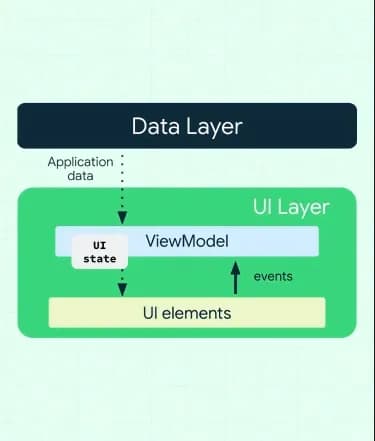
The definitive standard for 2026 Android development is a strict Unidirectional Data Flow (UDF). In this model, data travels "down" to be rendered, while user intents travel "up" to be processed. This "closed-loop" system eliminates the unpredictability of traditional imperative UI and ensures that your application remains stable as it grows from a single screen to a complex multi-module system.
The Immutable Loop
Data travels down, and events travel up. This is the main concept of Jetpack Compose UI architecture. By 2026, this pattern will have proven itself as the most effective way to manage the complexity of modern mobile apps.
- Events Up: The UI never decides what happens next; it only reports what the user did. This makes your UI components truly "dumb" and reusable.
- Data Down: The ViewModel remains the sole authority on the state. It transforms raw data into a displayable format, ensuring the UI is just a visual reflection of the current truth.
- Always one direction: Bi-directional data binding is a relic of the past. One-way flow prevents "circular dependencies" and state inconsistencies that were common in older architectures.
Scaling for the Future
This conceptual flow is identical whether you are handling a simple button click or a complex multi-device handoff. By adhering to this rigid structure, you create a "predictable" codebase. New developers can join a project and immediately understand where the data comes from and where the logic lives. This predictability is what allows engineering teams in 2026 to scale their applications to millions of users while maintaining a high velocity of feature delivery.
Conclusion
Adopting a scalable Jetpack Compose UI architecture is essential for navigating the complexities of modern Android development in 2026. By enforcing immutable state, typed action channels, and a clean separation between domain logic and the presentation layer, you build applications that are not only performant but also incredibly resilient to change. This structured approach significantly lowers technical debt, reduces the risk of "recomposition storms," and ensures that your project remains maintainable as it evolves across different devices and user requirements.
When your project demands this level of architectural precision and performance, it is vital to Hire Mobile Developers who understand the nuances of Unidirectional Data Flow, clean modularization, and reactive state management. Expert teams can ensure your transition to a declarative UI model is seamless, stable, and optimized for high-refresh-rate displays.
Zignuts provides expert development teams specializing in robust, future-proof solutions tailored for the modern Android landscape. Contact Zignuts today to start your project with a high-quality, professional architecture.

Navin Panchal
A technology enthusiast focused on crafting intuitive and high-performing mobile solutions that enhance everyday experiences.

Sameer Ashra
Developer focused on creating user-friendly applications and improving system performance. Committed to continuous learning and helping others through technical writing.