

When building React applications in 2026, performance optimization remains a cornerstone of providing a seamless user experience. As applications grow in complexity, integrating AI-driven UI components, high-frequency data streams, and predictive state management, poorly optimized code can lead to sluggish performance, frustrating "jank," and unnecessary re-renders that drain device battery and increase latency.
To combat these bottlenecks, React provides built-in hooks like useMemo() and useCallback(). These hooks are designed to help developers implement "memoization," a technique that stores the results of expensive operations or function instances to avoid repeating them across the render lifecycle. At Zignuts, we prioritize these optimizations to ensure enterprise-grade scalability and fluid interactions in data-heavy environments.
In the 2026 landscape of web development, where the "React Forget" compiler often automates basic optimizations, understanding the manual nuances of useMemo vs useCallback is still critical for managing complex object references and stabilizing third-party library dependencies. While both hooks serve a similar purpose of persistence, using the wrong one can lead to memory overhead without any tangible performance gain.
In this guide, we will explore the deep-seated differences between useMemo and useCallback, their specific use cases in modern architectures, and how to apply them effectively to keep your React applications running at peak efficiency.
What is useMemo?
The Purpose of useMemo in React
useMemo() is a React hook that memoizes the result of a function. It allows you to cache a value so that it doesn’t need to be recalculated unless one of its dependencies changes. This is particularly vital in 2026, where web apps often handle massive datasets, real-time AI inferences, or complex client-side 3D visualizations that demand high frame rates.
By utilizing useMemo, you ensure that expensive logic, such as sorting a list of 10,000 items or processing a large JSON payload, doesn't execute on every single render. This significantly reduces CPU usage and improves the responsiveness of the main thread. At Zignuts, we implement these strategies to ensure that data-intensive dashboards remain fluid even on lower-end mobile devices.
Syntax:-
Key Points of useMemo
- Returns a memoized value: Unlike useCallback, which returns a function, useMemo executes the function immediately and stores the output (whether it's an object, array, or primitive).
- Referential Equality: Beyond just performance, useMemo is essential for maintaining referential equality. If you pass an object or array as a dependency to another hook (like useEffect), useMemo ensures that the reference remains the same unless the data actually changes.
- Triggered by dependency changes: React uses a "shallow comparison" on the dependency array. If the values in [a, b] are identical to the previous render, React skips the function and returns the cached result.
- Optimizes expensive calculations: It acts as a shield against unnecessary work, preventing the re-execution of heavy mathematical operations or data transformations during minor UI updates.
Example: useMemo in Action
In this example, the function to compute the square of a number will only run when num changes, preventing unnecessary recalculations.
What is useCallback?
The Purpose of useCallback in React
useCallback() is a React hook that memoizes the function reference itself. In the React lifecycle, every time a component re-renders, all functions defined within its body are technically "new" instances in memory. While JavaScript handles this creation quickly, it creates a significant issue for performance optimization: referential instability.
When you pass a newly created function as a prop to a child component, React sees it as a different prop than before, even if the code inside hasn't changed. This causes child components to re-render unnecessarily. useCallback solves this by "freezing" the function instance, ensuring that the same memory reference is reused across renders unless its dependencies change. This is a core pillar of high-performance architecture at Zignuts, especially when building interactive, low-latency interfaces in 2026.
Syntax
Key Points of useCallback
- Returns a memoized function: Unlike useMemo, which executes a function and caches the result, useCallback stores the function definition itself. It says: "Give me this exact same function back next time."
- Stable Props & React.memo: Its primary superpower is preventing "prop-drill re-renders." When a child component is wrapped in React. memo, it only re-renders if its props change. By using useCallback, you ensure the function prop stays identical, keeping the child component idle and performant.
- Referential Integrity: In 2026, many hooks, like useEffect or other custom hooks, rely on function dependencies. useCallback ensures these hooks don't trigger an infinite loop or run more often than required due to changing function identities.
- Optimizing Event Handlers: It is the go-to solution for memoizing complex event handlers in functional components, especially those involving debouncing or throttling logic.
Example: useCallback in Action
Hire React.js Developers Today!

Key Differences: useMemo vs useCallback
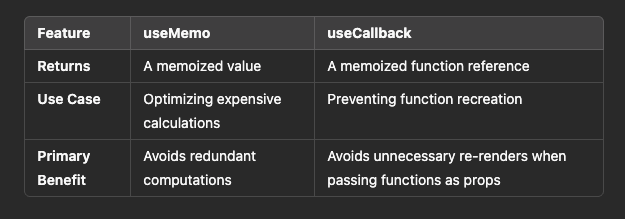
While both hooks are essential for performance optimization in modern React development, the primary distinction lies in what they actually cache in memory. To put it simply: useMemo is for data, and useCallback is for actions.
1. Main Purpose and Intent
The fundamental difference is the goal of the memoization process:
- useMemo is designed to cache a computed value. It is used when you have a piece of logic that is computationally "expensive," meaning it takes a significant amount of time, CPU cycles, or memory resources to run, and you want to ensure it only runs when its specific inputs change.
- useCallback is designed to cache a function definition. It ensures that the memory address (reference) of a function remains identical across multiple renders. In the 2026 landscape of React, this is crucial for maintaining stability in the component tree and preventing breakdown in high-frequency event listeners.
2. Return Type and Execution
The way these hooks handle the function you pass to them is a major technical differentiator:
- useMemo executes the function you provide immediately during the rendering process. It returns the result of that execution (which could be a string, object, array, or number). If the dependencies haven't changed in the next render, it simply hands you that stored result without running the function again.
- useCallback does not execute the function during the hook call. Instead, it returns the function itself as a persistent reference. You decide when to call that function later (e.g., when a user clicks a button).
3. Primary Usage Scenarios
In a 2026 development workflow, where applications often handle real-time data and AI-driven interfaces, these hooks solve different architectural problems:
- Use useMemo when you are transforming data, such as filtering a large list, calculating complex financial totals, or parsing heavy API responses. It acts as a performance shield for your CPU, preventing it from recalculating the same data if the source hasn't changed.
- Use useCallback when you are passing callbacks to optimized child components (using React.memo) or when a function is used as a dependency in other hooks like useEffect. It prevents the "referential invalidation" trigger that happens when a function is recreated on every render, which would otherwise force child components to update unnecessarily.
4. Memory Management and Overhead
It is important to remember that neither hook is "free":
- useMemo requires memory to store the result of the calculation. If the result is a massive array of objects, you are trading CPU time for Memory space.
- useCallback requires memory to store the function reference. In modern React, overusing useCallback on simple, local functions can actually make your code more complex and slightly slower due to the overhead of the dependency check.
5. Conceptual Analogy
- useMemo is like a calculator with a memory button. Once it calculates $10 \times 10$, it remembers the result is 100, so it doesn't have to do the math again. It provides the answer.
- useCallback is like a specific physical remote control. Instead of giving a child a "newly manufactured" remote every second, you keep giving them the exact same remote. This ensures the child doesn't get confused and try to reset their settings because they think they've received a different device. It provides the tool.
When to Use useMemo vs useCallback: A 2026 Perspective
In the current React ecosystem, browsers are faster than ever, but our applications have become significantly "heavier." With the integration of client-side machine learning, real-time data streaming via WebSockets, and complex 3D rendering, the main thread is often crowded. However, over-optimization is a real risk; memoization itself has a memory cost and a small execution overhead during the dependency check.
Choosing between these hooks requires a strategic understanding of your application's bottleneck: is it CPU cycles (calculation) or re-render cycles (references)?
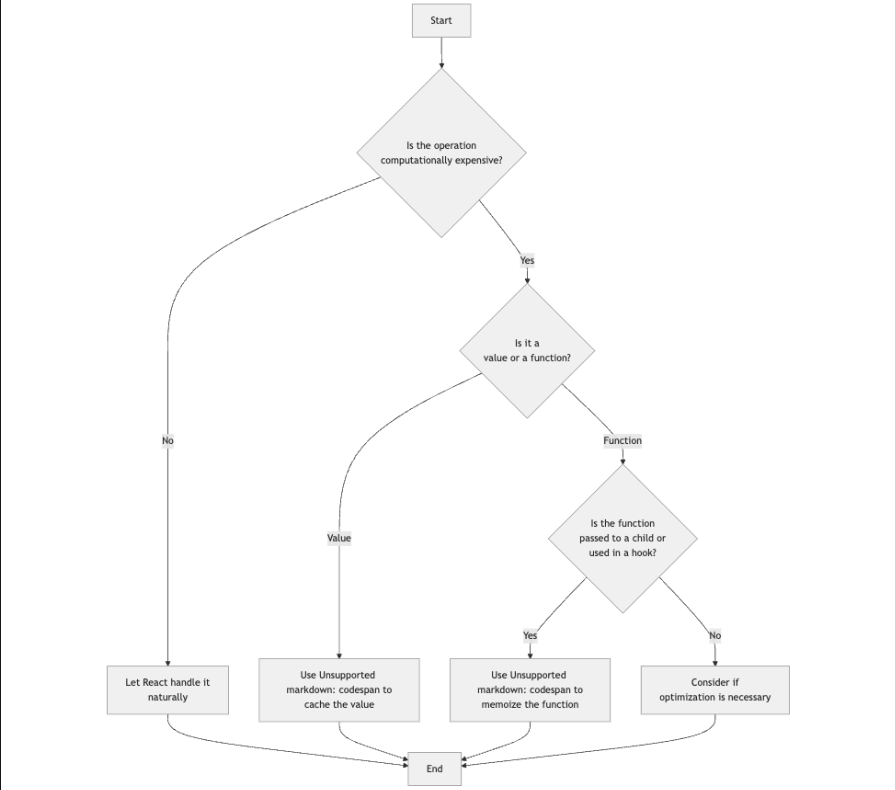
Use useMemo when:
Transforming Large Datasets:
If you are mapping, filtering, or sorting an array with thousands of items, useMemo is essential. In 2026, when we often handle "big data" directly in the browser, recalculating these lists on every keystroke in a search bar can lead to noticeable lag.
Referential Equality for Objects & Arrays:
In React, [] === [] is false. If you define an object or array inside your component and pass it as a dependency to a useEffect or another useMemo, that hook will run on every render. Wrapping the object in useMemo ensures the reference stays the same unless the actual data changes.
Heavy Computational Logic:
This includes complex mathematical algorithms, cryptographic hashing, or processing image data. A good rule of thumb in 2026 is that if a function takes more than 1ms to 2ms, it is a candidate for memoization.
Expensive Component Sub-trees:
Sometimes, you can use useMemo to memoize a piece of JSX itself. If a part of your UI is visually complex but doesn't change often, caching the rendered output can save the browser from unnecessary layout work.
Use useCallback when:
Child Component Optimization (React.memo):
This is the most common use case. If you have a child component wrapped in React.memo, it will only skip re-renders if its props are "shallowly equal." Since functions are recreated on every render, passing a non-memoized function will break React.memo. useCallback maintains that stability.
Maintaining State in Debouncing/Throttling:
When implementing search-as-you-type or window-resize listeners, you need a stable function reference to ensure that setTimeout or requestAnimationFrame logic isn't cleared or reset incorrectly during a re-render.
Custom Hook APIs:
If you are building a reusable hook that returns a function (like a useAuth hook returning a login function), you should wrap that function in useCallback. This prevents consumers of your hook from accidentally triggering infinite loops in their own useEffect blocks.
Interacting with Imperative APIs:
When working with non-React libraries (like D3.js, Three.js, or Google Maps), you often need stable function references to attach and detach event listeners correctly without memory leaks.
Hire React.js Developers Today!
Common Mistakes to Avoid
Even in the advanced React landscape of 2026, developers often fall into patterns that negate the benefits of memoization. Avoiding these pitfalls is key to maintaining a codebase that is both performant and readable.
1. Over-memoization (The "Just in Case" Trap)
One of the most frequent errors is wrapping every single function or value in these hooks. While it might seem like you are being thorough, memoization is not free.
- Performance Overhead: For simple operations like basic arithmetic or small string concatenations, the cost of React storing the value and comparing dependencies on every render is actually higher than just re-running the code.
- Code Complexity: It clutters your component logic with dependency arrays and extra boilerplate, making the code harder to read and maintain for other developers.
- Memory Pressure: Excessive use of useMemo keeps more objects in memory longer, which can be detrimental in memory-constrained environments like mobile browsers or IoT web interfaces.
2. Ignoring or Suppressing Dependencies
The dependency array is the "brain" of these hooks. If you use a variable inside the hook but omit it from the array:
- Stale Closures: Your function or value will become "frozen" in time, using values from a previous render. This leads to subtle, hard-to-track bugs where the UI doesn't update correctly despite the state changing.
- Broken Logic: For useCallback, a stale closure might mean an event handler is still trying to update a version of the state that no longer exists, leading to inconsistent application behavior.
- The Linter is Your Friend: Never ignore the exhaustive-deps linting rule. If the linter suggests adding a dependency, it’s usually because omitting it will eventually cause a bug.
3. Using useMemo for Side Effects
A common conceptual mistake is treating useMemo like a "trigger" for actions.
- Rendering Integrity: The function inside useMemo runs during rendering. React reserves the right to skip or re-run rendering at any time for optimization. If you put an API call or a manual DOM manipulation inside useMemo, it might run multiple times or not at all when you expect it to.
- The Right Tool: Always use useEffect for side effects (API calls, subscriptions, or timers). useMemo should remain a pure function that only returns a value based on its inputs.
4. Memoizing Without a Memoized Child
Using useCallback is often useless if the component receiving the prop isn't wrapped in React. memo.
- The Chain of Optimization: If a parent uses useCallback to stabilize a function but passes it to a standard component, that child will re-render anyway because its parent re-rendered. Optimization is a chain; if one link (like React.memo) is missing, the useCallback provides zero performance gain while still consuming memory.
5. Referential Instability in Dependencies
If you include an object or array in your dependency array that is also recreated on every render, your useMemo or useCallback will never actually cache anything.
- The Infinite Loop: This often happens when you pass an inline object [1, 2, 3] as a dependency. Because the reference changes every time, the hook executes every time, defeating the entire purpose of the optimization.
Conclusion: Mastering useMemo vs useCallback
Understanding the useMemo vs useCallback comparison is essential for any developer aiming to build high-performance React applications in 2026. While useMemo is your primary tool for data processing efficiency, useCallback ensures structural stability across your component tree. When used correctly, these hooks prevent the sluggishness that often plagues modern, data-heavy web apps.
However, as applications grow more complex, you may need expert assistance to ensure your architecture is truly optimized. If you're looking to scale your project with high-efficiency code, you should Hire react developer experts who understand these nuances deeply. At Zignuts, we help businesses build fluid, enterprise-grade applications by leveraging the best of React's performance features.
Ready to Optimize Your React Application?
Whether you are looking for a performance audit or need a dedicated team to build your next big project, Zignuts is here to help. Contact Zignuts to discuss your project today!

Pruthvi Darji
A problem solver with a passion for building robust, scalable web solutions that push the boundaries of technology and deliver impactful results

Ketul Soni
Passionate developer with expertise in building scalable web applications and solving complex problems. Loves exploring new technologies and sharing coding insights.