


.svg)

.svg)


.svg)

.svg)


.webp)
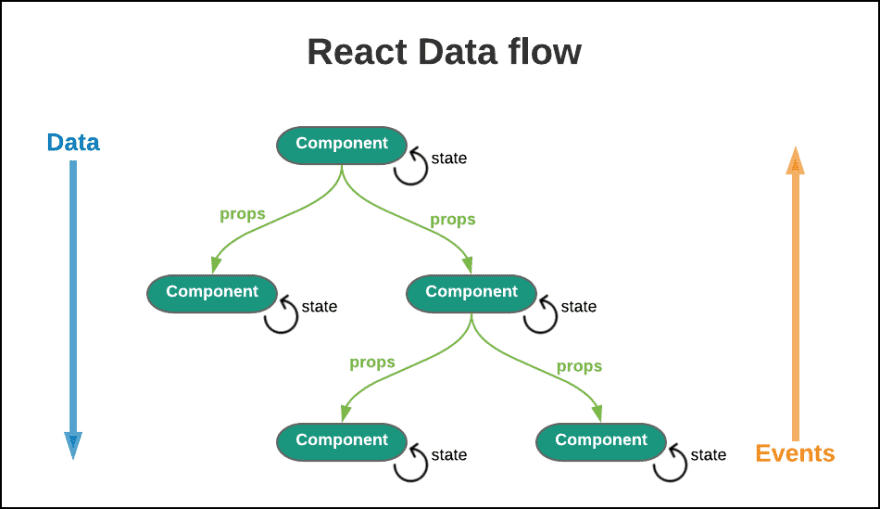
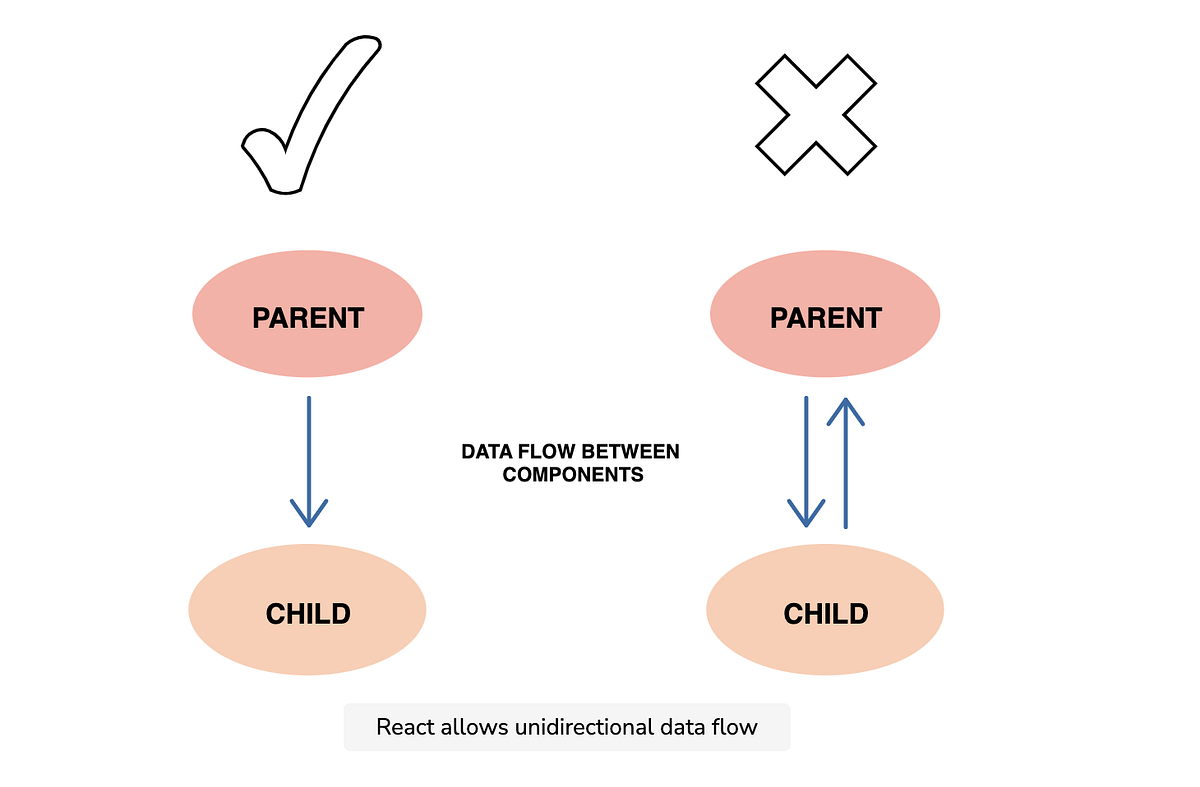
React State Architecture for Scalable Frontend Systems is essential for building scalable, maintainable, and predictable frontend applications. React follows a unidirectional data flow pattern, where data typically moves from parent to child components. However, real-world applications require multiple data-sharing strategies such as props, state, events, Context API, Redux, browser storage, and hooks. This article explores different types and levels of data sharing in React, explains practical implementation approaches with working examples, and shares personal insights from production-level experience.
Introduction of React State Architecture
When I started working with React in production applications, one of the first architectural challenges I faced was not UI design but data flow management. Small projects are manageable with props and local state. However, as applications grow, improper data-sharing patterns lead to prop drilling, duplicated state, inconsistent UI updates, and difficult debugging.
React State Architecture for Scalable Frontend Systems is not just about knowing APIs. It is about understanding:
- How data moves across components
- When to keep state local
- When to lift the state up
- When to introduce global state
- How to maintain predictable updates
In this article, I will break down data sharing in React based on:
- Type of sharing
- Level of sharing
- Different techniques available
- Real-world implementation examples
- Practical recommendations from experience
Types of Sharing
1. Data Sharing: Props and State
Props
Props allow data to move from parent to child components. This is the foundation of React’s unidirectional data flow.
Example: Parent to Child Using Props
In this example:
- The Parent component passes data
- The Child component receives it as props
- The data flow is top-down
This is clean and predictable.
State
State is used to manage data locally within a component.
Example: Managing Local State
Here:
- State is managed inside the component
- Changes trigger re-render
- Perfect for isolated UI behavior
In my experience, overusing global state when local state is sufficient creates unnecessary complexity.
2. Events and Function Sharing
React allows child components to communicate with parent components using callback functions.
This is commonly required for user interaction.
Example: Child to Parent Communication
Here:
- Parent passes a function
- Child triggers the function
- Data flows upward through events
This pattern is extremely common in form handling, modals, and dynamic components.
Levels of Sharing
1. Parent to Child Sharing
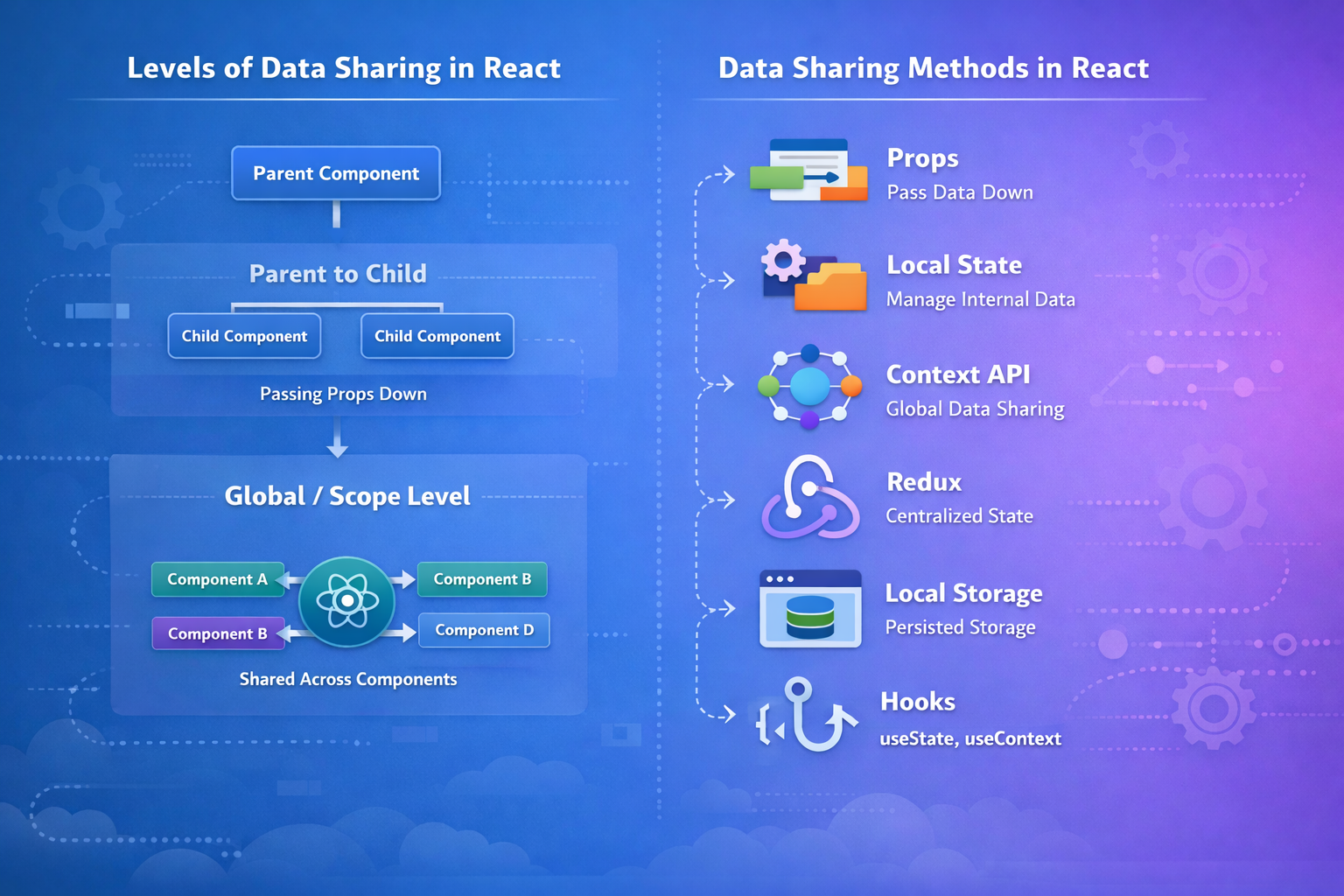
This is the simplest and most predictable method. However, in large applications, passing props through multiple layers can become cumbersome.
This issue is called prop drilling.
Example scenario:
App
→ Layout
→ Dashboard
→ UserCard
If UserCard needs user data from App, every intermediate component must pass the props down.
This is manageable in small applications but problematic in enterprise-level systems.
2. Child to Parent Sharing
Handled using callbacks, as shown earlier.
Common real-world examples:
- Form submission
- Modal close actions
- Updating parent lists
- Triggering API refresh
From my experience, lifting the state up too frequently can also make parent components too large and hard to maintain. Balance is key.
3. Global or Scope Level Sharing
When unrelated components need access to the same data, prop drilling becomes inefficient.
This is where global state solutions come into play.
Ready to bring your web application vision to life? Start your journey with Zignuts expert React.js developers.
**Hire now**Hire Now**Hire Now**Hire now**Hire now

Different Ways
1. Props
Best for:
- Direct parent-child communication
- Small and medium components
- Controlled data flow
Limitations:
- Becomes complex in deep trees
Use props when scope is limited.
2. State
Best for:
- Local UI interactions
- Form inputs
- Component-level toggles
Do not store global data in deeply nested local states.
3. Context API
The Context API allows sharing data without passing props manually at every level.
Example: Using Context API
Advantages:
- Avoids prop drilling
- Suitable for theme, auth, language settings
In production, I use Context for semi-global data such as authentication and role-based permissions.
4. Redux
Redux provides centralized state management with predictable updates.
Best for:
- Large-scale applications
- Complex shared state
- Multiple dependent UI updates
In my experience, Redux is powerful but should not be introduced too early. Many teams adopt Redux before they actually need it.
If the app is small or medium, Context API combined with hooks is often sufficient.
5. Local Storage
Local Storage allows persistence across sessions.
Example:
Best use cases:
- User preferences
- Remember login tokens
- Saving drafts
Important note:
Never store sensitive data like raw passwords in Local Storage.
6. Hooks
Hooks modernize data handling.
useState
Manages local state.
useContext
Access global context.
useMemo
Optimize performance by memoizing values.
Example:
Hooks allow functional components to manage data elegantly without class components.
Advantages of React State Architecture
- Predictable UI behavior
- Easier debugging
- Better performance optimization
- Scalable architecture
- Reduced technical debt
In real-world enterprise projects, poor data flow architecture often causes more bugs than API failures.
Common Mistakes of React State Architecture
- Overusing global state
- Deep prop drilling without refactoring
- Mutating state directly
- Storing redundant derived state
- Mixing business logic with UI logic
I once worked on a project where the entire dashboard state was stored in a single Redux slice without normalization. Debugging became extremely difficult. After refactoring and modularizing the state, performance and maintainability improved significantly.
My Personal Experience
In my early React projects, I relied heavily on props and lifted state frequently. This worked for small apps, but quickly became difficult to manage.
Later, I started applying these principles:
- Keep the state as local as possible
- Lift state only when necessary
- Use Context for global but lightweight state
- Introduce Redux only when complexity justifies it
- Use memoization carefully for performance
One important observation from production systems is that most performance issues are not due to React itself but due to poor data architecture.
Designing proper data boundaries between components makes scaling easier and reduces rework.
Conclusion
React State Architecture for Scalable Frontend Systems is foundational for building scalable and maintainable frontend applications. Understanding when to use props, state, Context API, Redux, Local Storage, and hooks allows developers to design predictable and optimized applications.
React provides flexibility, but with flexibility comes architectural responsibility. Choosing the correct data-sharing pattern at the right time can significantly improve application performance and maintainability.
In modern React development, simplicity should always be preferred over premature complexity. Start small, scale intentionally, and structure data flow thoughtfully.





.png)
.png)
.png)

.png)
.png)
.png)
.webp)
.webp)
.webp)


