


.svg)

.svg)


.svg)

.svg)


.webp)
Why pixel-perfect visual regression testing has dethroned functional unit testing as the definitive measure of UI success.
Introduction: The "Green Build" Illusion of 2026
It is 2026. The software development landscape has accelerated beyond what we imagined just five years ago. We are building hyper-responsive interfaces that adapt not just to screen size, but to user intent, ambient lighting, and AI-driven personalization cues. Our applications run on foldable phones, AR glasses, decentralized web nodes, and ultra-high-definition desktop displays simultaneously.
In this hyper-complex environment, a familiar and frustrating scenario plays out in CI/CD pipelines worldwide. The deployment pipeline glows a reassuring green. Thousands of tests, covering components, hooks, and utility functions, have executed flawlessly. The backend logic is sound. The state management is predictable.
Yet, five minutes after deployment, the support tickets start flooding in.
- "The 'Buy Now' button is covered by the cookie banner on the new FoldOS update."
- "The dark mode contrast is completely broken on the settings page; black text on dark gray background."
- "When the AI assistant suggests a product, the layout shifts five pixels to the left, causing a repulsive jitter."
The code worked. The logic was sound. The tests passed. But the product is broken.
This is the defining paradox of frontend engineering in 2026: the widening gap between functional correctness and visual integrity. For years, the industry relied on the testing pyramid, with unit tests forming the massive base. But as user interfaces became less about static documents and more about dynamic, immersive experiences, the unit test lost its position as the ultimate guardian of UI quality.
Welcome to the era of the "Golden Test."
The Definitions
Before we dissect why the industry has shifted, we must first establish the ground rules. In the context of 2026 frontend engineering, what exactly are we comparing?
What is "Golden Testing"?
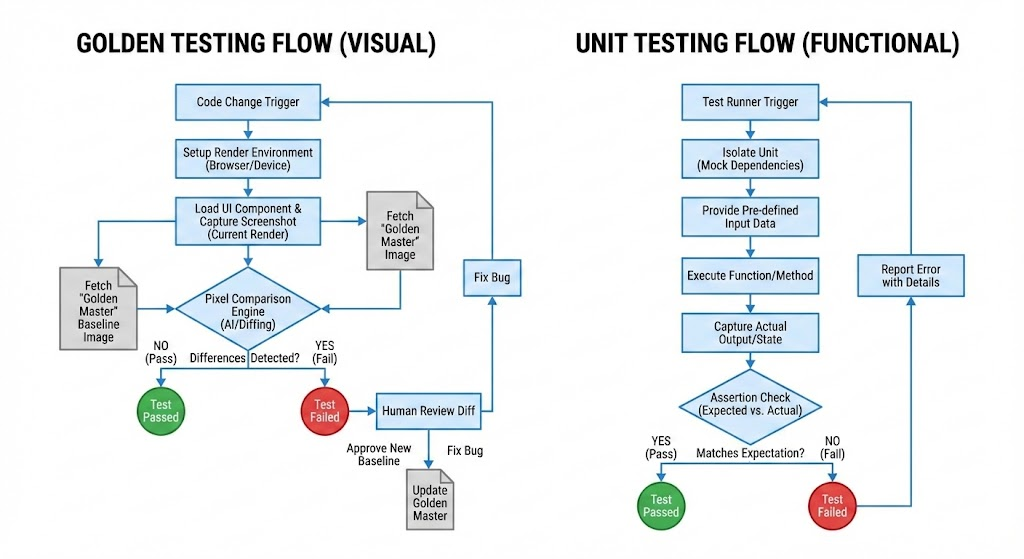
Golden Testing, historically known as Visual Regression Testing (VRT) or Snapshot Testing, is a quality assurance method that focuses on the output rather than the implementation.
In a Golden Test workflow, the "Golden Master" (or baseline) is an approved image file a screenshot of exactly how a specific component or page should look. This image acts as the source of truth.
When the test runs:
- Render: The automated test spins up a headless browser (like a containerized version of Chrome, Safari, or a spatial rendering engine).
- Capture: It loads the UI and takes a screenshot of the current state.
- Compare: Using sophisticated pixel-matching algorithms (often AI-assisted in 2026), it compares the new screenshot against the Golden Master.
- Verdict: If the pixels differ beyond a set threshold, the test fails.
It doesn’t care how you wrote the code. It doesn't care if you used React, Svelte, or vanilla JS. It only cares about one thing: Does the user see what we expect them to see?
Ready to build a high-quality mobile app? Start your project with Zignuts' expert mobile developers today.
**Hire now**Hire Now**Hire Now**Hire now**Hire now

What is Unit Testing?
Unit Testing is the practice of testing the smallest testable parts of an application, called "units," in isolation from the rest of the code.
In frontend development, a unit test typically targets a specific function, a React hook, or a state reducer. It inputs data and asserts an output.
When a unit test runs:
- Isolate: The test runner (like Vitest or Jest) loads a specific function, mocking all external dependencies (APIs, databases, child components).
- Execute: It passes arguments to the function (e.g., calculateTotal(100, 0.2)).
- Assert: It checks if the return value matches the expectation (e.g., expect(result).toBe(120)).
Unit tests care deeply about logic. They verify that the internal mechanics of your code are calculating, sorting, and transforming data correctly. They are the "under the hood" diagnostics of your software vehicle.
The Exponential Complexity of the 2026 UI Landscape
To understand why unit tests are failing our UIs, we must first appreciate the environment we are building for. The days of testing for Chrome, Safari, and Firefox on desktop and mobile are a quaint memory.
The Fragmentation of Everything
In 2026, "responsive design" doesn't just mean media queries for width. It means adapting to foldable displays where the crease dictates layout changes in real-time. It means designing for spatial computing interfaces where UI elements float in 3D space, susceptible to environmental occlusion and varying lighting engines. A unit test can verify that a component receives the correct props to render in "spatial mode," but it cannot verify that the browser's rendering engine didn't glitch and render it upside down or transparent.
The Rise of Generative UI
Perhaps the biggest disruptor is AI-driven, generative UI. We are no longer just building static components that accept data. We are building systems where AI agents dynamically compose interfaces based on user needs at that moment.
If an AI decides that a user needs a chart instead of a table and generates the UI on the fly, how do you write a predetermined unit test for that? You can’t predict the exact structure. You can only validate the final visual output against a set of acceptable visual guidelines. The code is dynamic; the visual expectation is the only constant.
Micro-frontend Chaos
Large-scale applications in 2026 are almost exclusively composed of micro-frontends owned by dozens of distributed teams. Team A updates their design system package, changing a global CSS variable for line-height. Team B's unit tests for their pricing card component still pass because the logic hasn't changed. But in production, the pricing numbers now wrap awkwardly onto two lines, breaking the layout.
The complexity of modern UI lies in the interactions between systems, CSS cascades, browser rendering quirks, device constraints, and dynamic content, none of which are effectively captured by isolated unit tests.
The Unit Test Illusion in UI
Let’s be clear: unit tests remain vital. In 2026, they are still the best way to test pure functions, complex calculations, data transformers, and state management reducers. If you are testing a mortgage calculator function, unit tests are your best friend.
However, applying unit testing philosophy to visual components has always been a square peg in a round hole. We spent years trying to make it work using tools like Jest and Enzyme (and later React Testing Library). We wrote tests that looked like this:
“Render the Button component. Find the element with role 'button'. Assert that it has the class 'btn-primary' and contains the text 'Submit'.”
What does this test actually prove? It proves that the developer remembered to add a class name and the correct text. It tells us absolutely nothing about:
- CSS Bleed: Is an errant !important style from a global stylesheet overriding the .btn-primary color, making it invisible against the background?
- Layout Shifts: Does the addition of an icon inside the button cause it to grow unnaturally tall and break the surrounding container?
- Z-Index Wars: Is the button actually clickable, or is it obscured by a transparent modal overlay that a unit test can't "see"?
- Rendering Engines: Do the gradients look smooth in WebKit but band terribly in Blink?
Unit tests operate in a simulated JSDOM environment. They do not render pixels. They analyze a sanitized DOM tree. They test the intent of the code, not the reality of the user experience. In the high-stakes UI world of 2026, relying solely on intent is negligence. We needed a way to test reality.
Enter the Golden Test (Visual Regression Maturity
A "Golden Test" operates on a fundamentally different premise. Instead of asking the code, "Did you apply the correct class?", it asks the browser, "What does this look like?" and then asks the developer, "Is this what you wanted?"
The Evolution of Tooling
In the early 2020s, visual regression testing was painful. It was brittle. A 1-pixel difference in font rendering between Linux and macOS CI servers would cause false positives (flakiness). It required massive storage for images and slowed down pipelines.
By 2026, these issues will have been largely solved by AI and cloud infrastructure:
- AI-Powered Diffing: Modern tools use computer vision models, not just dumb pixel matching. They can distinguish between a genuine visual regression (e.g., a button disappearing) and acceptable variance (e.g., anti-aliasing differences due to a browser update). This has virtually eliminated flakiness.
- Smart Baselines: The tooling knows that dynamic data (like timestamps or user names) will change. AI automatically identifies these regions and ignores them during comparison, focusing only on the layout and styling structure.
- Cloud Parallelization: Tests run across hundreds of browser/device combinations simultaneously in the cloud, returning results in seconds, not minutes.
The Golden Test has moved from a brittle secondary check to a robust primary gatekeeper.
Why Golden Tests Capture Value Where Unit Tests Leak
In the context of 2026, the value proposition of the Golden Test far outstrips the unit test for UI concerns. This shift is driven by the nature of the bugs we are now fighting.
1. Catching the "Cascading Disaster" of CSS
CSS is inherently global and interdependent. The introduction of new CSS features (like advanced container queries and state-driven animations) has made styling more powerful but also harder to isolate.
A unit test is scoped to a component. A visual test captures the environment. If a developer working on the footer accidentally changes a generic span style that affects the header navigation, unit tests for the header will pass (the DOM structure hasn't changed). A Golden Test of the homepage will instantly catch the regression because the header will look different. Golden tests capture the side effects of code changes, which is where 90% of UI bugs live.
2. The Ultimate Cross-Browser/Device Validator
We cannot write unit tests for browser rendering engines. We cannot write a Jest test that asserts "Safari handles the backdrop-filter blur correctly on iOS 19."
In 2026, with the explosion of device types, the only way to verify UI is to render it on the target device. Golden tests allow teams to maintain baselines for iPhone 17, Pixel Fold, Meta Quest glasses, and desktop Chrome. A single code change triggers visual comparisons across all these targets. If a change looks good on a desktop but breaks the layout on a foldable device's "unfolded" state, the Golden Test is the only automated mechanism that will catch it.
3. Testing Design System Integrity
Companies in 2026 rely heavily on centralized Design Systems. When the design system team updates a core "design token" (e.g., changing the primary brand color hex code), the ripple effects are immense.
Previously, teams would have to manually smoke-test dozens of applications consuming that design system. Now, they run a Golden Test suite across the entire component library. They can instantly visualize every single component that is affected by that color change. The Golden Test becomes a documentation tool, showing the "before and after" of a design system upgrade, allowing designers to sign off on changes with confidence.
4. The Human-Centric Workflow
Unit tests are written for computers. Golden tests are optimized for humans.
When a visual test fails, it presents an image to a human developer or designer. The human looks at the diff and makes a judgment call: "Is this a bug, or is this an intended update?" If it's an update, they click "Approve," and a new Golden baseline is set.
This workflow aligns perfectly with how UI is actually built. UI is subjective. It requires human approval. Golden tests automate the detection of change, but streamline the human decision process of accepting that change. It brings designers into the CI/CD loop in a meaningful way.
Ready to elevate your digital product's user experience? Start your project with Zignuts expert UI/UX designers.
**Hire now**Hire Now**Hire Now**Hire now**Hire now
The Modern Testing Strategy in 2026
Does this mean we delete all unit tests? Absolutely not. It means re-evaluating the "Testing Pyramid" for frontend applications.
The traditional pyramid had Unit Tests at the bottom (largest section), Integration in the middle, and End-to-End (E2E) at the top (smallest section).

In 2026, the frontend testing structure looks more like a "Testing Diamond" or even an inverted pyramid regarding UI:
- Business Logic (Unit Tests): Keep writing robust unit tests for hooks, utilities, data manipulation, and state machines. These are non-negotiable for functional stability.
- Component Functionality (Component Tests): Use tools like React Testing Library to test interactions. (e.g., "Does clicking this open the modal?"). These are vital for accessibility and basic behavioral correctness.
- UI Appearance & Integration (Golden Tests): This is now the heaviest layer for UI. Every page, key state, and complex component should have visual coverage across major breakpoints. This replaces many shallow unit tests that used to just check for class names.
The Shift in Mindset
The biggest hurdle in 2026 is not technological; it's cultural. Developers have been trained for a decade to chase "100% code coverage" via unit tests. Shifting to visual testing requires accepting that code coverage is a poor metric for UI quality.
We must embrace "Visual Coverage." Are all the critical states of our application visually documented and protected against regression? When we stop obsessing over testing implementation details (the code) and start obsessing over the user experience (the pixels), our testing strategy finally aligns with our business goals.
Conclusion: Embracing the Visual Truth
The history of software engineering is a constant march toward higher layers of abstraction. We moved from assembly to C, from manual deployment to CI/CD. In testing, we are moving from testing the under-the-hood mechanics to verifying the actual driver experience.
In 2026, the user interface is too complex, too dynamic, and too dependent on the rendering environment to be constrained by unit tests alone. The unit test is a contract with the compiler. The Golden Test is a contract with the user.
While unit tests provide the comforting illusion of control, Golden tests provide the sometimes harsh, but always necessary, truth of reality. By embracing visual regression testing as the primary driver of UI quality, development teams in 2026 can finally stop fearing deployments and start shipping truly resilient, pixel-perfect experiences in an ever-fragmenting digital world.
Is your team ready to transition to a visual-first QA strategy? If you need any assistance in implementing Golden Testing, optimizing your CI/CD pipelines, or scaling your UI automation, we are here to help. Contact us today to modernize your testing infrastructure.
Reference Links:
UI tests #DecodingFlutter
UI testing in Flutter | Golden tests
Flutter golden testing - taking into account the Flutter logical resolution on mobile devices.
Test Semantics with Golden Tests - Sandra Lundh | Fluttercon EU 2025
Flutter golden testing with views sized to your mobile devices
Spot the Difference: Automating Visual Regression Testing
Snapshot tests are so easy it feels like cheating
Why unit testing is not enough? How to achieve full test coverage.
UI testing in Flutter | Golden tests
Visual Regression Testing at the Speed of Unit Testing




.webp)
.webp)
.webp)

.webp)
.webp)
.webp)
.webp)
.webp)
.webp)


